
CustomSeries QML Type
CustomSeries 型を使用すると、カスタマイズされたグラフタイプを表示することができます。詳細...
| Import Statement: | import QtGraphs |
| Since: | Qt 6.11 |
| In C++: | QCustomSeries |
プロパティ
- delegate : Component
方法
- void append()
- void append(var data)
- void clear()
- void insert(int index)
- void insert(int index, var data)
- real mapX(real x)
- real mapY(real y)
- void remove(int index)
詳細説明
CustomSeries を使用して、カスタマイズされたグラフを作成します。これは、各要素のカスタムデータにアクセスできる散布図のようなものと考えてください。
CustomSeriesは、グラフに追加されるすべてのアイテムをレンダリングするために使用されるデリゲートを定義します。各アイテムには、QVariantMap に格納されたユーザー定義のデータが含まれます。また、グラフ内でのアイテムのインデックスも、データマップに自動的に追加されます。 QMLのコンテキストでは、variant mapはJavaScriptオブジェクトによって定義されます。シリーズは、このマップをデリゲートに基づいて作成された各要素に渡します。デリゲートは、データの使用方法を決定します。
データをGraphsView の軸によって定義されたレンダリング座標にマッピングするには、mapX およびmapY 関数を使用します。
注:現在 、カスタム系列内の個々の要素は互いに情報を共有しません。このため、カスタム線形系列を実装することはできません。
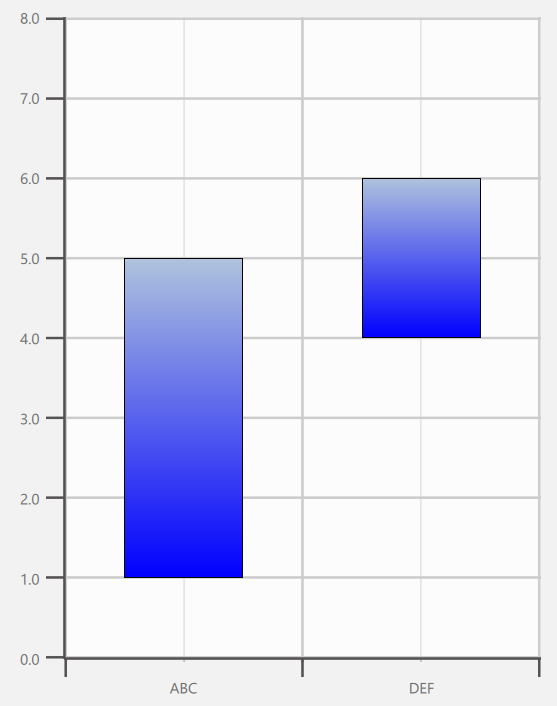
以下のコードは、図に示されたカスタムグラフを実装したものです。この場合、カスタムデータには upper と lower の 2 つの値が含まれています。これらはデリゲート内で定義され、要素の高さと y 座標に影響を与えます。
import QtQuick
import QtGraphs

Window {
    width: 640
    height: 480
    visible: true

    GraphsView {
        anchors.fill: parent

        axisX: BarCategoryAxis {
            categories: ["ABC", "DEF"]
        }

        axisY: ValueAxis {
            max: 8
            tickInterval: 1
        }

        CustomSeries {
            id: custom

            delegate: Rectangle {
                property var data
                gradient: Gradient {
                    GradientStop { position: 0.0; color: "lightsteelblue" }
                    GradientStop { position: 1.0; color: "blue" }
                }
                border.width: 1
                x: custom.mapX(data.index + 0.5) - width * 0.5
                y: custom.mapY((data.upper + data.lower) * 0.5) - height * 0.5
                width: Math.abs(custom.mapX(1) - custom.mapX(0)) * 0.5
                height: Math.abs(custom.mapY(data.upper) - custom.mapY(data.lower))
            }

            CustomSeriesData {
                data: ({
                    upper: 5,
                    lower: 1
                })
            }

            CustomSeriesData {
                data: ({
                    upper: 6,
                    lower: 4
                })
            }
        }
    }
}
プロパティのドキュメント
delegate : Component
このデリゲートは、指定されたカスタムデータに対応する要素をQMLに挿入するために使用されます。データはCustomSeries 自体で定義され、「data」プロパティを通じてデリゲートされた要素に渡されます。
delegate: Rectangle {
        property var data
        Rectangle {
            color: "tan"
            border.color: "black"
            border.width: 4
            y: series.mapY(data.index + 1) - height / 2 + 1
            x: series.mapX(data.median) - width / 2
            height: 32
            width: Math.abs(series.mapX(data.upperQuartile) - series.mapX(data.lowerQuartile))
        }
    }
}
メソッドのドキュメント
void append()
シリーズに空のデータ項目を追加します。
void append(var data)
data で定義されたデータ項目を、シリーズに追加します。
void clear()
すべてのデータ項目を消去します。
void insert(int index)
位置index にある系列に、空のデータ項目を追加します。
void insert(int index, var data)
data で定義されたデータ項目を、位置index にある系列に追加します。
real mapX(real x)
x の軸空間座標を、レンダリング空間に変換した値を返します。
real mapY(real y)
y の軸空間座標をレンダリング空間に変換した値を返します。
void remove(int index)
位置index にあるデータ項目を削除します。
© 2026 The Qt Company Ltd. Documentation contributions included herein are the copyrights of their respective owners. The documentation provided herein is licensed under the terms of the GNU Free Documentation License version 1.3 as published by the Free Software Foundation. Qt and respective logos are trademarks of The Qt Company Ltd. in Finland and/or other countries worldwide. All other trademarks are property of their respective owners.
