
Qt Quick 3D - RuntimeLoader の例
実行時にアセットを読み込む方法を示します。
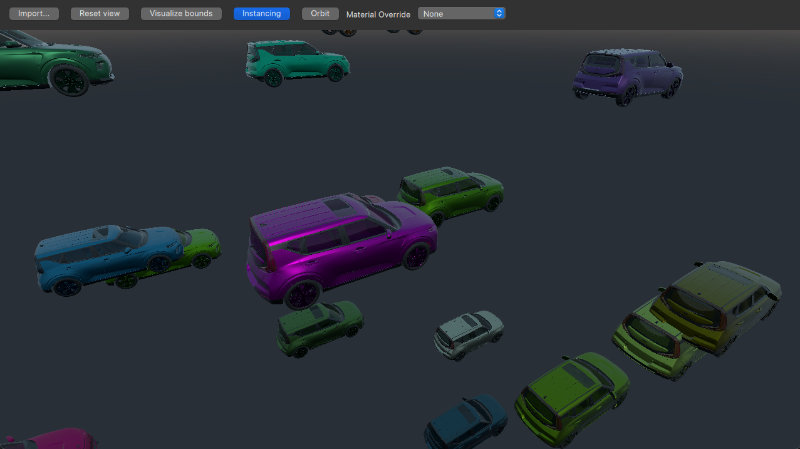
この例では、RuntimeLoader を使用して簡単なアセットビューアを実装する方法を示します。
基本的なシーンの設定方法については、入門用サンプルのドキュメントを参照してください。シーンの設定が完了したら、RuntimeLoader アイテムを追加できます:
RuntimeLoader {
    id: importNode
    source: windowRoot.importUrl
    instancing: instancingButton.checked ? instancing : null
    onBoundsChanged: helper.updateBounds(bounds)
}アセットの読み込みは、RuntimeLoader のsource プロパティを設定することで行います。このサンプルでは、source がimportUrl にバインドされており、ユーザーがファイルダイアログでファイルを選択すると、この値が変更されます。
アセットの読み込みに成功した場合、コンテンツはRuntimeLoader のimportNode の子要素として作成されます。なお、RuntimeLoader はNode 型であり、読み込まれたアセットのルートノードでもあるため、importNode に適用された変換は、その子要素にも影響します。
エラー処理
アセットの読み込みに失敗した場合、RuntimeLoader のstatus プロパティはError に設定されます。その後、RuntimeLoader のerrorString をクエリすることで、エラーに関するより詳細な説明を取得できます。
この例では、次のように、画面中央の赤いメッセージボックスにエラーメッセージを表示します。
Rectangle {
    id: messageBox
    visible: importNode.status !== RuntimeLoader.Success
    color: "red"
    width: parent.width * 0.8
    height: parent.height * 0.8
    anchors.centerIn: parent
    radius: Math.min(width, height) / 10
    opacity: 0.6
    Text {
        anchors.fill: parent
        font.pixelSize: 36
        text: "Status: " + importNode.errorString + "\nPress \"Import...\" to import a model"
        color: "white"
        wrapMode: Text.Wrap
        horizontalAlignment: Text.AlignHCenter
        verticalAlignment: Text.AlignVCenter
    }
}
カメラの移動
カメラの位置を変更できるようにするため、Helpers モジュールのWasdController を使用し、次のようにカメラにバインドします:
OrbitCameraController {
    id: orbitController
    origin: orbitCameraNode
    camera: orbitCamera
    enabled: helper.orbitControllerEnabled
}
WasdController {
    id: wasdController
    controlledObject: wasdCamera
    enabled: !helper.orbitControllerEnabled
}
WasdController に加え、この例ではモデルの拡大縮小や回転を行うために、WheelHandler とPointerHandler も使用しています。
インスタンス化
RuntimeLoader アイテムは、以下に示すようにインスタンス化と組み合わせて使用することもできます:
RandomInstancing {
    id: instancing
    instanceCount: 30
    position: InstanceRange {
        property alias boundsDiameter: helper.boundsDiameter
        from: Qt.vector3d(-3*boundsDiameter, -3*boundsDiameter, -3*boundsDiameter);
        to: Qt.vector3d(3*boundsDiameter, 3*boundsDiameter, 3*boundsDiameter)
    }
    color: InstanceRange { from: "black"; to: "white" }
}
RuntimeLoader は Model から継承されていませんが、独自のinstancing プロパティを持っており、これにより、インポートされた複雑なアセットを、あたかも単純なモデルであるかのようにインスタンス化することができます。この例では、Helpers モジュールのRandomInstancing コンポーネントを使用して、固定された領域内にアイテムをランダムな位置と色で配置しています。
マテリアルの上書き
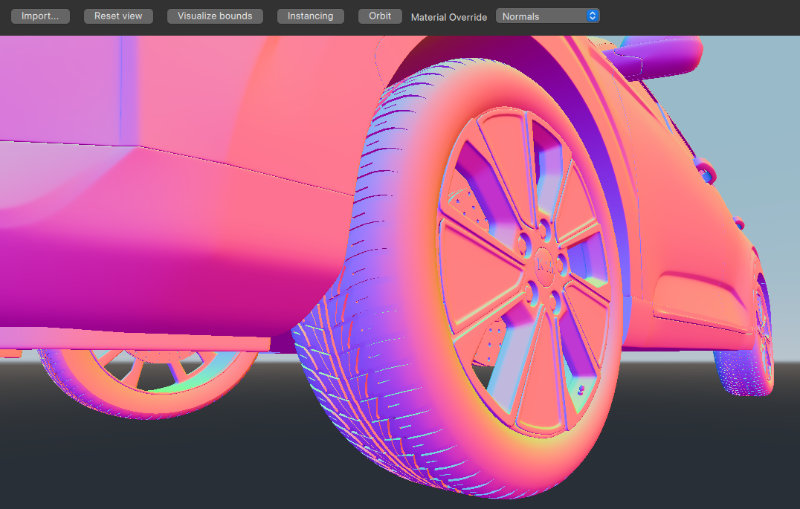
アセットを読み込んだ際、期待通りの外観にならない場合があります。「materialOverride 」プロパティを設定すると、シーン内の各マテリアルのレンダリング方法が変わり、全体的なレンダリングに対する各マテリアルの寄与度が明確に表示されます。これにより、アセットのどの部分が正しくないのかを特定し、必要に応じて元のアセットを調整するのに役立ちます。
© 2026 The Qt Company Ltd. Documentation contributions included herein are the copyrights of their respective owners. The documentation provided herein is licensed under the terms of the GNU Free Documentation License version 1.3 as published by the Free Software Foundation. Qt and respective logos are trademarks of The Qt Company Ltd. in Finland and/or other countries worldwide. All other trademarks are property of their respective owners.
