
QML에서 극좌표 차트 사용하기
참고: 이 내용은 ‘QML을 활용한 차트 갤러리’ 예제의 일부입니다.
먼저, 스플라인 시리즈와 임의의 데이터가 포함된 산점도 시리즈가 있는 차트로 시작합니다. 두 시리즈 모두 동일한 축을 사용합니다.
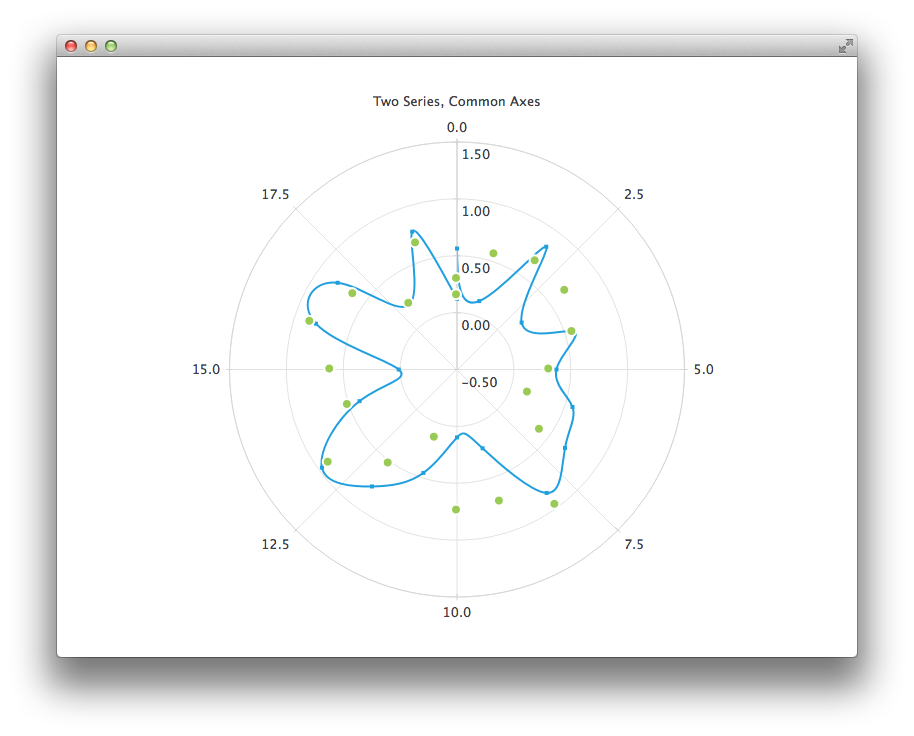
PolarChartView {
    title: "Two Series, Common Axes"
    anchors.fill: parent
    legend.visible: false
    antialiasing: true

    ValueAxis {
        id: axisAngular
        min: 0
        max: 20
        tickCount: 9
    }

    ValueAxis {
        id: axisRadial
        min: -0.5
        max: 1.5
    }

    SplineSeries {
        id: series1
        axisAngular: axisAngular
        axisRadial: axisRadial
        pointsVisible: true
    }

    ScatterSeries {
        id: series2
        axisAngular: axisAngular
        axisRadial: axisRadial
        markerSize: 10
    }

    // Add data dynamically to the series
    Component.onCompleted: {
        for (var i = 0; i <= 20; i++) {
            series1.append(i, Math.random());
            series2.append(i, Math.random());
        }
    }
}
다음 차트는 정확한 과거 데이터를 보여주며, 이를 위해 DateTimeAxis와 AreaSeries를 사용해야 합니다.
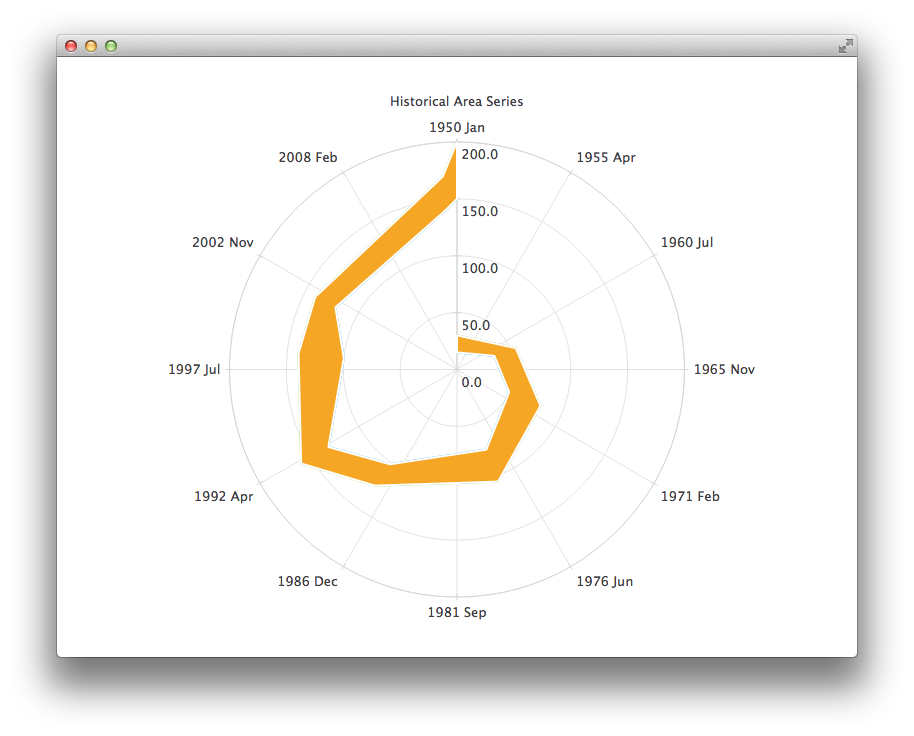
PolarChartView {
    id: root
    title: "Historical Area Chart"
    anchors.fill: parent
    legend.visible: false
    antialiasing: true

    DateTimeAxis {
        id: axis1
        format: "yyyy MMM"
        tickCount: 13
    }
    ValueAxis {
        id: axis2
    }
    LineSeries {
        id: lowerLine
        axisAngular: axis1
        axisRadial: axis2

        // Please note that month in JavaScript months are zero based, so 2 means March
        XYPoint { x: root.toMsecsSinceEpoch(new Date(1950, 0, 1)); y: 15 }
        XYPoint { x: root.toMsecsSinceEpoch(new Date(1962, 4, 1)); y: 35 }
        XYPoint { x: root.toMsecsSinceEpoch(new Date(1970, 0, 1)); y: 50 }
        XYPoint { x: root.toMsecsSinceEpoch(new Date(1978, 2, 1)); y: 75 }
        XYPoint { x: root.toMsecsSinceEpoch(new Date(1987, 11, 1)); y: 102 }
        XYPoint { x: root.toMsecsSinceEpoch(new Date(1992, 1, 1)); y: 132 }
        XYPoint { x: root.toMsecsSinceEpoch(new Date(1998, 7, 1)); y: 100 }
        XYPoint { x: root.toMsecsSinceEpoch(new Date(2002, 4, 1)); y: 120 }
        XYPoint { x: root.toMsecsSinceEpoch(new Date(2012, 8, 1)); y: 140 }
        XYPoint { x: root.toMsecsSinceEpoch(new Date(2013, 5, 1)); y: 150 }
    }
    LineSeries {
        id: upperLine
        axisAngular: axis1
        axisRadial: axis2

        // Please note that month in JavaScript months are zero based, so 2 means March
        XYPoint { x: root.toMsecsSinceEpoch(new Date(1950, 0, 1)); y: 30 }
        XYPoint { x: root.toMsecsSinceEpoch(new Date(1962, 4, 1)); y: 55 }
        XYPoint { x: root.toMsecsSinceEpoch(new Date(1970, 0, 1)); y: 80 }
        XYPoint { x: root.toMsecsSinceEpoch(new Date(1978, 2, 1)); y: 105 }
        XYPoint { x: root.toMsecsSinceEpoch(new Date(1987, 11, 1)); y: 125 }
        XYPoint { x: root.toMsecsSinceEpoch(new Date(1992, 1, 1)); y: 160 }
        XYPoint { x: root.toMsecsSinceEpoch(new Date(1998, 7, 1)); y: 140 }
        XYPoint { x: root.toMsecsSinceEpoch(new Date(2002, 4, 1)); y: 140 }
        XYPoint { x: root.toMsecsSinceEpoch(new Date(2012, 8, 1)); y: 170 }
        XYPoint { x: root.toMsecsSinceEpoch(new Date(2013, 5, 1)); y: 200 }
    }
    AreaSeries {
        axisAngular: axis1
        axisRadial: axis2
        lowerSeries: lowerLine
        upperSeries: upperLine
    }

    // DateTimeAxis is based on QDateTimes so we must convert our JavaScript dates to
    // milliseconds since epoch to make them match the DateTimeAxis values
    function toMsecsSinceEpoch(date) {
        var msecs = date.getTime();
        return msecs;
    }
}
다음 차트는 데이터를 더 쉽게 이해할 수 있도록 CategoryAxis를 사용합니다.
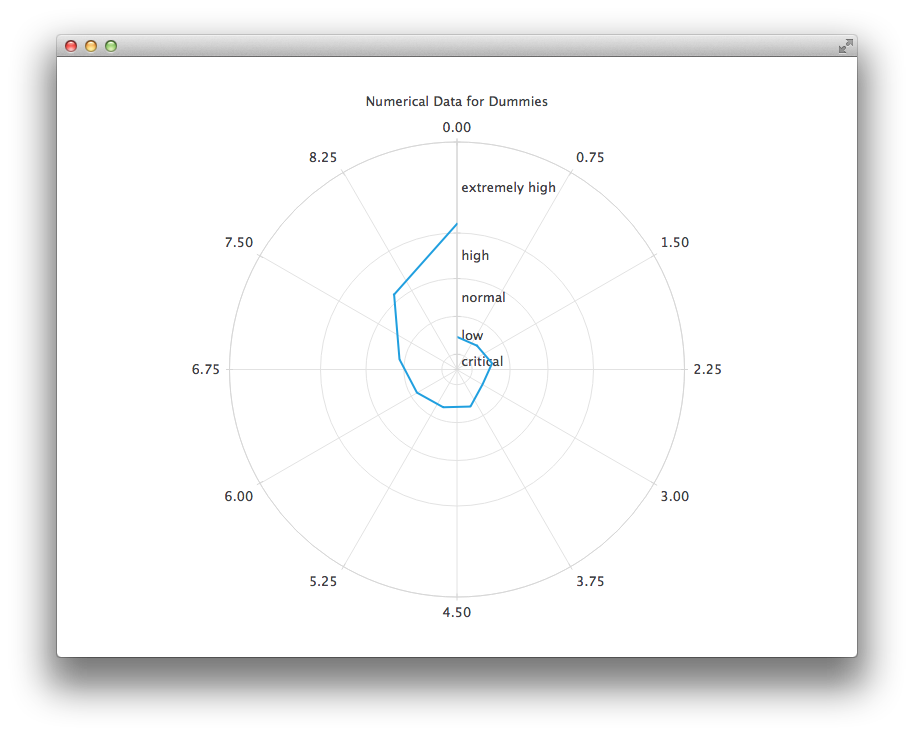
PolarChartView {
    title: "Numerical Data for Dummies"
    anchors.fill: parent
    legend.visible: false
    antialiasing: true

    LineSeries {
        axisRadial: CategoryAxis {
            min: 0
            max: 30
            CategoryRange {
                label: "critical"
                endValue: 2
            }
            CategoryRange {
                label: "low"
                endValue: 7
            }
            CategoryRange {
                label: "normal"
                endValue: 12
            }
            CategoryRange {
                label: "high"
                endValue: 18
            }
            CategoryRange {
                label: "extremely high"
                endValue: 30
            }
        }

        axisAngular: ValueAxis {
            tickCount: 13
        }

        XYPoint { x: 0; y: 4.3 }
        XYPoint { x: 1; y: 4.1 }
        XYPoint { x: 2; y: 4.7 }
        XYPoint { x: 3; y: 3.9 }
        XYPoint { x: 4; y: 5.2 }
        XYPoint { x: 5; y: 5.3 }
        XYPoint { x: 6; y: 6.1 }
        XYPoint { x: 7; y: 7.7 }
        XYPoint { x: 8; y: 12.9 }
        XYPoint { x: 9; y: 19.2 }
    }
}
© 2026 The Qt Company Ltd. Documentation contributions included herein are the copyrights of their respective owners. The documentation provided herein is licensed under the terms of the GNU Free Documentation License version 1.3 as published by the Free Software Foundation. Qt and respective logos are trademarks of The Qt Company Ltd. in Finland and/or other countries worldwide. All other trademarks are property of their respective owners.
