
파일 구문 분석
프로젝트를 열면, Qt Creator 는 프로젝트 내의 소스 파일을 파싱하고, 탐색 및 사용 위치 찾기 등 코드 편집 서비스에 필요한 정보를 구축하기 위해 의미 분석을 수행합니다.
구문 분석 컨텍스트 선택
코드는 컨텍스트에 따라 다르게 해석될 수 있습니다. 파일은 서로 다른 정의가 적용된 여러 프로젝트나 하위 프로젝트에서 사용될 수 있으며, C, C++, Objective-C 또는 Objective-C++ 컨텍스트에 포함될 수도 있습니다.
활성 구문 분석 컨텍스트를 변경하려면, # 의 ‘ Edit ’ 모드 툴바에서 사용 가능한 구문 분석 컨텍스트를 선택하십시오. 이 버튼은 여러 구문 분석 컨텍스트가 사용 가능한 경우에만 표시됩니다.
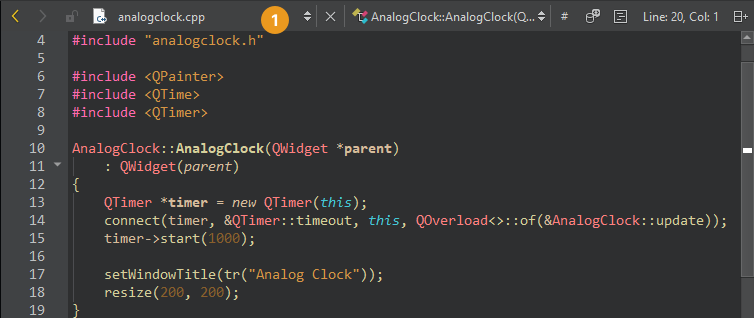
파싱 컨텍스트를 재설정하려면 ‘ # ’ > ‘ Clear Preferred Parse Context ’로 이동하십시오.
프로젝트 분석에 필요한 정보가 여전히 불완전하거나 잘못된 경우, Additional Preprocessor Directives 로 이동하여 전처리기 지시문을 추가하십시오.
외부에서 변경된 파일 재구문 분석
Qt Creator 외부에서 소스 파일이 수정된 경우, 열려 있는 파일(1)은 자동으로 재구문 분석됩니다. 다른 파일을 업데이트하려면 Tools > C++ > Reparse Externally Changed Files 로 이동하여 코드 모델을 업데이트하십시오.
‘방법: 코드 편집’, ‘코드 편집’, ‘Clang 코드 모델’ 및 ‘코드 모델’항목도 참조하십시오 .
Copyright © The Qt Company Ltd. and other contributors. Documentation contributions included herein are the copyrights of their respective owners. The documentation provided herein is licensed under the terms of the GNU Free Documentation License version 1.3 as published by the Free Software Foundation. Qt and respective logos are trademarks of The Qt Company Ltd in Finland and/or other countries worldwide. All other trademarks are property of their respective owners.
