
C
AnchorChanges QML Type
状態における項目のアンカーを変更する方法を指定します。詳細...
| Import Statement: | import QtQuick |
| Since: | Qt Quick Ultralite 1.0 |
プロパティ
- anchors
- anchors.baseline : AnchorLine
- anchors.bottom : AnchorLine
- anchors.horizontalCenter : AnchorLine
- anchors.left : AnchorLine
- anchors.right : AnchorLine
- anchors.top : AnchorLine
- anchors.verticalCenter : AnchorLine
- target : Item
詳細な説明
AnchorChanges型は、State 内の項目のアンカーを変更するために使用されます。
AnchorChanges を使用してアイテムのマージンを変更することはできません。その場合は、代わりに `PropertyChanges ` を使用してください。
次の例では、AnchorChanges を使用してアイテムの上部および下部のアンカーを変更し、PropertyChanges を使用して上部および下部のアンカーマージンを変更しています:
import QtQuick 2.15

Rectangle {
    id: window
    width: 120; height: 120
    color: "black"

    Rectangle { id: anchorRectStart; x: 60; y: 60; height: 60; width: 60; color: "yellow"}
    Rectangle { id: anchorRectEnd; x: 0; y: 0; height: 60; width: 60; color: "blue"}

    Rectangle {
        id: myRect; color: "red"
        anchors {
            top: anchorRectStart.top
            bottom: anchorRectStart.bottom
            left: anchorRectStart.left
            right: anchorRectStart.right
            topMargin: 10
            bottomMargin: 10
            leftMargin: 10
            rightMargin: 10
        }
    }

    states: State {
        name: "reanchored"
        AnchorChanges {
            target: myRect
            anchors {
                top: anchorRectEnd.top
                bottom: anchorRectEnd.bottom
                left: anchorRectEnd.left
                right: anchorRectEnd.right
            }
        }
        PropertyChanges {
            target: myRect
            anchors {
                topMargin: 20
                bottomMargin: 20
                leftMargin: 20
                rightMargin: 20
            }
        }
    }

    MouseArea { anchors.fill: parent; onClicked: window.state = "reanchored" }
}
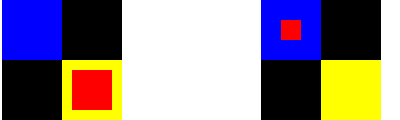
アンカーのマージンの変更は、NumberAnimation を使用してアニメーション化できます。
アンカーの詳細については、「アンカーレイアウト」を参照してください。
プロパティのドキュメント
anchors group
anchors.baseline : AnchorLine
anchors.bottom : AnchorLine
anchors.horizontalCenter : AnchorLine
anchors.left : AnchorLine
anchors.right : AnchorLine
anchors.top : AnchorLine
anchors.verticalCenter : AnchorLine
これらのプロパティは、項目のそれぞれのアンカーを変更します。
target : Item
このプロパティは、アンカーの変更が適用されるItem を保持します。
特定のQtライセンスの下で利用可能です。
詳細はこちら。
