
C
Qt Quick Ultraliteマップの例
Qt Quick Ultralite で、Map アイテムを使用して地図を表示する方法を示します。
概要
この例では、「Map 」アイテムを使用して、Qt Quick Ultralite アプリケーションに地図を表示する方法を示します。
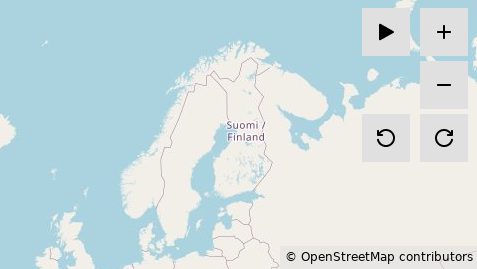
最小限のマップモード
このモードでは、4つのズームレベル(0~3)に対応したマップタイルが用意されています。ズームインするには「 」ボタンを選択し、ズームアウトするには「
 」ボタンを選択します。どのズームレベルでも、マップを時計回りに回転させるには「
 」ボタンを選択します。反時計回りに回転させるには「
 」ボタンを選択します。 また、地図をドラッグして画面内を移動することもできます。
ユーザー位置デモモード
デモモードでは、あらかじめ定義されたルートに沿って、地図上のユーザーの現在位置の変化をシミュレートします。デモモードを開始するには、「 」ボタンを選択してください。デモモードでは、「
 」ボタンと「
 」ボタン以外のすべてのボタンが非表示になります。
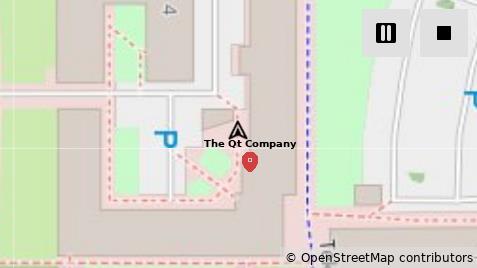
デモは、地図がズームレベル17まで拡大された状態から開始されます。ユーザーの現在位置を表す「 」アイコンと、注目地点を表す「
 」アイコンが地図上に表示されます。 デモを一時停止するには、「 」ボタンを選択してください。ボタンが「 」に変わります。デモが一時停止している間は、地図をドラッグして周囲を見渡すことができます。デモを再開するには、「 」を選択してください。デモを停止して最小限の地図モードに戻すには、「 」ボタンを選択してください。
このサンプルでは、ファイルシステムからマップタイルを取得するために `Qul::MapTileFetcher ` を実装しています。ファイルシステムの実装は、`fileloading` サンプルから提供されています。マップタイルは `JPEG ` 形式であり、これには `JPEG ` デコーダーが必要です。JPEG デコーダーの実装は、`imagedecoder` サンプルから提供されています。詳細については、「マップタイルの取得」を参照してください。
このサンプルでは、ダミーの位置情報ソースから位置情報を取得するために、Qul::GeoPositionSource を実装しています。詳細については、「位置情報の取得」を参照してください。
対象プラットフォーム
デスクトップでのサンプル実行
このサンプルは、Qtを使用して画像をデコードする「imagedecoder」サンプルのJPEGデコーダ実装を利用しています。そのため、ヘッダーファイルを提供するために、プロジェクトのビルドには開発用Qtが必要です。
cmake examples/map -DCMAKE_PREFIX_PATH=$HOME/Qt/6.2.4/gcc_64 -DQUL_PLATFORM=Qt -DQul_ROOT=${QUL_ROOT}cmake examples\map -DCMAKE_PREFIX_PATH=C:\Qt\6.2.4\msvc2022_64 -DQUL_COMPILER_NAME=msvc -DQUL_PLATFORM=Qt -DQul_ROOT=%QUL_ROOT%
プラットフォームバックエンドがリンクされているQtのバージョンによるリンクの問題を回避するには、両者のバージョンを一致させる必要があります。カスタムビルドのプラットフォームの場合は、デスクトッププラットフォームバックエンドのビルドに使用したのと同じQtを使用してください。あらかじめビルド済みのプラットフォームライブラリの場合は、Qt 6.2.4を使用する必要があります。
注: MinGWを使用する場合は 、コンパイラ名として「gnu 」を、CMAKE_PREFIX_PATH として「C:\Qt\6.2.4\mingw_64」を指定してください。
注: Linuxでは 、Qt は OpenGL に依存しています。例の構成中に OpenGL が見つからないというエラーが発生した場合は、次のコマンドを使用してインストールできます。
sudo apt install libgl1-mesa-dev
デバイス上でサンプルを実行する
ターゲットプラットフォームでサンプルを実行するには、FAT32 形式でフォーマットされたSD カードが必要です。サンプルディレクトリ内のoffline_tiles_provider/ にあるtiles/ ディレクトリを、SD カードのルートディレクトリにコピーしてください。
ハードウェア要件
優れたパフォーマンス、高いフレームレート、スムーズなユーザー体験を実現するには、画像の高速デコードおよび高速回転をサポートするデバイスが不可欠です。
RAM の要件は、マップのサイズによって異なります。 画面サイズが 800 x 480 のSTM32F769iデバイスでフルスクリーン表示を行う場合、heap およびstack メモリを 32 KB 消費します。同じ画面サイズの場合、マップタイル画像のキャッシュ用に 3840 KB のSDRAM メモリが必要です。詳細については、「画像のキャッシュ」を参照してください。
マップタイル
このサンプルには、Web Mercator投影法による世界地図のタイルが5つのズームレベルで含まれています。各タイルは、JPEG形式の256×256ピクセルの画像です。各ズームレベルにおけるタイル数は、2zoomlevel×2zoomlevel の計算式で算出されます。
地図タイルは、サンプルディレクトリ内のoffline_tiles_provider/tiles/ ディレクトリにあります。
地図タイルの取得(テクノロジープレビュー)
このサンプルでは、オフラインの外部ストレージからマップタイルを取得します。
OfflineTileFetcher クラス
OfflineTileFetcher クラスは、Qul::MapTileFetcher クラスのリファレンス実装です。実装内容は、offline_tile_provider/offlinetilefetcher.h およびoffline_tile_provider/offlinetilefetcher.cpp ファイルで確認できます。
Qul::MapTileFetcher クラスには、実装が必須のQul::MapTileFetcher::getTileImage 関数があります。OfflineTileFetcher クラスでは、これを次のように実装しています:
bool OfflineTileFetcher::getTileImage(const Qul::Private::TileSpec &spec, Qul::Private::TileImage &tileImage)
{
    // user has to configure url to point to tiles images root dir.
    QulString url = generateTileUrl(TILES_BASE_DIR, spec);
    if (url.empty()) {
        url = PLACEHOLDER_TILE;
        Qul::PlatformInterface::log("warning: tile url is empty. using placeholder tile at '%s'.\n", PLACEHOLDER_TILE);
    }

    const TileCacheMap::iterator it = tileCache.find(url);
    if (it != tileCache.end()) {
        tileImage.image = it->second;
        return true;
    }

    if (tileCache.size() >= maxCacheSize)
        removeOldestImage();

    Qul::SharedImage newTileImage = findImage(url.c_str());
    if (!newTileImage && url != PLACEHOLDER_TILE) {
#ifndef NDEBUG
        Qul::PlatformInterface::log("warning: could not fetch a tile with url '%s'. using placeholder tile.\n",
                                    url.c_str());
#endif

        newTileImage = findImage(PLACEHOLDER_TILE);

        if (!newTileImage) {
            Qul::PlatformInterface::log("error: could not fetch a placeholder tile from '%s'.\n", PLACEHOLDER_TILE);
            return false;
        }
    } else if (!newTileImage) {
        Qul::PlatformInterface::log("error: could not fetch a placeholder tile from '%s'.\n", PLACEHOLDER_TILE);
        return false;
    }

    tileImage.image = newTileImage;
    tileCache[url] = newTileImage;
    cacheOrder.push_back(url);

    return true;
}
OfflineTileFetcher クラスは、メンバー関数generateTileUrl を実装し、spec パラメータと、例のCMakeLists.txt ファイルで定義されたTILES_BASE_DIR を使用して、マップタイルのURI を構成します。
static int printTileSpec(char *buffer, int size, const char *baseDir, const Qul::Private::TileSpec &spec)
{
    return std::snprintf(buffer, size, "%s%u/%u/%u.jpeg", baseDir, spec.zoom, spec.x, spec.y);
}

OfflineTileFetcher::QulString OfflineTileFetcher::generateTileUrl(const char *baseDir,
                                                                  const Qul::Private::TileSpec &spec) const
{
    const int size = printTileSpec(nullptr, 0, baseDir, spec);
    if (size <= 0) {
        Qul::PlatformInterface::log("error: failed to calculate the required buffer size for the tile url.");
        return QulString();
    }

    QulString url;
    url.resize(size + 1);

    // The generated string has a length of at most n-1, leaving space for the
    // additional terminating null character.
    printTileSpec(&url[0], url.size(), baseDir, spec);
    url.resize(size);

    return url;
}
OfflineTileFetcher クラスは、FileCache::get を使用して、マップタイル画像にアクセスし、デコードを行い、デコード済みの画像をRAMにキャッシュします。FileCache::get は、Qul::SharedImage オブジェクトを返します。
Qul::SharedImage OfflineTileFetcher::findImage(const char *url)
{
    if (m_fileCache)
        return m_fileCache->get(url);

    return Qul::Private::findImageForString(url);
}
OfflineTileFetcher すでにアクセス済みのマップタイルを格納するためのキャッシュ機能を実装しています。
...
tileCache[url] = newTileImage;
...
アクセス済みのマップタイルをキャッシュする際、Qul::SharedImage への参照を保持し、RAMキャッシュ内にそのタイルが見つかった場合は、すでにデコード済みのタイル画像を返します。
...
const TileCacheMap::iterator it = tileCache.find(url);
if (it != tileCache.end()) {
    tileImage.image = it->second;
    return true;
}
...
OfflineTileFetcher CMakeLists.txt で定義されている を使用して を設定し、その後、最も古いキャッシュエントリが削除されます。MAX_CACHE_SIZE maxCacheSize
OfflineTileFetcher::OfflineTileFetcher(bool useFileCache)
    ...
    , maxCacheSize(MAX_CACHE_SIZE)
{}

void OfflineTileFetcher::removeOldestImage()
{
    for (int i = 0; i < MAX_CACHE_SIZE / 5 && !cacheOrder.empty(); ++i) {
        const QulString oldestUrl = cacheOrder.front();
        cacheOrder.pop_front();
        tileCache.erase(oldestUrl);
    }
}
位置情報の取得(テクノロジープレビュー)
この例では、ダミーの位置情報ソースから位置情報を取得する処理をシミュレートしています。
DummyPositionSource クラス
DummyPositionSource クラスは、Qul::GeoPositionSource クラスのリファレンス実装です。この実装は、dummy_position_source/dummypositionsource.h およびdummy_position_source/dummypositionsource.cpp ファイルに記載されています。
Qul::GeoPositionSource クラスには、実装が必須のQul::GeoPositionSource::getCurrentPosition 関数があります。DummyPositionSource クラスでは、これを次のように実装しています:
Qul::Private::PositionSource::SourceError DummyPositionSource::getCurrentPosition(Qul::GeoPositionInfo &positionInfo)
{
    const size_t lastIndex = dataSource.size() - 1;
    IndexManager &indexManager = IndexManager::instance();
    Qul::GeoPositionInfo posInfo = dataSource[indexManager.getIndex()];

    positionInfo.latitude = posInfo.latitude;
    positionInfo.longitude = posInfo.longitude;
    positionInfo.direction = posInfo.direction;
    positionInfo.speed = posInfo.speed;
    positionInfo.timestamp = posInfo.timestamp;

    if (indexManager.getIndex() == lastIndex)
        return Qul::Private::PositionSource::ClosedError;

    indexManager.incrementIndex();

    return Qul::Private::PositionSource::NoError;
}
DummyPositionSource::getCurrentPosition この関数は、dataSource ベクトルからシミュレーションされた位置データにアクセスします。dataSource ベクトルの定義は、dummy_position_source/dummypositiondata.cpp 内にあります。
extern const std::vector<Qul::GeoPositionInfo, Qul::PlatformInterface::Allocator<Qul::GeoPositionInfo> > dataSource
    = {{65.05877, 25.45545, 270, 0.000000, 1754406549865},
       {65.05877, 25.455422549019605, 270, 1.287166, 1754406550864},
       {65.05877, 25.455395098039215, 270, 1.287166, 1754406551866},
        ...

{65.0542974509804, 25.456510980392157, 248.6951536973353, 0.660902, 1754407107864},
{65.05427156862746, 25.45636862745098, 248.6951535146238, 7.269921, 1754407108858},
{65.05427078431373, 25.45636431372549, 248.6951535146238, 0.220301, 1754407109868},
{65.05427, 25.45636, 248.6951535146238, 0.220301, 1754407110869}};
C++およびQMLからdataSource 内のどの位置データ項目にアクセスするかを制御するために、IndexManager クラスがdummy_position_source/indexmanager.h に実装されています。
class IndexManager : public Qul::Singleton<IndexManager>
{
public:
    IndexManager()
        : m_index(0){};

    void setIndex(size_t i) { m_index = i; }
    size_t getIndex() const { return m_index; }
    void incrementIndex() { m_index++; }

private:
    size_t m_index;
};
DummyPositionSource::getCurrentPosition この関数は、最後の位置データエントリに到達し、現在の位置の更新を停止する場合に `CloseError ` を返します。それ以外の場合、PositionSource から呼び出され、updateInterval プロパティの値に従って現在の位置の更新を継続する際には、`NoError ` を返します。
プロジェクトの構造
CMakeプロジェクトファイル
CMakeLists.txt には、デスクトッププラットフォームとSTM32F769iプラットフォームの両方に対する設定が含まれています。
CMakeのコンパイル定義
TILES_BASE_DIRこれは、マップタイルが格納されているルートディレクトリを指しています。PLACEHOLDER_TILEユーザーが生成されたマップ領域の外側にパンした場合に表示されるプレースホルダー画像へのパスを指定します。MAX_CACHE_SIZE古いキャッシュエントリが削除されるまでの時間を設定します。
デスクトップの設定
デスクトップの設定は、マップタイルの画像にアクセスするためのファイル読み込みサンプルにおけるPOSIX ファイルシステムの実装と、マップタイルの画像をデコードするためのimagedecoderサンプルにおけるデスクトップJPEG のimagedecoder実装に依存します。
target_sources(map PRIVATE
...
                      ../imagedecoder/desktop/desktopimagedecoder.cpp
                      ../fileloading/posix/posixfilesystem.cpp
)STM32F769iの設定
プラットフォームの設定は、SD カード内のマップタイルの画像にアクセスするためのfileloadingサンプルにおけるFATFS ファイルシステムの実装、およびマップタイルの画像をデコードするためのimagedecoderサンプルにおけるハードウェアJPEG イメージデコーダに依存します。
# file system sources
target_sources(map PRIVATE
        ../fileloading/3rdparty/FatFs/src/diskio.c
        ../fileloading/3rdparty/FatFs/src/ff.c
        ../fileloading/3rdparty/FatFs/src/ff_gen_drv.c
        ../fileloading/3rdparty/FatFs/src/sd_diskio.c
        ../fileloading/3rdparty/FatFs/src/option/unicode.c
        ${QUL_BOARD_SDK_DIR}/Drivers/STM32F7xx_HAL_Driver/Src/stm32f7xx_ll_sdmmc.c
        ${QUL_BOARD_SDK_DIR}/Drivers/STM32F7xx_HAL_Driver/Src/stm32f7xx_hal_sd.c
        ${QUL_BOARD_SDK_DIR}/Drivers/BSP/STM32F769I-Discovery/stm32f769i_discovery_sd.c
    )
# jpeg decoder sources
target_sources(map PRIVATE
        ${QUL_BOARD_SDK_DIR}/Drivers/STM32F7xx_HAL_Driver/Src/stm32f7xx_hal_jpeg.c
        ../imagedecoder/stm/${STM32XX}/stm32f7xx_hal_msp.c
        ../imagedecoder/stm/${STM32XX}/buffer_config.cpp
        ../imagedecoder/stm/stmimagedecoder.cpp
        ../imagedecoder/common/jpeg.cpp
        ../imagedecoder/3rdparty/stm/Utilities/JPEG/jpeg_utils.c
    )
QmlProject ファイル
サンプル QmlProject ファイルには、必要な QML ファイル、画像ファイル、インターフェースファイル、およびQt Quick Ultralite モジュールが記載されています。また、MCU.Config.maxResourceCacheSize を、ターゲットプラットフォームで動作する値に設定しています。
// Copyright (C) 2026 The Qt Company Ltd.
// SPDX-License-Identifier: LicenseRef-Qt-Commercial

import QmlProject

Project {
    mainFile: "map.qml"

    QmlFiles {
        files: [
            "MapButton.qml",
            "MapContainer.qml",
            "MapParameters.qml",
            "MapMarker.qml",
            "CopyrightText.qml"
        ]
    }

    ModuleFiles {
        MCU.qulModules: ["Positioning", "Location"]
    }

    InterfaceFiles {
        files: [
            "dummy_position_source/indexmanager.h"
        ]
    }

    MCU.Config {
        maxResourceCacheSize: 4000000
    }

    ImageFiles {
        MCU.base: "icons/24px"
        files: [
            "icons/24px/plus.png",
            "icons/24px/minus.png",
            "icons/24px/rotate-right.png",
            "icons/24px/rotate-left.png",
            "icons/24px/nav-arrow.png",
            "icons/24px/location-marker.png",
            "icons/24px/start-resume.png",
            "icons/24px/pause.png",
            "icons/24px/stop.png"
        ]
    }
}
MapContainer.qml
メインのQMLファイルでは、Map アイテムを使用し、マップのcenter をフィンランドのオウル市に設定しています。また、マップの初期zoomLevel を3、minimumZoomLevel を0、maximumZoomLevel を3に設定しています。
    Map {
        id: map
        property bool panning: false

        anchors.fill: parent
        center: mapParameters.startPosition
        bearing: mapParameters.bearing
        zoomLevel: root.zoomLevel
        minimumZoomLevel: mapParameters.minimumZoomLevel
        maximumZoomLevel: mapParameters.maximumZoomLevel
...
これは、pan 関数のdeltaX およびdeltaY パラメータの計算を担当するMouseArea を定義します。
        MouseArea {
            id: mapPan

            anchors.fill: parent

            property real pressPointX: 0
            property real pressPointY: 0
            property real translationX: 0
            property real translationY: 0

            onPressed: {
                map.panning = true
                pressPointX = mouse.x
                pressPointY = mouse.y
                translationX = 0
                translationY = 0
            }
            onReleased: {
                map.panning = false
            }
            onPositionChanged: {
                var x = mouse.x - pressPointX
                var y = mouse.y - pressPointY

                var deltaX = x - translationX
                var deltaY = y - translationY
                translationX = x
                translationY = y

                map.pan(-deltaX, -deltaY)
            }
        }
MapParameters.qml
Map 項目のデフォルトパラメータを定義します。
...
    readonly property real zoomLevel: 3
    readonly property real minimumZoomLevel: 0
    readonly property real maximumZoomLevel: 3
    readonly property real bearing: 0
    readonly property geoCoordinate startPosition: QtPositioning.coordinate(65.05877, 25.45545)
...
MapMarker.qml
MapMarker.qml これはカスタムQML型です。地図上の注目地点マーカーを表すMapQuickItem アイテムをラップしています。
// Copyright (C) 2025 The Qt Company Ltd.
// SPDX-License-Identifier: LicenseRef-Qt-Commercial
import QtQuick
import QtLocation
import QtPositioning

MapQuickItem {
    id: root

    property alias markerText: markerText.text
    property alias imageSource: markerImage.source

    sourceItem: Image {
        id: markerImage
        source: ""

        Text {
            id: markerText
            text: ""
            font.pointSize: 7
            font.bold: true
            anchors.bottom: parent.top
            anchors.horizontalCenter: parent.horizontalCenter
        }
    }

    coordinate: QtPositioning.coordinate(0, 0)

    anchorPoint: Qt.point(sourceItem.width / 2, sourceItem.height / 2)
}
ファイル:
- map/+t2g/+4m/MapContainer.qml
- map/+t2g/+4m/map.qml
- map/+t2g/+6m/MapContainer.qml
- map/+t2g/+6m/map.qml
- map/+t2g/MapParameters.qml
- map/CMakeLists.txt
- map/CopyrightText.qml
- map/MapButton.qml
- map/MapContainer.qml
- map/MapMarker.qml
- map/MapParameters.qml
- map/board_config.h
- map/desktop/board_config.cpp
- map/dummy_position_source/dummypositiondata.cpp
- map/dummy_position_source/dummypositionsource.cpp
- map/dummy_position_source/dummypositionsource.h
- map/dummy_position_source/indexmanager.h
- map/map.qml
- map/mcu_map.qmlproject
- map/mcu_map_t2g_4m.qmlproject
- map/mcu_map_t2g_6m.qmlproject
- map/offline_tiles_provider/offlinetilefetcher.cpp
- map/offline_tiles_provider/offlinetilefetcher.h
- map/os/baremetal/main.cpp
- map/stm/stm32f7/board_config.cpp
- map/stm/stm32u5/board_config.cpp
- map/t2g-traveo/board_config.cpp
画像:
特定のQtライセンスの下で利用可能です。
詳細はこちら。


