C
Qt Quick Ultralite の perspective_transforms の例
Qt Quick のUltraliteアプリケーションで、パースペクティブ(2.5D)変換を実装する方法を示します。
概要
このperspective_transforms のサンプルでは、Matrix4x4 のQML変換タイプを使用して、パースペクティブ変換と疑似3D効果を実装しています。音楽アルバムのカバーフローコンポーネントを用いて、その動作を実演しています。
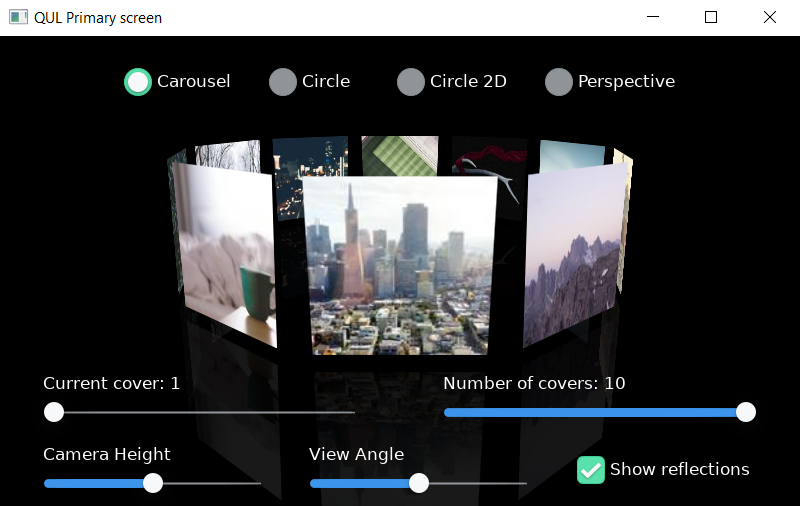
この例のUIの上部には、ラジオボタンのグループがあり、以下のカバーフローのスタイルを切り替えることができます。
- カルーセル
- サークル
- Circle 2D(直交変換を使用)
- パースペクティブ
中央にはカバーフローコンポーネントが表示され、選択されたスタイルに応じてアルバムカバーの動きがアニメーション化されます。
画面の最下部には、スライダーコントロールのグループがあり、ユーザーはこれを使って仰角や傾斜角などのカメラパラメータを調整できます。
さらに、このサンプルには「デモ」モードがあり、5秒以上ユーザー操作がない場合に有効になります。このモードでは、利用可能なカバーや表示タイプ間の切り替えがアニメーションで表示されます。ユーザーがアプリケーションの操作を開始すると、アニメーションは停止します。
対象プラットフォーム
プロジェクト構造
アプリケーションプロジェクトの構造には、パースペクティブ変換に関連する特別な機能はありませんが、最小構成よりも若干複雑になっています。以下のサブディレクトリが含まれています:
- controls -CheckBox 、Slider など、この例で使用されるカスタム UI コントロールの実装が含まれています。RadioButton
- imports - プロジェクトで使用されるQMLモジュールの内容。主にプロジェクト全体で共有される定数(シングルトンを使用)を格納
- resources - グラフィックアセット(主にアルバムカバー)
CMakeプロジェクトファイル
この例のCMakeLists.txtでは、perspective_transforms をメインの実行可能ターゲットとして定義しています。
...
    qul_add_target(perspective_transforms
        QML_PROJECT
        mcu_perspective_transforms.qmlproject
        SELECTORS no_controls
        GENERATE_ENTRYPOINT
    )
elseif(NOT QUL_PLATFORM MATCHES "^stm32f769i" AND NOT QUL_PLATFORM MATCHES "^mimxrt1170-evkb")
    qul_add_target(perspective_transforms
        QML_PROJECT
        mcu_perspective_transforms.qmlproject
        SELECTORS small_controls
        GENERATE_ENTRYPOINT
    )
...
QmlProject ファイル
関連するすべての qml ファイルは、QmlProject ファイルで指定されています。
...
        QmlFiles {
                files: [
                "CoverFlow.qml",
                "CoverFlowState.qml",
                "Cover.qml",
                "IdleTimer.qml",
                "perspective_transforms.qml"
                ]
        }

        QmlFiles {
                files: [
                "controls/CheckBox.qml",
                "controls/RadioButton.qml",
                "controls/Slider.qml"
                ]
        }
...すべての画像アセットは、ImageFiles.MCU.resourceOptimizeForRotationプロパティを有効にして追加されます。これにより、サポートされているプラットフォームでの変換パフォーマンスが向上します。
        ImageFiles {
                files: [
                "resources/cover0.jpg",
                "resources/cover1.jpg",
                "resources/cover2.jpg",
                "resources/cover3.jpg",
                "resources/cover4.jpg",
                "resources/cover5.jpg",
                "resources/cover6.jpg",
                "resources/cover7.jpg",
                "resources/cover8.jpg",
                "resources/cover9.jpg",
                ]
                MCU.base: "resources"

                // Optimize all assets for transformations
                MCU.resourceOptimizeForRotation: true
さらに、プロジェクト全体の定数を保持するモジュールが constants.qmlproject を使用して定義され、メインのプロジェクトファイルに追加されています。
        ModuleFiles {
                files: [
        "imports/constants/constants.qmlproject",
        "configuration/configuration.qmlproject"
        ]
                MCU.qulModules: ["Controls"]
        }
アプリケーションの UI
perspective_transforms.qmlファイルは、アプリケーションのユーザーインターフェースを定義します。
このファイルでは、RadioButton や Slider などの主要な UI コンポーネントのレイアウトが定義されています。これらは、controls サブディレクトリで定義されているカスタムコントロールです。
import "controls"
IdleTimer は、ユーザーの非アクティブ状態が検出されたときに UI のアニメーションを処理します。これは、タッチスクリーンを備えていないプラットフォームを対象としています。このモジュールは 2 つのシグナルを公開しており、これらはカバーフローのタイプと現在選択されているアルバムの切り替えに個別に使用されます。
    IdleTimer {
        id: idleTimer
        property int coverDir: 1
        onSwitchCover: {
            ...
        }
        onSwitchFlowType: {
            ...
        }
    }
最も重要な部分は、Cover Flowコンポーネントのインスタンス化です。これは、CoverFlow コンポーネントの現在の状態を保持するオブジェクトの作成から始まります。
    CoverFlowState {
        id: currentState
        screenWidth: root.width
        screenHeight: root.height
    }
    ...
その後、CoverFlow コンポーネントが実際のレンダリングを担当します。
    CoverFlow {
        anchors.fill: parent
        currentState: currentState
    }
CoverFlowState
CoverFlowState.qmlファイルには、CoverFlow のレンダリング方法に影響を与えるすべてのパラメータが格納されています。このファイルでは、以下のパラメータを設定します:
- 画面/キャンバスのサイズ
CoverFlowサイズと位置- レンダリングするカバーの数および現在選択されているカバーのインデックス
- FOVやクリッピング距離、仰角、傾斜角などのカメラ設定
- 特定のカバーフロータイプの設定
- 現在のビュータイプに関する情報およびタイプ遷移に関連するパラメータ
モーフ比とは、異なるカバーフロータイプ間のアニメーションによる遷移に使用されるプロパティです。
    property real morphRatio: 1
    property int currentViewType: CoverFlowType.Carousel
    property int previousViewType: CoverFlowType.Carousel

    NumberAnimation on morphRatio {
        id: morphAnimation
        from: 0.0
        to: 1.0
        duration: 200
    }
カバーフロー・タイプの切り替えは、switchViewType を使用して行います。
    function switchViewType(newType : int){
         previousViewType = currentViewType
         currentViewType = newType
         morphAnimation.start()
    }
CoverFlow
CoverFlow.qmlファイルは、カバーフローコンポーネントを実装しています。このファイルは、実際のレンダリングロジックが実装されているCover コンポーネントの複数のインスタンスを作成する役割を担っています。
このコンポーネントには、現在の状態を保持する単一のプロパティがあります。
Item {
    id: root
    property CoverFlowState currentState
    ...
Repeater は、カバーフローの状態に定義された値に基づいて、Covers を動的に作成します。
    Repeater {
        model: root.currentState.numberOfCovers
        delegate: Cover {
            required property int index

            texture: "cover" + index + ".jpg"
            coverIndex: index
            state: root.currentState
            postMatrix: root.globalPostMatrix
            preMatrix: root.globalPreMatrix
            reflectionTransform: root.reflectionTransform
        }
    }
Cover
Cover.qmlは、右変換を使用してカバー(およびその反射)をレンダリングするために必要なすべての行列計算を実装しています。Cover コントロールは、Image アイテム(適切な変換が適用されている)を子要素とするRectangle です。1 つの画像は実際のカバー画像を表し、もう 1 つは 1 つ目の画像の反射をレンダリングするために使用されます。両方の Image アイテムは、Matrix4x4 変換を使用しており、matrix プロパティは、matrix4x4 QML 基本型(Matrix4x4 変換オブジェクトとは異なります)を返す適切な関数にバインドされています。
Rectangle {
    id: cover

    property string texture
    property int coverIndex
    property CoverFlowState state

    property matrix4x4 coverTransform: calcCoverTransform()
    property matrix4x4 postMatrix
    property matrix4x4 preMatrix
    property matrix4x4 reflectionTransform
    z: calcFinalZ()

    Image {
        id: coverImageBase
        source: cover.texture
        transform: Matrix4x4 { matrix: coverTransform }
        opacity: 1.0
    }

    Image {
        id: mirrorImageBase
        visible: cover.state.showReflection
        source: cover.texture
        transform: [
            Matrix4x4 { matrix: reflectionTransform },
            Matrix4x4 { matrix: coverTransform }
        ]

        opacity: 0.1
    }
    ...
新しいmatrix4x4 は、Qt::matrix4x4()ファクトリメソッドを使用し、すべての行列成分を指定することで作成できます。例として、並進行列を取り上げてみましょう:
    function mtxTranslate(x : real, y : real, z : real) : matrix4x4 {
        return Qt.matrix4x4(1, 0, 0, x,
                            0, 1, 0, y,
                            0, 0, 1, z,
                            0, 0, 0, 1)
    }
matrix4x4 型では、以下の算術演算が利用可能です:
- 行列同士の乗算matrix4x4::times
- 行列とスカラーの乗算matrix4x4::times
- 行列の加算matrix4x4::plus
これらはすべて、calcCoverTransform() 関数で使用されています:
    function calcCoverTransform() : matrix4x4 {
        var previousViewType = state.previousViewType
        var currentViewType = state.currentViewType
        if (state.morphRatio == 0) {
            currentViewType = previousViewType
        } else if (state.morphRatio == 1) {
matrix4x4 型には16個の値があり、それぞれm11 からm44 までのプロパティ(行/列順)を介してアクセスできます。これは、カバー全体のz 位置を計算する際に使用されます。
    function calcFinalZ() : real {
        var coverTransform = cover.coverTransform

        var x = state.coverSize/2
        var y = state.coverSize/2

        var inv_d = 1.0 / (coverTransform.m41 * x + coverTransform.m42 * y + coverTransform.m44)
        var fX = (coverTransform.m11 * x + coverTransform.m12 * y + coverTransform.m14) * inv_d
        var fZ = (coverTransform.m31 * x + coverTransform.m32 * y + coverTransform.m34) * inv_d

        var littleX = Math.abs(fX - state.coverFlowX - state.coverFlowW * 0.5)
        return -fZ * 100000 - littleX
    }
Cover.qmlには、行列を操作する複数の関数が実装されており、参考として利用できます。これらの関数は、以下のカテゴリに分類できます:
- 基本行列生成関数(平行移動、拡大縮小、回転、透視)
- 変換前後の行列の計算(カメラ行列および初期カバー変換)
- 個々のカバーフロータイプに対する最終変換の計算
これらの基本的な構成要素さえあれば、複雑な2.5Dエフェクトを実装するのに十分です。
ファイル:
- perspective_transforms/CMakeLists.txt
- perspective_transforms/Cover.qml
- perspective_transforms/CoverFlow.qml
- perspective_transforms/CoverFlowState.qml
- perspective_transforms/IdleTimer.qml
- perspective_transforms/configuration/+no_controls/Configuration.qml
- perspective_transforms/configuration/Configuration.qml
- perspective_transforms/configuration/configuration.qmlproject
- perspective_transforms/controls/CheckBox.qml
- perspective_transforms/controls/RadioButton.qml
- perspective_transforms/controls/Slider.qml
- perspective_transforms/imports/constants/+small_controls/Constants.qml
- perspective_transforms/imports/constants/Constants.qml
- perspective_transforms/imports/constants/CoverFlowType.qml
- perspective_transforms/imports/constants/constants.qmlproject
- perspective_transforms/imports/constants/qmldir
- perspective_transforms/mcu_perspective_transforms.qmlproject
- perspective_transforms/perspective_transforms.qml
画像:
- perspective_transforms/resources/cover0.jpg
- perspective_transforms/resources/cover1.jpg
- perspective_transforms/resources/cover2.jpg
- perspective_transforms/resources/cover3.jpg
- perspective_transforms/resources/cover4.jpg
- perspective_transforms/resources/cover5.jpg
- perspective_transforms/resources/cover6.jpg
- perspective_transforms/resources/cover7.jpg
- perspective_transforms/resources/cover8.jpg
- perspective_transforms/resources/cover9.jpg
関連項目: Matrix4x4 、matrix4x4 、およびQt::matrix4x4()。
特定のQtライセンスの下で利用可能です。
詳細はこちらをご覧ください。