
C
Qul::PlatformInterface::Rect Class
class Qul::PlatformInterface::RectRect クラスは、整数精度を用いて平面上の長方形を定義します。詳細...
| Header: | #include <platforminterface/rect.h> |
| Since: | Qt Quick Ultralite (Platform) 1.5 |
パブリック関数
| Rect() | |
| Rect(const Qul::PlatformInterface::Point &topLeft, const Qul::PlatformInterface::Point &bottomRight) | |
| Rect(const Qul::PlatformInterface::Point &topLeft, const Qul::PlatformInterface::Size &size) | |
| Rect(Qul::PlatformInterface::coord_t x, Qul::PlatformInterface::coord_t y, Qul::PlatformInterface::coord_t width, Qul::PlatformInterface::coord_t height) | |
| void | adjust(Qul::PlatformInterface::coord_t x1, Qul::PlatformInterface::coord_t y1, Qul::PlatformInterface::coord_t x2, Qul::PlatformInterface::coord_t y2) |
| Qul::PlatformInterface::Rect | adjusted(Qul::PlatformInterface::coord_t x1, Qul::PlatformInterface::coord_t y1, Qul::PlatformInterface::coord_t x2, Qul::PlatformInterface::coord_t y2) const |
| Qul::PlatformInterface::coord_t | bottom() const |
| Qul::PlatformInterface::Point | bottomLeft() const |
| Qul::PlatformInterface::Point | bottomRight() const |
| Qul::PlatformInterface::Point | center() const |
| bool | contains(Qul::PlatformInterface::coord_t x, Qul::PlatformInterface::coord_t y) const |
| bool | contains(const Qul::PlatformInterface::Point &point, bool proper = false) const |
| bool | contains(const Qul::PlatformInterface::Rect &rectangle, bool proper = false) const |
| bool | contains(Qul::PlatformInterface::coord_t x, Qul::PlatformInterface::coord_t y, bool proper) const |
| void | getCoords(Qul::PlatformInterface::coord_t *x1, Qul::PlatformInterface::coord_t *y1, Qul::PlatformInterface::coord_t *x2, Qul::PlatformInterface::coord_t *y2) const |
| void | getRect(Qul::PlatformInterface::coord_t *x, Qul::PlatformInterface::coord_t *y, Qul::PlatformInterface::coord_t *width, Qul::PlatformInterface::coord_t *height) const |
| Qul::PlatformInterface::coord_t | height() const |
| Qul::PlatformInterface::Rect | intersected(const Qul::PlatformInterface::Rect &rectangle) const |
| bool | intersects(const Qul::PlatformInterface::Rect &rectangle) const |
| bool | isEmpty() const |
| bool | isNull() const |
| bool | isValid() const |
| Qul::PlatformInterface::coord_t | left() const |
| void | moveBottom(Qul::PlatformInterface::coord_t y) |
| void | moveBottomLeft(const Qul::PlatformInterface::Point &position) |
| void | moveBottomRight(const Qul::PlatformInterface::Point &position) |
| void | moveCenter(const Qul::PlatformInterface::Point &position) |
| void | moveLeft(Qul::PlatformInterface::coord_t x) |
| void | moveRight(Qul::PlatformInterface::coord_t x) |
| void | moveTo(const Qul::PlatformInterface::Point &position) |
| void | moveTo(Qul::PlatformInterface::coord_t x, Qul::PlatformInterface::coord_t y) |
| void | moveTop(Qul::PlatformInterface::coord_t y) |
| void | moveTopLeft(const Qul::PlatformInterface::Point &position) |
| void | moveTopRight(const Qul::PlatformInterface::Point &position) |
| Qul::PlatformInterface::Rect | normalized() const |
| Qul::PlatformInterface::coord_t | right() const |
| void | setBottom(Qul::PlatformInterface::coord_t y) |
| void | setBottomLeft(const Qul::PlatformInterface::Point &position) |
| void | setBottomRight(const Qul::PlatformInterface::Point &position) |
| void | setCoords(Qul::PlatformInterface::coord_t x1, Qul::PlatformInterface::coord_t y1, Qul::PlatformInterface::coord_t x2, Qul::PlatformInterface::coord_t y2) |
| void | setHeight(Qul::PlatformInterface::coord_t height) |
| void | setLeft(Qul::PlatformInterface::coord_t x) |
| void | setRect(Qul::PlatformInterface::coord_t x, Qul::PlatformInterface::coord_t y, Qul::PlatformInterface::coord_t width, Qul::PlatformInterface::coord_t height) |
| void | setRight(Qul::PlatformInterface::coord_t x) |
| void | setSize(const Qul::PlatformInterface::Size &size) |
| void | setTop(Qul::PlatformInterface::coord_t y) |
| void | setTopLeft(const Qul::PlatformInterface::Point &position) |
| void | setTopRight(const Qul::PlatformInterface::Point &position) |
| void | setWidth(Qul::PlatformInterface::coord_t width) |
| void | setX(Qul::PlatformInterface::coord_t x) |
| void | setY(Qul::PlatformInterface::coord_t y) |
| Qul::PlatformInterface::Size | size() const |
| Qul::PlatformInterface::coord_t | top() const |
| Qul::PlatformInterface::Point | topLeft() const |
| Qul::PlatformInterface::Point | topRight() const |
| void | translate(const Qul::PlatformInterface::Point &offset) |
| void | translate(Qul::PlatformInterface::coord_t dx, Qul::PlatformInterface::coord_t dy) |
| Qul::PlatformInterface::Rect | translated(const Qul::PlatformInterface::Point &offset) const |
| Qul::PlatformInterface::Rect | translated(Qul::PlatformInterface::coord_t dx, Qul::PlatformInterface::coord_t dy) const |
| Qul::PlatformInterface::Rect | transposed() const |
| Qul::PlatformInterface::Rect | united(const Qul::PlatformInterface::Rect &rectangle) const |
| Qul::PlatformInterface::coord_t | width() const |
| Qul::PlatformInterface::coord_t | x() const |
| Qul::PlatformInterface::coord_t | y() const |
| Qul::PlatformInterface::Rect | operator&(const Qul::PlatformInterface::Rect &rectangle) const |
| Qul::PlatformInterface::Rect & | operator&=(const Qul::PlatformInterface::Rect &rectangle) |
| Qul::PlatformInterface::Rect | operator|(const Qul::PlatformInterface::Rect &rectangle) const |
| Qul::PlatformInterface::Rect & | operator|=(const Qul::PlatformInterface::Rect &rectangle) |
関連する非メンバー
| bool | operator!=(const Qul::PlatformInterface::Rect &r1, const Qul::PlatformInterface::Rect &r2) |
| bool | operator==(const Qul::PlatformInterface::Rect &r1, const Qul::PlatformInterface::Rect &r2) |
詳細な説明
長方形は通常、左上隅とサイズとして表現されます。Rect のサイズ(幅と高さ)は、そのレンダリングの基礎となる数学的な長方形と常に等しくなります。
Rect は、左、上、幅、高さの整数のセット、または Point と Size から構築することができます。
左上と右下の座標を使用して Rect を作成する 3 つ目のコンストラクタもあります。
Rect クラスは、さまざまな矩形の座標を返す一連の関数を提供しており、これらを操作することができます。 また、Rect クラスは、さまざまな座標を基準にして長方形を移動させる関数も提供しています。さらに、moveTo() 関数を使用すると、長方形の左上隅を指定された座標に固定したまま、長方形全体を移動させることができます。あるいは、translate() 関数を使用すると、現在の位置を基準に指定されたオフセット分だけ長方形を移動させることができ、translated() 関数を使用すると、この長方形の平行移動後のコピーが返されます。
size() 関数は、矩形の寸法を Size 型として返します。寸法は、width() およびheight() 関数を使用して個別に取得することもできます。寸法を操作するには、setSize()、setWidth()、またはsetHeight() 関数を使用します。あるいは、setBottom() やsetRight() など、矩形の座標を設定する関数のいずれかを適用することで、サイズを変更することもできます。
contains() 関数は、指定された点が矩形の内側にあるかどうかを判定し、intersects() 関数は、この矩形が指定された矩形と交差する場合に `true ` を返します。Rect クラスは、交差する矩形を返す `intersected()` 関数や、指定された矩形とこの矩形を囲む矩形を返す `united()` 関数も提供しています。
isEmpty() 関数は、left() >right() またはtop() >bottom() の場合に、true を返します。空の矩形は有効ではないことに注意してください。isValid() 関数は、left() <=right()かつ top() <=bottom() の場合に、true を返します。一方、null 矩形(isNull() == true)は、幅と高さの両方が 0 に設定されています。
なお、Rect およびRectF の定義の仕方のため、空の Rect は本質的にRectF と同様に定義されています。
Rect オブジェクトは比較可能です。
座標
Rect クラスは、さまざまな矩形の座標を返す一連の関数を提供しており、これらを操作することができます。また、Rect は、さまざまな座標を基準にして矩形を移動させる関数も提供しています。
例えば、left()、setLeft()、moveLeft() といった関数があります。left() は、矩形の左端の x 座標を返し、setLeft() は、矩形の左端を指定された x 座標に設定します(幅が変わる場合がありますが、矩形の右端が変わることはありません)。また、moveLeft() は、矩形の左端を指定された x 座標に保ち、サイズを変更せずに、矩形全体を水平方向に移動させます。
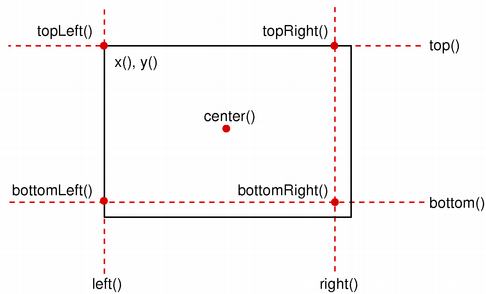
Qt XML との互換性を確保するため、bottom() およびright() 関数が返す値は、矩形の真の右下隅とは異なります。right() 関数は left () +width() - 1を返し、bottom() 関数はtop() +height() - 1 を返します。bottomRight() 便利関数が返す点についても同様です。さらに、topRight() 関数とbottomLeft() 関数がそれぞれ返す x 座標と y 座標は、実際の右端および下端からのずれが同じです。
真の右下隅を見つけるには、x() +width() およびy() +height() を使用し、right() およびbottom() は使用しないことをお勧めします。別の解決策として、RectF を使用する方法があります。RectF クラスは、座標に浮動小数点精度を使用して平面上の矩形を定義しており、RectF::right() およびRectF::bottom() 関数は、右端と下端の座標を返します。
また、adjust() 関数を使用してこの矩形の座標にオフセットを追加したり、adjusted() 関数を使用して元の矩形を調整した新しい矩形を取得したりすることも可能です。幅または高さのいずれかが負の場合は、normalized() 関数を使用して、角が入れ替わった矩形を取得してください。
さらに、Rect クラスには、矩形の左上隅と右下隅の位置を取得する `getCoords()` 関数や、矩形の左上隅、幅、高さを取得する `getRect()` 関数が用意されています。`setCoords()` 関数や `setRect()` 関数を使用すると、矩形の座標と寸法を一度に操作できます。
制約
Rectは、coord_t 型の最小値および最大値の範囲内に制限されます。この範囲外の値となる可能性のあるRectに対する操作は、未定義の挙動を引き起こします。
RectFも参照してください 。
メンバ関数のドキュメント
Rect::Rect()
ヌル矩形を作成します。
setRect() およびisNull()も参照してください 。
Rect::Rect(const Qul::PlatformInterface::Point &topLeft, const Qul::PlatformInterface::Point &bottomRight)
指定されたtopLeft およびbottomRight の角座標を持つ長方形を作成します。
setTopLeft() およびsetBottomRight()も参照してください 。
Rect::Rect(const Qul::PlatformInterface::Point &topLeft, const Qul::PlatformInterface::Size &size)
指定されたtopLeft の角と、指定されたsize を用いて長方形を作成します。
setTopLeft() およびsetSize()も参照してください 。
Rect::Rect(Qul::PlatformInterface::coord_t x, Qul::PlatformInterface::coord_t y, Qul::PlatformInterface::coord_t width, Qul::PlatformInterface::coord_t height)
(x,y)を左上隅とし、指定されたwidth およびheight を持つ長方形を作成します。
setRect()も参照してください 。
void Rect::adjust(Qul::PlatformInterface::coord_t x1, Qul::PlatformInterface::coord_t y1, Qul::PlatformInterface::coord_t x2, Qul::PlatformInterface::coord_t y2)
矩形の既存の座標に、それぞれx1 、y1 、x2 、y2 を追加します。
adjusted() およびsetRect()も参照してください 。
Qul::PlatformInterface::Rect Rect::adjusted(Qul::PlatformInterface::coord_t x1, Qul::PlatformInterface::coord_t y1, Qul::PlatformInterface::coord_t x2, Qul::PlatformInterface::coord_t y2) const
この矩形の既存の座標に、それぞれx1 、y1 、x2 、y2 を加えた新しい矩形を返します。
adjust()も参照してください 。
Qul::PlatformInterface::coord_t Rect::bottom() const
矩形の下辺の y 座標を返します。
Qtとの互換性のため、この関数はtop() +height() - 1を返すことに注意してください。実際のy座標を取得するには、y() +height()を使用してください。
setBottom()、bottomLeft()、およびbottomRight()も参照してください 。
Qul::PlatformInterface::Point Rect::bottomLeft() const
矩形の左下隅の位置を返します。なお、歴史的な理由により、この関数は Point(left(),top() +height() - 1) を返します。
setBottomLeft()、bottom()、およびleft()も参照してください 。
Qul::PlatformInterface::Point Rect::bottomRight() const
矩形の右下隅の位置を返します。
Qt XMLとの互換性を確保するため、この関数は Point(left() +width() - 1,top() +height() - 1) を返すことに注意してください。
setBottomRight()、bottom()、およびright()も参照してください 。
Qul::PlatformInterface::Point Rect::center() const
矩形の中心点を返します。
moveCenter()も参照してください 。
bool Rect::contains(Qul::PlatformInterface::coord_t x, Qul::PlatformInterface::coord_t y) const
点 (x,y) がこの矩形の内側にある場合は `true ` を返し、そうでない場合は `false` を返します。
これはオーバーロードされた関数です。
bool Rect::contains(const Qul::PlatformInterface::Point &point, bool proper = false) const
指定されたpoint が矩形の内側または境界線上にある場合はtrue を返し、そうでない場合はfalse を返します。proper がtrueの場合、この関数は、指定されたpoint が矩形の内側(つまり、境界線上ではない)にある場合にのみtrue を返します。
これはオーバーロードされた関数です。
intersects()も参照してください 。
bool Rect::contains(const Qul::PlatformInterface::Rect &rectangle, bool proper = false) const
指定されたrectangle がこの矩形内にある場合、true を返します。そうでない場合は、false を返します。proper がtrueの場合、この関数は、rectangle がこの矩形内に完全に収まっている(端に接していない)場合にのみ、true を返します。
これはオーバーロードされた関数です。
bool Rect::contains(Qul::PlatformInterface::coord_t x, Qul::PlatformInterface::coord_t y, bool proper) const
点 (x,y) が矩形の内側または境界線上にある場合は `true ` を返し、そうでない場合は `false` を返します。proper が true の場合、この関数は、点が矩形の内側に完全に収まっている(境界線上ではない)場合にのみ `true ` を返します。
これはオーバーロードされた関数です。
void Rect::getCoords(Qul::PlatformInterface::coord_t *x1, Qul::PlatformInterface::coord_t *y1, Qul::PlatformInterface::coord_t *x2, Qul::PlatformInterface::coord_t *y2) const
矩形の左上隅の位置を *x1 および *y1 に、右下隅の位置を *x2 および *y2 に抽出します。
setCoords() およびgetRect()も参照してください 。
void Rect::getRect(Qul::PlatformInterface::coord_t *x, Qul::PlatformInterface::coord_t *y, Qul::PlatformInterface::coord_t *width, Qul::PlatformInterface::coord_t *height) const
矩形の左上隅の位置を *x および *y に、その寸法を *width および *height に取得します。
setRect() およびgetCoords()も参照してください 。
Qul::PlatformInterface::coord_t Rect::height() const
矩形の高さを返します。
setHeight()、width()、およびsize()も参照してください 。
Qul::PlatformInterface::Rect Rect::intersected(const Qul::PlatformInterface::Rect &rectangle) const
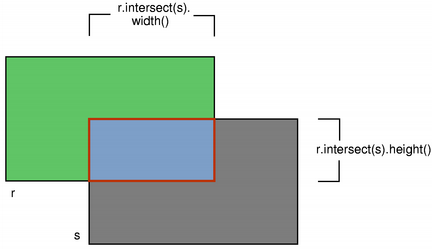
この矩形と、指定されたrectangle との共通部分を返します。なお、rectangle.intersected(s) はr & s と同等であることに注意してください。
intersects()、united()、およびoperator&=()も参照してください 。
bool Rect::intersects(const Qul::PlatformInterface::Rect &rectangle) const
この矩形が指定されたrectangle と交差する場合(つまり、両方の矩形内に少なくとも1つのピクセルが含まれている場合)、true を返します。そうでない場合は、false を返します。
交差する矩形は、intersected() 関数を使用して取得できます。
contains()も参照してください 。
bool Rect::isEmpty() const
矩形が空の場合は `true ` を返し、それ以外の場合は `false` を返します。
空の矩形は、left() >right() またはtop() >bottom() となります。空の矩形は無効です(つまり、isEmpty() == !isValid() となります)。
normalized() 関数を使用すると、角の位置が入れ替わった矩形を取得できます。
isNull()、isValid()、およびnormalized()も参照してください 。
bool Rect::isNull() const
矩形がヌル矩形の場合は `true ` を返し、それ以外の場合は `false` を返します。
ヌル矩形とは、幅と高さの両方が 0 に設定されている矩形のことです(つまり、right() ==left() - 1 およびbottom() ==top() - 1)。ヌル矩形は空であるため、無効です。
isEmpty() およびisValid()も参照してください 。
bool Rect::isValid() const
矩形が有効な場合は `true ` を返し、そうでない場合は `false` を返します。
有効な矩形は、left() <=right() かつtop() <=bottom() を満たします。なお、交差などの非自明な演算は、無効な矩形に対しては定義されていないことに注意してください。有効な矩形は空ではありません(すなわち、isValid() == !isEmpty() です)。
isNull()、isEmpty()、およびnormalized()も参照してください 。
Qul::PlatformInterface::coord_t Rect::left() const
矩形の左端のx座標を返します。x() と同等です。
setLeft()、topLeft()、およびbottomLeft()も参照してください 。
void Rect::moveBottom(Qul::PlatformInterface::coord_t y)
矩形を垂直方向に移動させ、矩形の下端を指定されたy 座標に固定します。矩形のサイズは変更されません。
bottom()、setBottom()、およびmoveTop()も参照してください 。
void Rect::moveBottomLeft(const Qul::PlatformInterface::Point &position)
指定されたposition に左下隅を固定したまま、矩形を移動します。矩形のサイズは変更されません。
setBottomLeft()、moveBottom()、およびmoveLeft()も参照してください 。
void Rect::moveBottomRight(const Qul::PlatformInterface::Point &position)
指定されたposition を右下隅として、矩形を移動します。矩形のサイズは変更されません。
setBottomRight()、moveRight()、およびmoveBottom()も参照してください 。
void Rect::moveCenter(const Qul::PlatformInterface::Point &position)
指定されたposition を原点として、矩形を移動します。矩形のサイズは変更されません。
center()も参照してください 。
void Rect::moveLeft(Qul::PlatformInterface::coord_t x)
矩形を水平方向に移動させ、矩形の左端を指定されたx 座標に固定します。矩形のサイズは変更されません。
left()、setLeft()、およびmoveRight()も参照してください 。
void Rect::moveRight(Qul::PlatformInterface::coord_t x)
矩形を水平方向に移動させ、矩形の右端を指定されたx 座標に固定します。矩形のサイズは変更されません。
right()、setRight()、およびmoveLeft()も参照してください 。
void Rect::moveTo(const Qul::PlatformInterface::Point &position)
指定されたposition を左上隅として、矩形を移動します。
これはオーバーロードされた関数です。
void Rect::moveTo(Qul::PlatformInterface::coord_t x, Qul::PlatformInterface::coord_t y)
指定された位置(x 、y )に左上隅を固定したまま、矩形を移動します。矩形のサイズは変更されません。
これはオーバーロードされた関数です。
translate() およびmoveTopLeft()も参照してください 。
void Rect::moveTop(Qul::PlatformInterface::coord_t y)
矩形を垂直方向に移動し、矩形の上辺を指定されたy 座標の位置に保持します。矩形のサイズは変更されません。
top()、setTop()、およびmoveBottom()も参照してください 。
void Rect::moveTopLeft(const Qul::PlatformInterface::Point &position)
指定されたposition を左上隅に据えたまま、矩形を移動します。矩形のサイズは変更されません。
setTopLeft()、moveTop()、およびmoveLeft()も参照してください 。
void Rect::moveTopRight(const Qul::PlatformInterface::Point &position)
指定されたposition の位置に右上隅を固定したまま、矩形を移動します。矩形のサイズは変更されません。
setTopRight()、moveTop()、およびmoveRight()も参照してください 。
Qul::PlatformInterface::Rect Rect::normalized() const
正規化された長方形、すなわち、幅と高さがともに非負の値を持つ長方形を返します。
width() < 0 の場合、この関数は左隅と右隅を入れ替え、height() < 0 の場合、上隅と下隅を入れ替えます。
isValid() およびisEmpty()も参照してください 。
Qul::PlatformInterface::coord_t Rect::right() const
矩形の右端のx座標を返します。
Qt XMLとの互換性のため、この関数はleft() +width() - 1を返すことに注意してください。実際のx座標を取得するには、x() +width()を使用してください。
setRight()、topRight()、およびbottomRight()も参照してください 。
void Rect::setBottom(Qul::PlatformInterface::coord_t y)
矩形の下辺を、指定されたy 座標に設定します。高さが変わる場合がありますが、矩形の上辺が変わることはありません。
bottom() およびmoveBottom()も参照してください 。
void Rect::setBottomLeft(const Qul::PlatformInterface::Point &position)
長方形の左下隅を、指定されたposition に設定します。サイズは変更される場合がありますが、長方形の右上隅は決して変更されません。
bottomLeft() およびmoveBottomLeft()も参照してください 。
void Rect::setBottomRight(const Qul::PlatformInterface::Point &position)
長方形の右下隅を、指定された座標position に設定します。サイズは変更される場合がありますが、長方形の左上隅は決して変更されません。
bottomRight() およびmoveBottomRight()も参照してください 。
void Rect::setCoords(Qul::PlatformInterface::coord_t x1, Qul::PlatformInterface::coord_t y1, Qul::PlatformInterface::coord_t x2, Qul::PlatformInterface::coord_t y2)
矩形の左上隅の座標を (x1,y1) に、右下隅の座標を (x2,y2) に設定します。
getCoords() およびsetRect()も参照してください 。
void Rect::setHeight(Qul::PlatformInterface::coord_t height)
矩形の高さを、指定されたheight に設定します。下辺は変更されますが、上辺は変更されません。
height() およびsetSize()も参照してください 。
void Rect::setLeft(Qul::PlatformInterface::coord_t x)
矩形の左端を、指定されたx 座標に設定します。幅が変わる場合がありますが、矩形の右端は決して変わりません。
setX() と同等です。
left() およびmoveLeft()も参照してください 。
void Rect::setRect(Qul::PlatformInterface::coord_t x, Qul::PlatformInterface::coord_t y, Qul::PlatformInterface::coord_t width, Qul::PlatformInterface::coord_t height)
矩形の左上隅の座標を (x,y) に設定し、そのサイズを指定されたwidth およびheight に設定します。
getRect() およびsetCoords()も参照してください 。
void Rect::setRight(Qul::PlatformInterface::coord_t x)
矩形の右端を、指定されたx 座標に設定します。幅が変わる場合がありますが、矩形の左端が変わることはありません。
right() およびmoveRight()も参照してください 。
void Rect::setSize(const Qul::PlatformInterface::Size &size)
矩形のサイズを、指定されたsize に設定します。左上隅の位置は変更されません。
size()、setWidth()、およびsetHeight()も参照してください 。
void Rect::setTop(Qul::PlatformInterface::coord_t y)
矩形の上辺を、指定されたy 座標に設定します。高さが変わる場合がありますが、矩形の下辺は決して変わりません。
setY() と同等です。
void Rect::setTopLeft(const Qul::PlatformInterface::Point &position)
矩形の左上隅を、指定されたposition に設定します。サイズは変更される場合がありますが、矩形の右下隅は決して変更されません。
topLeft() およびmoveTopLeft()も参照してください 。
void Rect::setTopRight(const Qul::PlatformInterface::Point &position)
長方形の右上隅を、指定されたposition に設定します。サイズは変更される場合がありますが、長方形の左下隅は決して変更されません。
topRight() およびmoveTopRight()も参照してください 。
void Rect::setWidth(Qul::PlatformInterface::coord_t width)
矩形の幅を、指定されたwidth に設定します。右端は変更されますが、左端は変更されません。
width() およびsetSize()も参照してください 。
void Rect::setX(Qul::PlatformInterface::coord_t x)
矩形の左端を、指定されたx 座標に設定します。幅が変わる場合がありますが、矩形の右端は決して変わりません。
setLeft() と同等です。
x()、setY()、およびsetTopLeft()も参照してください 。
void Rect::setY(Qul::PlatformInterface::coord_t y)
矩形の上辺を、指定されたy 座標に設定します。高さが変わる場合がありますが、矩形の下辺が変更されることはありません。
setTop() と同等です。
y()、setX()、およびsetTopLeft()も参照してください 。
Qul::PlatformInterface::Size Rect::size() const
矩形のサイズを返します。
setSize()、width()、およびheight()も参照してください 。
Qul::PlatformInterface::coord_t Rect::top() const
矩形の上辺の y 座標を返します。y() と同等です。
setTop()、topLeft()、およびtopRight()も参照してください 。
Qul::PlatformInterface::Point Rect::topLeft() const
矩形の左上隅の位置を返します。
setTopLeft()、top()、およびleft()も参照してください 。
Qul::PlatformInterface::Point Rect::topRight() const
矩形の右上隅の位置を返します。
Qt XMLとの互換性を確保するため、この関数は Point(left() +width() - 1,top()) を返すことに注意してください。
setTopRight()、top()、およびright()も参照してください 。
void Rect::translate(const Qul::PlatformInterface::Point &offset)
矩形を、現在の位置を基準として、offset.x() だけ x 軸方向に、offset.y() だけ y 軸方向に移動させます。
これはオーバーロードされた関数です。
void Rect::translate(Qul::PlatformInterface::coord_t dx, Qul::PlatformInterface::coord_t dy)
現在の位置を基準として、矩形をx軸方向にdx 、y軸方向にdy だけ移動させます。正の値は、矩形を右方向および下方向に移動させます。
これはオーバーロードされた関数です。
moveTopLeft()、moveTo()、およびtranslated()も参照してください 。
Qul::PlatformInterface::Rect Rect::translated(const Qul::PlatformInterface::Point &offset) const
現在の位置を基準として、x軸方向にはoffsetx ()、y軸方向にはoffsety ()だけ平行移動させた矩形のコピーを返します。
これはオーバーロードされた関数です。
translate()も参照してください 。
Qul::PlatformInterface::Rect Rect::translated(Qul::PlatformInterface::coord_t dx, Qul::PlatformInterface::coord_t dy) const
現在の位置を基準として、x 軸方向にdx 、y 軸方向にdy だけ平行移動させた矩形のコピーを返します。正の値は、矩形を右および下に移動させます。
これはオーバーロードされた関数です。
translate()も参照してください 。
Qul::PlatformInterface::Rect Rect::transposed() const
幅と高さが入れ替わった矩形のコピーを返します。
Qul::PlatformInterface::Size::transposed()も参照してください 。
Qul::PlatformInterface::Rect Rect::united(const Qul::PlatformInterface::Rect &rectangle) const
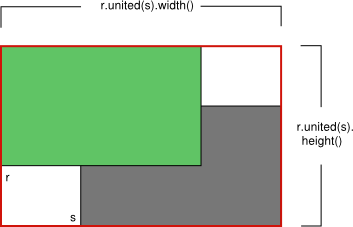
この矩形と指定されたrectangle の包み矩形を返します。
intersected()も参照してください 。
Qul::PlatformInterface::coord_t Rect::width() const
矩形の幅を返します。
setWidth()、height()、およびsize()も参照してください 。
Qul::PlatformInterface::coord_t Rect::x() const
矩形の左端のx座標を返します。left() と同等です。
setX()、y()、およびtopLeft()も参照してください 。
Qul::PlatformInterface::coord_t Rect::y() const
矩形の上辺の y 座標を返します。top() と同等です。
setY()、x()、およびtopLeft()も参照してください 。
Qul::PlatformInterface::Rect Rect::operator&(const Qul::PlatformInterface::Rect &rectangle) const
この矩形と、指定されたrectangle との共通部分を返します。共通部分がない場合は、空の矩形を返します。
operator&=() およびintersected()も参照してください 。
Qul::PlatformInterface::Rect &Rect::operator&=(const Qul::PlatformInterface::Rect &rectangle)
この長方形と、指定されたrectangle との交点を求めます。
intersected() およびoperator&()も参照してください 。
Qul::PlatformInterface::Rect Rect::operator|(const Qul::PlatformInterface::Rect &rectangle) const
この矩形と、指定されたrectangle の境界矩形を返します。
operator|=() およびunited()も参照してください 。
Qul::PlatformInterface::Rect &Rect::operator|=(const Qul::PlatformInterface::Rect &rectangle)
この長方形を、指定されたrectangle と結合します。
関連する非メンバ関数
bool operator!=(const Qul::PlatformInterface::Rect &r1, const Qul::PlatformInterface::Rect &r2)
矩形r1 とr2 が異なる場合はtrue を返し、そうでない場合はfalse を返します。
bool operator==(const Qul::PlatformInterface::Rect &r1, const Qul::PlatformInterface::Rect &r2)
矩形r1 とr2 が等しい場合はtrue を返し、そうでない場合はfalse を返します。
特定の Qt ライセンスの下で利用可能です。
詳細はこちら。
