
C
Qul::PlatformInterface::RectF Class
class Qul::PlatformInterface::RectFRectF クラスは、浮動小数点数の精度を用いて平面上の長方形を定義します。詳細...
| Header: | #include <platforminterface/rect.h> |
| Since: | Qt Quick Ultralite (Platform) 1.5 |
パブリック関数
| RectF() | |
| RectF(const Qul::PlatformInterface::Rect &rectangle) | |
| RectF(const Qul::PlatformInterface::PointF &topLeft, const Qul::PlatformInterface::PointF &bottomRight) | |
| RectF(const Qul::PlatformInterface::PointF &topLeft, const Qul::PlatformInterface::SizeF &size) | |
| RectF(float x, float y, float width, float height) | |
| void | adjust(float dx1, float dy1, float dx2, float dy2) |
| Qul::PlatformInterface::RectF | adjusted(float dx1, float dy1, float dx2, float dy2) const |
| float | bottom() const |
| Qul::PlatformInterface::PointF | bottomLeft() const |
| Qul::PlatformInterface::PointF | bottomRight() const |
| Qul::PlatformInterface::PointF | center() const |
| bool | contains(const Qul::PlatformInterface::PointF &point) const |
| bool | contains(const Qul::PlatformInterface::RectF &rectangle) const |
| bool | contains(float x, float y) const |
| void | getCoords(float *x1, float *y1, float *x2, float *y2) const |
| void | getRect(float *x, float *y, float *width, float *height) const |
| float | height() const |
| Qul::PlatformInterface::RectF | intersected(const Qul::PlatformInterface::RectF &rectangle) const |
| bool | intersects(const Qul::PlatformInterface::RectF &rectangle) const |
| bool | isEmpty() const |
| bool | isNull() const |
| bool | isValid() const |
| float | left() const |
| void | moveBottom(float y) |
| void | moveBottomLeft(const Qul::PlatformInterface::PointF &position) |
| void | moveBottomRight(const Qul::PlatformInterface::PointF &position) |
| void | moveCenter(const Qul::PlatformInterface::PointF &position) |
| void | moveLeft(float x) |
| void | moveRight(float x) |
| void | moveTo(const Qul::PlatformInterface::PointF &position) |
| void | moveTo(float x, float y) |
| void | moveTop(float y) |
| void | moveTopLeft(const Qul::PlatformInterface::PointF &position) |
| void | moveTopRight(const Qul::PlatformInterface::PointF &position) |
| Qul::PlatformInterface::RectF | normalized() const |
| float | right() const |
| void | setBottom(float y) |
| void | setBottomLeft(const Qul::PlatformInterface::PointF &position) |
| void | setBottomRight(const Qul::PlatformInterface::PointF &position) |
| void | setCoords(float x1, float y1, float x2, float y2) |
| void | setHeight(float height) |
| void | setLeft(float x) |
| void | setRect(float x, float y, float width, float height) |
| void | setRight(float x) |
| void | setSize(const Qul::PlatformInterface::SizeF &size) |
| void | setTop(float y) |
| void | setTopLeft(const Qul::PlatformInterface::PointF &position) |
| void | setTopRight(const Qul::PlatformInterface::PointF &position) |
| void | setWidth(float width) |
| void | setX(float x) |
| void | setY(float y) |
| Qul::PlatformInterface::SizeF | size() const |
| Qul::PlatformInterface::Rect | toAlignedRect() const |
| Qul::PlatformInterface::Rect | toRect() const |
| float | top() const |
| Qul::PlatformInterface::PointF | topLeft() const |
| Qul::PlatformInterface::PointF | topRight() const |
| void | translate(const Qul::PlatformInterface::PointF &offset) |
| void | translate(float dx, float dy) |
| Qul::PlatformInterface::RectF | translated(const Qul::PlatformInterface::PointF &offset) const |
| Qul::PlatformInterface::RectF | translated(float dx, float dy) const |
| Qul::PlatformInterface::RectF | transposed() const |
| Qul::PlatformInterface::RectF | united(const Qul::PlatformInterface::RectF &rectangle) const |
| float | width() const |
| float | x() const |
| float | y() const |
| Qul::PlatformInterface::RectF | operator&(const Qul::PlatformInterface::RectF &rectangle) const |
| Qul::PlatformInterface::RectF & | operator&=(const Qul::PlatformInterface::RectF &rectangle) |
| Qul::PlatformInterface::RectF | operator|(const Qul::PlatformInterface::RectF &rectangle) const |
| Qul::PlatformInterface::RectF & | operator|=(const Qul::PlatformInterface::RectF &rectangle) |
関連する非メンバー
| bool | operator!=(const Qul::PlatformInterface::RectF &r1, const Qul::PlatformInterface::RectF &r2) |
| bool | operator==(const Qul::PlatformInterface::RectF &r1, const Qul::PlatformInterface::RectF &r2) |
詳細な説明
長方形は通常、左上隅とサイズで表されます。RectF のサイズ(幅と高さ)は、そのレンダリングの基礎となる数学的な長方形と常に等しくなります。
RectF は、左、上、幅、高さの座標のセット、あるいは `PointF ` および `SizeF` から構築することができます。
また、RectからRectFを作成する3つ目のコンストラクタと、この長方形の値に基づいてRectオブジェクトを返す対応するtoRect()関数も用意されています(返される長方形の座標は、最も近い整数に丸められていることに注意してください)。
RectF クラスは、さまざまな矩形の座標を返す一連の関数を提供し、これらの操作を可能にします。また、RectF は、さまざまな座標を基準として矩形を移動させる関数も提供します。さらに、左上隅を指定された座標に固定したまま矩形を移動させるmoveTo() 関数もあります。 あるいは、translate() 関数は、現在の位置を基準として指定されたオフセット分だけ矩形を移動させ、translated() 関数は、この矩形の移動後のコピーを返します。
size() 関数は、矩形の寸法を `SizeF` として返します。寸法は、width() およびheight() 関数を使用して個別に取得することもできます。寸法を操作するには、setSize()、setWidth()、またはsetHeight() 関数を使用します。あるいは、setBottom() やsetRight() など、矩形の座標を設定する関数のいずれかを適用することで、サイズを変更することもできます。
contains() 関数は、指定された点が矩形の内側にあるかどうかを判定し、intersects() 関数は、この矩形が指定された矩形と交差する場合にtrue を返し(そうでない場合は false を返す)。RectF クラスは、交差する矩形を返すintersected() 関数や、指定された矩形とこの矩形を囲む矩形を返すunited() 関数も提供している:
isEmpty() 関数は、矩形の幅または高さが 0 以下である場合に `true ` を返します。空の矩形は有効ではないことに注意してください。isValid() 関数は、幅と高さの両方が 0 より大きい場合に `true ` を返します。一方、null 矩形(isNull() == true)は、幅と高さの両方が 0 に設定されています。
なお、Rect および RectF の定義の仕方のため、空の RectF は本質的に Rect と同じ方法で定義されます。
RectF オブジェクトは比較可能です。
座標
RectF クラスは、さまざまな矩形の座標を返し、それらの操作を可能にする一連の関数を提供します。また、RectF は、さまざまな座標を基準にして矩形を移動させる関数も提供します。
例えば、bottom()、setBottom()、moveBottom() といった関数があります。bottom() は、矩形の下端の y 座標を返し、setBottom() は、矩形の下辺を指定された y 座標に設定します(高さが変わる場合がありますが、矩形の上辺は決して変わりません)。また、moveBottom() は、矩形の下辺を指定された y 座標に固定したまま、サイズを変更せずに矩形全体を垂直方向に移動させます。
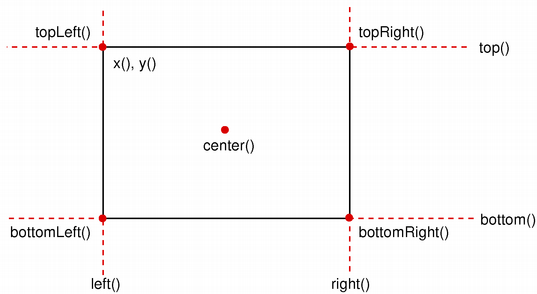
また、adjust() 関数を使用してこの矩形の座標にオフセットを追加したり、adjusted() 関数を使用して元の矩形の調整に基づいた新しい矩形を取得したりすることも可能です。幅または高さのいずれかが負の場合、normalized() 関数を使用して、角が入れ替わった矩形を取得します。
さらに、RectF には、矩形の左上隅と右下隅の位置を取得する `getCoords()` 関数や、矩形の左上隅、幅、高さを取得する `getRect()` 関数が用意されています。矩形の座標と寸法を一度に操作するには、`setCoords()` 関数と `setRect()` 関数を使用してください。
「Rect」も参照してください 。
メンバ関数のドキュメント
RectF::RectF()
ヌル矩形を作成します。
isNull()も参照してください 。
RectF::RectF(const Qul::PlatformInterface::Rect &rectangle)
指定された Rectrectangle から RectF 矩形を生成します。
toRect()も参照してください 。
RectF::RectF(const Qul::PlatformInterface::PointF &topLeft, const Qul::PlatformInterface::PointF &bottomRight)
指定されたtopLeft およびbottomRight の角座標を持つ長方形を作成します。
setTopLeft() およびsetBottomRight()も参照してください 。
RectF::RectF(const Qul::PlatformInterface::PointF &topLeft, const Qul::PlatformInterface::SizeF &size)
指定されたtopLeft の角と、指定されたsize を用いて長方形を作成します。
setTopLeft() およびsetSize()も参照してください 。
RectF::RectF(float x, float y, float width, float height)
(x,y)を左上隅とし、指定されたwidth およびheight を持つ長方形を作成します。
setRect()も参照してください 。
void RectF::adjust(float dx1, float dy1, float dx2, float dy2)
矩形の既存の座標に、それぞれdx1 、dy1 、dx2 、dy2 を加算します。
adjusted() およびsetRect()も参照してください 。
Qul::PlatformInterface::RectF RectF::adjusted(float dx1, float dy1, float dx2, float dy2) const
この矩形の既存の座標に、それぞれdx1 、dy1 、dx2 、dy2 を加算した新しい矩形を返します。
adjust()も参照してください 。
float RectF::bottom() const
矩形の下辺の y 座標を返します。
setBottom()、bottomLeft()、およびbottomRight()も参照してください 。
Qul::PlatformInterface::PointF RectF::bottomLeft() const
矩形の左下隅の位置を返します。
setBottomLeft()、bottom()、およびleft()も参照してください 。
Qul::PlatformInterface::PointF RectF::bottomRight() const
矩形の右下隅の位置を返します。
setBottomRight()、bottom()、およびright()も参照してください 。
Qul::PlatformInterface::PointF RectF::center() const
矩形の中心点を返します。
moveCenter()も参照してください 。
bool RectF::contains(const Qul::PlatformInterface::PointF &point) const
指定されたpoint が矩形の内側または境界線上にある場合はtrue を返し、そうでない場合はfalse を返します。
これはオーバーロードされた関数です。
intersects()も参照してください 。
bool RectF::contains(const Qul::PlatformInterface::RectF &rectangle) const
指定されたrectangle がこの矩形内にある場合はtrue を返し、そうでない場合はfalse を返します。
これはオーバーロードされた関数です。
bool RectF::contains(float x, float y) const
点 (x,y) が矩形の内側または境界線上にある場合は `true ` を返し、そうでない場合は `false` を返します。
これはオーバーロードされた関数です。
void RectF::getCoords(float *x1, float *y1, float *x2, float *y2) const
矩形の左上隅の位置を *x1 および *y1 に、右下隅の位置を *x2 および *y2 に抽出します。
setCoords() およびgetRect()も参照してください 。
void RectF::getRect(float *x, float *y, float *width, float *height) const
矩形の左上隅の位置を *x および *y に、その寸法を *width および *height に抽出します。
setRect() およびgetCoords()も参照してください 。
float RectF::height() const
矩形の高さを返します。
setHeight()、width()、およびsize()も参照してください 。
Qul::PlatformInterface::RectF RectF::intersected(const Qul::PlatformInterface::RectF &rectangle) const
この矩形と、指定されたrectangle との共通部分を返します。なお、r.intersected(s) はr & s と同等であることに注意してください。
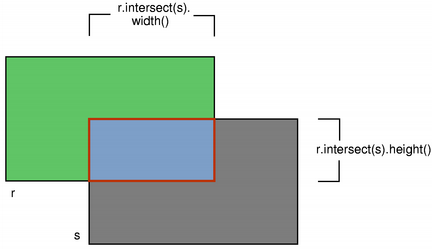
intersects()、united()、およびoperator&=()も参照してください 。
bool RectF::intersects(const Qul::PlatformInterface::RectF &rectangle) const
この矩形が指定されたrectangle と交差する場合(つまり、両者の間に空でない重なり合う領域が存在する場合)、true を返します。それ以外の場合は、false を返します。
交差する矩形は、intersected() 関数を使用して取得できます。
contains()も参照してください 。
bool RectF::isEmpty() const
矩形が空の場合、true を返し、それ以外の場合はfalse を返します。
空の矩形は、width() <= 0 またはheight() <= 0 となります。空の矩形は無効です(つまり、isEmpty() == !isValid() となります)。
normalized() 関数を使用すると、角が入れ替わった矩形を取得できます。
isNull()、isValid()、およびnormalized()も参照してください 。
bool RectF::isNull() const
矩形がヌル矩形の場合は `true ` を返し、それ以外の場合は `false` を返します。
ヌル矩形とは、幅と高さの両方が 0 に設定されている矩形のことです。ヌル矩形は空であるため、無効となります。
isEmpty() およびisValid()も参照してください 。
bool RectF::isValid() const
矩形が有効な場合は `true ` を返し、そうでない場合は `false` を返します。
有効な矩形は、width() > 0 かつheight() > 0 を満たします。なお、交差などの非自明な演算は、無効な矩形に対しては定義されていません。有効な矩形は空ではありません(すなわち、isValid() == !isEmpty())。
isNull()、isEmpty()、およびnormalized()も参照のこと 。
float RectF::left() const
矩形の左端のx座標を返します。x() と同等です。
setLeft()、topLeft()、およびbottomLeft()も参照してください 。
void RectF::moveBottom(float y)
矩形を垂直方向に移動させ、矩形の下端を指定されたy 座標に固定します。矩形のサイズは変更されません。
bottom()、setBottom()、およびmoveTop()も参照してください 。
void RectF::moveBottomLeft(const Qul::PlatformInterface::PointF &position)
指定された座標 (position) を左下隅として、矩形を移動します。矩形の大きさは変わりません。
setBottomLeft()、moveBottom()、およびmoveLeft()も参照してください 。
void RectF::moveBottomRight(const Qul::PlatformInterface::PointF &position)
指定されたposition に右下隅を固定したまま、矩形を移動します。矩形のサイズは変更されません。
setBottomRight()、moveBottom()、およびmoveRight()も参照してください 。
void RectF::moveCenter(const Qul::PlatformInterface::PointF &position)
指定されたposition に中心点を固定したまま、矩形を移動します。矩形のサイズは変更されません。
center()も参照してください 。
void RectF::moveLeft(float x)
矩形の左端を指定されたx 座標に固定したまま、矩形を水平方向に移動します。矩形のサイズは変更されません。
left()、setLeft()、およびmoveRight()も参照してください 。
void RectF::moveRight(float x)
矩形を水平方向に移動させ、矩形の右端を指定されたx 座標に合わせます。矩形のサイズは変更されません。
right()、setRight()、およびmoveLeft()も参照してください 。
void RectF::moveTo(const Qul::PlatformInterface::PointF &position)
指定されたposition を左上隅として、矩形を移動します。
これはオーバーロードされた関数です。
void RectF::moveTo(float x, float y)
指定された位置(x 、y )に左上隅を固定したまま、矩形を移動します。矩形のサイズは変更されません。
これはオーバーロードされた関数です。
translate() およびmoveTopLeft()も参照してください 。
void RectF::moveTop(float y)
矩形を垂直方向に移動させ、矩形の上辺を指定されたy 座標に合わせます。矩形のサイズは変更されません。
top()、setTop()、およびmoveBottom()も参照してください 。
void RectF::moveTopLeft(const Qul::PlatformInterface::PointF &position)
指定されたposition を左上隅として、矩形を移動します。矩形のサイズは変更されません。
setTopLeft()、moveTop()、およびmoveLeft()も参照してください 。
void RectF::moveTopRight(const Qul::PlatformInterface::PointF &position)
指定されたposition を右上隅として、矩形を移動します。矩形のサイズは変更されません。
setTopRight()、moveTop()、およびmoveRight()も参照してください 。
Qul::PlatformInterface::RectF RectF::normalized() const
正規化された矩形、つまり幅と高さが非負の矩形を返します。
width() < 0 の場合、この関数は左隅と右隅を交換し、height() < 0 の場合は上隅と下隅を交換します。
isValid() およびisEmpty()も参照してください 。
float RectF::right() const
矩形の右端のx座標を返します。
setRight()、topRight()、およびbottomRight()も参照してください 。
void RectF::setBottom(float y)
矩形の下辺を、指定されたy 座標に設定します。高さが変わる場合がありますが、矩形の上辺が変わることはありません。
bottom() およびmoveBottom()も参照してください 。
void RectF::setBottomLeft(const Qul::PlatformInterface::PointF &position)
長方形の左下隅を、指定されたposition に設定します。サイズは変更される場合がありますが、長方形の右上隅は決して変更されません。
bottomLeft() およびmoveBottomLeft()も参照してください 。
void RectF::setBottomRight(const Qul::PlatformInterface::PointF &position)
長方形の右下隅を、指定されたposition に設定します。サイズは変更される場合がありますが、長方形の左上隅は決して変更されません。
bottomRight() およびmoveBottomRight()も参照してください 。
void RectF::setCoords(float x1, float y1, float x2, float y2)
矩形の左上隅の座標を (x1,y1) に、右下隅の座標を (x2,y2) に設定します。
getCoords() およびsetRect()も参照してください 。
void RectF::setHeight(float height)
矩形の高さを、指定されたheight に設定します。下辺の高さは変更されますが、上辺の高さは変更されません。
height() およびsetSize()も参照してください 。
void RectF::setLeft(float x)
矩形の左端を、指定されたx 座標に設定します。幅が変わる場合がありますが、矩形の右端は決して変わりません。
setX() と同等です。
left() およびmoveLeft()も参照してください 。
void RectF::setRect(float x, float y, float width, float height)
矩形の左上隅の座標を (x,y) に設定し、そのサイズを指定されたwidth およびheight に設定します。
getRect() およびsetCoords()も参照してください 。
void RectF::setRight(float x)
矩形の右端を、指定されたx 座標に設定します。幅が変わる場合がありますが、矩形の左端が変わることはありません。
right() およびmoveRight()も参照してください 。
void RectF::setSize(const Qul::PlatformInterface::SizeF &size)
矩形のサイズを指定されたsize に設定します。左上隅の位置は変更されません。
size()、setWidth()、およびsetHeight()も参照してください 。
void RectF::setTop(float y)
矩形の上辺を、指定されたy 座標に設定します。高さが変わる場合がありますが、矩形の下辺は決して変わりません。
setY() と同等です。
void RectF::setTopLeft(const Qul::PlatformInterface::PointF &position)
長方形の左上隅を、指定されたposition に設定します。サイズは変更される場合がありますが、長方形の右下隅は決して変更されません。
topLeft() およびmoveTopLeft()も参照してください 。
void RectF::setTopRight(const Qul::PlatformInterface::PointF &position)
長方形の右上隅を、指定されたposition に設定します。サイズは変更される場合がありますが、長方形の左下隅は決して変更されません。
topRight() およびmoveTopRight()も参照してください 。
void RectF::setWidth(float width)
矩形の幅を、指定されたwidth に設定します。右端は変更されますが、左端は変更されません。
width() およびsetSize()も参照してください 。
void RectF::setX(float x)
矩形の左端を、指定されたx 座標に設定します。幅が変わる場合がありますが、矩形の右端が変わることはありません。
setLeft() と同等です。
x()、setY()、およびsetTopLeft()も参照してください 。
void RectF::setY(float y)
矩形の上辺を、指定されたy 座標に設定します。高さが変わる場合がありますが、矩形の下辺は決して変わりません。
setTop() と同等です。
y()、setX()、およびsetTopLeft()も参照してください 。
Qul::PlatformInterface::SizeF RectF::size() const
矩形のサイズを返します。
setSize()、width()、およびheight()も参照してください 。
Qul::PlatformInterface::Rect RectF::toAlignedRect() const
この矩形の値に基づいて、この矩形を完全に包含する最小の整数矩形を表す Rect を返します。
toRect()も参照してください 。
Qul::PlatformInterface::Rect RectF::toRect() const
この矩形の値に基づいて Rect を返します。返される矩形の座標は、最も近い整数に丸められますのでご注意ください。
RectF() およびtoAlignedRect()も参照してください 。
float RectF::top() const
矩形の上辺の y 座標を返します。y() と同等です。
setTop()、topLeft()、およびtopRight()も参照してください 。
Qul::PlatformInterface::PointF RectF::topLeft() const
矩形の左上隅の位置を返します。
setTopLeft()、top()、およびleft()も参照してください 。
Qul::PlatformInterface::PointF RectF::topRight() const
矩形の右上隅の位置を返します。
setTopRight()、top()、およびright()も参照してください 。
void RectF::translate(const Qul::PlatformInterface::PointF &offset)
矩形を、現在の位置を基準として、offset.x() だけ x 軸方向に、offset.y() だけ y 軸方向に移動させます。
これはオーバーロードされた関数です。
void RectF::translate(float dx, float dy)
現在の位置を基準として、矩形をx軸方向にdx 、y軸方向にdy だけ移動させます。正の値を設定すると、矩形は右方向および下方向に移動します。
これはオーバーロードされた関数です。
moveTopLeft()、moveTo()、およびtranslated()も参照してください 。
Qul::PlatformInterface::RectF RectF::translated(const Qul::PlatformInterface::PointF &offset) const
現在の位置を基準として、x軸方向にはoffset.x()、y軸方向にはoffset.y()だけ平行移動させた矩形のコピーを返します。
これはオーバーロードされた関数です。
Qul::PlatformInterface::RectF RectF::translated(float dx, float dy) const
現在の位置を基準として、x 軸方向に `dx `、y 軸方向に `dy ` だけ平行移動させた矩形のコピーを返します。正の値は、矩形を右方向および下方向に移動させます。
これはオーバーロードされた関数です。
translate()も参照してください 。
Qul::PlatformInterface::RectF RectF::transposed() const
幅と高さが入れ替わった矩形のコピーを返します。
SizeF::transposed()も参照してください 。
Qul::PlatformInterface::RectF RectF::united(const Qul::PlatformInterface::RectF &rectangle) const
この矩形と、指定されたrectangle の境界矩形を返します。
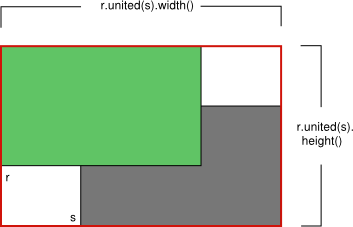
intersected()も参照してください 。
float RectF::width() const
矩形の幅を返します。
setWidth()、height()、およびsize()も参照してください 。
float RectF::x() const
矩形の左端のx座標を返します。left() と同等です。
setX()、y()、およびtopLeft()も参照してください 。
float RectF::y() const
矩形の上辺の y 座標を返します。top() と同等です。
setY()、x()、およびtopLeft()も参照してください 。
Qul::PlatformInterface::RectF RectF::operator&(const Qul::PlatformInterface::RectF &rectangle) const
この矩形と、指定されたrectangle との共通部分を返します。共通部分がない場合は、空の矩形を返します。
operator&=() およびintersected()も参照してください 。
Qul::PlatformInterface::RectF &RectF::operator&=(const Qul::PlatformInterface::RectF &rectangle)
この長方形と、指定されたrectangle との交線を求めます。
intersected() およびoperator|=()も参照してください 。
Qul::PlatformInterface::RectF RectF::operator|(const Qul::PlatformInterface::RectF &rectangle) const
この矩形と、指定されたrectangle の境界矩形を返します。
united() およびoperator|=()も参照してください 。
Qul::PlatformInterface::RectF &RectF::operator|=(const Qul::PlatformInterface::RectF &rectangle)
この長方形を、指定されたrectangle と結合します。
関連する非メンバー
bool operator!=(const Qul::PlatformInterface::RectF &r1, const Qul::PlatformInterface::RectF &r2)
矩形r1 とr2 が異なる場合はtrue を返し、そうでない場合はfalse を返します。
bool operator==(const Qul::PlatformInterface::RectF &r1, const Qul::PlatformInterface::RectF &r2)
矩形 `r1 ` と `r2 ` が等しい場合は `true ` を返し、そうでない場合は `false` を返します。
特定の Qt ライセンスの下で利用可能です。
詳細はこちら。
