
LineSeries QML Type
Stellt Daten in Liniendiagrammen dar. Mehr...
| Import Statement: | import QtCharts 2.12 |
| In C++: | QLineSeries |
| Inherits: | |
| Status: | Deprecated |
Dieser Typ ist veraltet. Wir raten dringend davon ab, ihn in neuem Code zu verwenden.
Eigenschaften
Ausführliche Beschreibung
Ein Liniendiagramm dient dazu, Informationen als eine Reihe von Datenpunkten darzustellen, die durch gerade Linien verbunden sind.
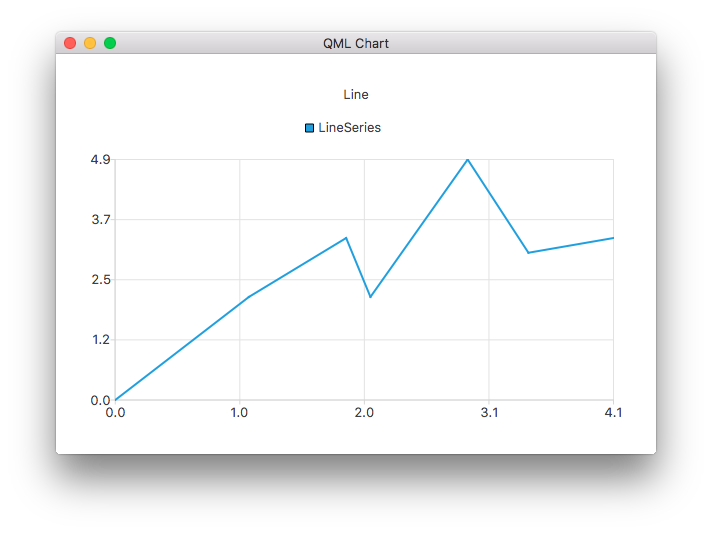
Das folgende QML-Beispiel zeigt, wie man ein einfaches Liniendiagramm erstellt:
ChartView {
    title: "Line Chart"
    anchors.fill: parent
    antialiasing: true

    LineSeries {
        name: "Line"
        XYPoint { x: 0; y: 0 }
        XYPoint { x: 1.1; y: 2.1 }
        XYPoint { x: 1.9; y: 3.3 }
        XYPoint { x: 2.1; y: 2.1 }
        XYPoint { x: 2.9; y: 4.9 }
        XYPoint { x: 3.4; y: 3.0 }
        XYPoint { x: 4.1; y: 3.3 }
    }
}
Dokumentation zu den Eigenschaften
capStyle : Qt::PenCapStyle
Steuert den Endpunktstil der Linie. Setzen Sie den Wert auf einen der folgenden Werte: Qt.FlatCap, Qt.SquareCap oder Qt.RoundCap. Standardmäßig ist der Endpunktstil „Qt.SquareCap“.
Siehe auch Qt::PenCapStyle.
count : int
Die Anzahl der Datenpunkte in der Reihe.
style : Qt::PenStyle
Steuert den Stil der Linie. Setzen Sie den Wert auf eine der folgenden Optionen: „ Qt.NoPen “, „ Qt.SolidLine “, „ Qt.DashLine “, „ Qt.DotLine “, „ Qt.DashDotLine “ oder „ Qt.DashDotDotLine “. Die Verwendung von „ Qt.CustomDashLine “ wird in der QML-API nicht unterstützt. Standardmäßig ist der Stil „Qt.SolidLine“ eingestellt.
Siehe auch Qt::PenStyle.
width : real
Die Breite der Linie. Standardmäßig beträgt die Breite 2,0.
© 2026 The Qt Company Ltd. Documentation contributions included herein are the copyrights of their respective owners. The documentation provided herein is licensed under the terms of the GNU Free Documentation License version 1.3 as published by the Free Software Foundation. Qt and respective logos are trademarks of The Qt Company Ltd. in Finland and/or other countries worldwide. All other trademarks are property of their respective owners.
