
C
EK-RA8D1 キット
このトピックでは、Renesas の「EK-RA8D1」に関するボード固有の情報を提供します。
ボードの特長
- ARM Cortex-M85、2 MBのフラッシュメモリ、1 MBのSRAMを搭載したR7FA8D1BHECBD MCU
- 4.5 インチ 480x854 LCD タッチディスプレイ
- 64 MB SDRAM
- 64MBの外部Octo-SPIフラッシュ
対応カラー深度
このボードのリファレンスポートは、16bppの色深度に対応しています。詳細については、「QUL_COLOR_DEPTH」および「色深度」を参照してください。
あらかじめビルド済みのQt Quick Ultraliteライブラリを使用したアプリケーションの構築
- ビルドしたい例のCMakeプロジェクトファイルを開きます。
- 「Configure Project 」ウィンドウで:
- 先ほど作成したキットを選択します。たとえば、 Qt for MCUs 2.12.3 - Desktop 32bpp.
- 「Configure Project 」を選択します。
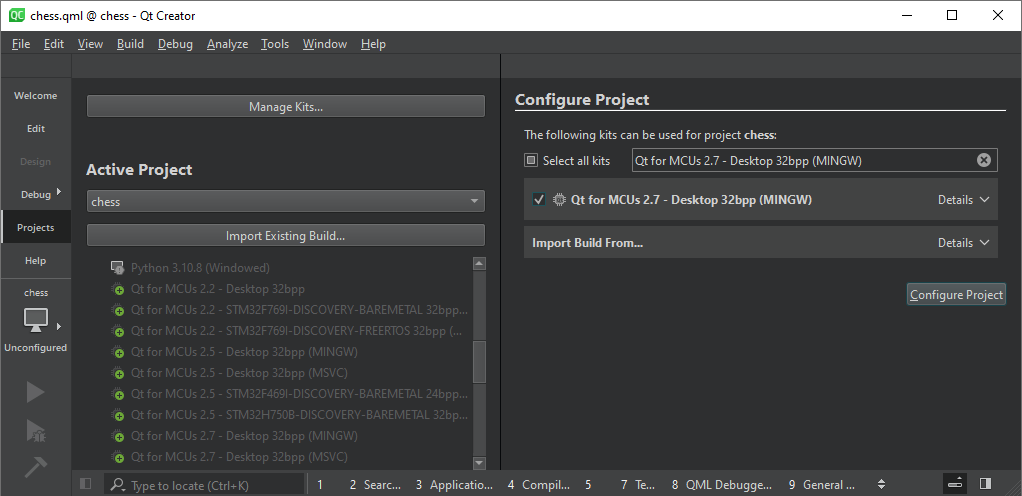
プロジェクトの設定が完了したら、「Run 」を選択するか、キーボードのCtrl+rキーを押して、バイナリをビルドし、ターゲットに書き込みます。
デバッグメッセージの読み取り
デフォルトでは、ログデータは JLink CDC UART ポート(USB COM ポート)にリダイレクトされます。
ポート設定
| 設定 | 値 |
|---|---|
| 1秒あたりのビット数 | 115200 |
| データビット | 8 |
| パリティ | None |
| ストップビット | 1 |
| フロー制御 | None |
デバッグ
Renesas e2studio
Renesas e2studio では、カスタム設定を使用してプロジェクトのデバッグを行うことができます。
- Bare Metal を作成します。EK-RA8D1用の最小構成プロジェクトです。
- プロジェクトをビルドします。
- Qt Quick Ultralite の .elf ファイルを、e2studio プロジェクトの Debug フォルダにコピーします。
- 元の .sbd ファイルのコピーを作成し、Qt Quick Ultralite .elf ファイルと同じ名前に変更します。
- トップメニューから「実行」を選択します。
- [Debug Configurations...] を選択します。
- 「Renesas GDB ハードウェア デバッグ」を選択します。
- 「C/C++ アプリケーション:」に「Qt Quick Ultralite」の .elf ファイルを設定します。
- [適用] および [閉じる] を選択します。
- 「デバッグ」モードで起動を選択します。
Renesas e2studio におけるデフォルトの FSP 設定
以下の設定を生成するために使用された FSP 設定 .xml ファイルは、platform/boards/renesas/ek-ra8d1-common/3rdparty/e2_project/configuration.xml にあります。
注: 表に指定がない場合は、プロパティのデフォルト値を使用してください 。
BSP
| プロパティ | 値 |
|---|---|
| RA Common > Main stack size (bytes) | 65536 |
| RA Common > Heap size (bytes) | 262144 |
時計
| Clock setting | 価値 |
|---|---|
| SCICLK Src | PLL1P |
| PLL2 Src | XTAL |
| PLL2 Mul | x40.0 |
| LCDCLK Src | PLL2P |
| OCTASPICLK Src | PLL2P |
注:SCICLK は120MHzである必要があります
注:LCDCLKは 200MHzにする必要があります
注:OCTASPICLK は100MHzにする必要があります
スタック
以下のスタックを追加し、設定を行ってください:
Analog > ADC (r_adc)
| プロパティ | 値 |
|---|---|
| Module > General > Name | g_adc0 |
| Module > Input > Channel Scan Mask > Channel 2 | Selected |
| Pins > AN02 | P006 |
接続性 > I2C マスター (r_iic_master)
| プロパティ | 値 |
|---|---|
| Module > Name | g_i2c_touch |
| Module > Channel | 1 |
| Module > Rate | Standard |
| Module > Rise Time (ns) | 120 |
| Module > Fall Time (ns) | 120 |
| Module > Duty Cycle (%) | 50 |
| Module > Slave Address | 0x00 |
| Module > Address Mode | 7-bit |
| Module > Timeout Mode | Short Mode |
| Module > Callback | touch_i2c_callback |
| Module > Interrupt Priority Level | Priority 6 |
| Pins > SCL1 | P512 |
| Pins > SDA1 | P511 |
接続性 > UART (r_sci_b_uart)
| プロパティ | 値 |
|---|---|
| Module > General > Name | g_uart0 |
| Module > General > Channel | 9 |
| Module > General > Data Bits | 8bits |
| Module > General > Parity | None |
| Module > General > Stop Bits | 1bit |
| Module > Interrupts > Callback | user_uart_callback |
| Pins > RXD9 | PA15 |
| Pins > TXD9 | PA14 |
グラフィックス > D/AVE 2D ポートインターフェース (r_drw)
| プロパティ | 値 |
|---|---|
| Common > Allow Indirect Mode | Enabled |
| Common > Memory Allocation | Custom |
| Module D/AVE 2D Port Interface (r_drw) > D2 Device Handle Name | d2_handle0 |
| Module D/AVE 2D Port Interface (r_drw) > DRW Interrupt Priority | Priority 2 |
グラフィックス > グラフィックスLCD (r_glcdc)
| プロパティ | 値 |
|---|---|
| Module > General > Name | g_display0 |
| Module > Interrupts > Callback Function | glcdc_callback |
| Module > Interrupts > Line Detect Interrupt Priority | Priority 12 |
| Module > Input > Graphics Layer 1 > General > Horizontal size | 480 |
| Module > Input > Graphics Layer 1 > General > Vertical size | 854 |
| Module > Input > Graphics Layer 1 > Framebuffer > Number of framebuffers | 2 |
| Module > Input > Graphics Layer 1 > Framebuffer > Section for framebuffer allocation | .sdram |
| Module > Output > Timing > Horizontal total cycles | 559 |
| Module > Output > Timing > Horizontal active video cycles | 480 |
| Module > Output > Timing > Horizontal back porch cycles | 5 |
| Module > Output > Timing > Horizontal sync signal cycles | 2 |
| Module > Output > Timing > Horizontal sync signal polarity | Low active |
| Module > Output > Timing > Vertical total lines | 894 |
| Module > Output > Timing > Vertical active video lines | 954 |
| Module > Output > Timing > Vertical back porch lines | 20 |
| Module > Output > Timing > Vertical sync signal cycles | 3 |
| Module > Output > Timing > Vertical sync signal polarity | Low active |
| Module > Output > Timing > Data Enable Signal Polarity | High active |
| Module > Output > Timing > Sync edge | Falling edge |
| Module > Output > Format > Color format | 24bits RGB888 |
| Module > TCON > Hsync pin select | LCD_TCON1 |
| Module > TCON > Vsync pin select | LCD_TCON0 |
| Module > TCON > Panel clock division ratio | 1/8 |
MIPI ディスプレイ (r_mipi_dsi)
| プロパティ | 値 |
|---|---|
| Module > General > Name | g_display0 |
| Module > Low Power > Ultra Low Power State Wakeup Period | 290 |
MIPI 物理層 (r_mipi_phy)
| プロパティ | 値 |
|---|---|
| Module > DSI PLL Frequency | 560 |
入力 > 外部IRQ (r_icu)
| プロパティ | 値 |
|---|---|
| Module > Name | g_touch_irq |
| Module > Channel | 3 |
| Module > Trigger | Falling |
| Module > Digital Filtering | Enabled |
| Module > Digital Filtering Sample Clock | PCLK / 64 |
| Module > Callback | touch_irq_cb |
| Module > Pin Interrupt Priority | Priority 5 |
注: ピンP510 のモードがOutput mode (Initial Low) になっていることを確認してください 。GT911の初期化処理中に、このモードはInput mode に変更されます。
ストレージ > OSPIフラッシュ (r_ospi_b)
| プロパティ | 値 |
|---|---|
| Common > Memory-mapping Support > Prefetch Function | Enable |
| Common > Memory-mapping Support > Combination Function | 64 Byte |
| Common > Memory-mapping Support > XiP Support | Disable |
| Common > DMAC Support | Enable |
| Common > Autocalibration Support | Enable |
| Common > DOTF Support | Disable |
| Module > General > Name | g_ospi_b |
| Module > General > Channel | 1 |
| Module > General > Initial Protocol Mode | SPI (1S-1S-1S) |
| Module > General > Initial Address Bytes | 4 |
| Module > General > Write Status Bit | 0 |
| Module > General > Write Enable Bit | 1 |
| Module > General > Sector Erase Size | 4096 |
| Module > General > Block Erase Size | 262144 |
| Module > General > Command Set Table | (empty) |
| Module > General > Command Set Table Length | 0 |
| Module > Defaults > Command Definitions > Page Program Command | 0x12 |
| Module > Defaults > Command Definitions > Read Command | 0x0B |
| Module > Defaults > Command Definitions > Write Enable Command | 0x06 |
| Module > Defaults > Command Definitions > Status Command | 0x05 |
| Module > Defaults > Erase Command Definitions > Sector Erase Command | 0x2121 |
| Module > Defaults > Erase Command Definitions > Block Erase Command | 0xDCDC |
| Module > Defaults > Erase Command Definitions > Chip Erase Command | 0x6060 |
| Module > Defaults > Dummy Cycles > Memory Read Dummy Cycles | 3 |
| Module > Defaults > Dummy Cycles > Status Read Dummy Cycles | 0 |
| Module > High-speed Mode > Auto-Calibration > Data latching delay | 0 |
| Module > High-speed Mode > Auto-Calibration > Auto-Calibration Address | 0x90002000 |
| Module > High-speed Mode > Command Definitions > Page Program Command | 0x1212 |
| Module > High-speed Mode > Command Definitions > Dual Read Command | 0xEEEE |
| Module > High-speed Mode > Command Definitions > Write Enable Command | 0x0606 |
| Module > High-speed Mode > Command Definitions > Status Command | 0x0505 |
| Module > High-speed Mode > Command Definitions > Sector Erase Command | 0x2121 |
| Module > High-speed Mode > Command Definitions > Block Erase Command | 0xDCDC |
| Module > High-speed Mode > Command Definitions > Chip Erase Command | 0x6060 |
| Module > High-speed Mode > Protocol | Dual data rate OPI (8D-8D-8D) |
| Module > High-speed Mode > Command Length Bytes | 2 |
| Module > High-speed Mode > Memory Read Dummy Cycles | 10 |
| Module > High-speed Mode > Status Read Dummy Cycles | 4 |
| Module > Chip Select Timing Setting > Command Interval | 2 |
| Module > Chip Select Timing Setting > Pull-up Timing | No Extension |
| Module > Chip Select Timing Setting > Pull-down Timing | No Extension |
| Pins > OM_CS1 | P104 |
| Pins > OM_DQS | P801 |
| Pins > OM_ECSINT1 | P105 |
| Pins > OM_RESET | P106 |
| Pins > OM_SCLK | P808 |
| Pins > OM_SIO0 | P100 |
| Pins > OM_SIO1 | P803 |
| Pins > OM_SIO2 | P103 |
| Pins > OM_SIO3 | P101 |
| Pins > OM_SIO4 | P102 |
| Pins > OM_SIO5 | P800 |
| Pins > OM_SIO6 | P802 |
| Pins > OM_SIO7 | P804 |
タイマー > タイマー、汎用PWM (r_gpt)
| プロパティ | 値 |
|---|---|
| Common > Pin Output Support | Enabled |
| Module > General > Name | g_timer_for_qul_tick |
| Module > General > Channel | 0 |
| Module > General > Mode | Periodic |
| Module > General > Period | 1000 |
| Module > General > Period Unit | Microseconds |
| Module > Output > GTIOCA Output Enabled | False |
| Module > Output > GTIOCB Output Enabled | False |
| Module > Interrupts > Callback | qul_tick_interrupt_cb |
| Module > Interrupts > Overflow/Crest Interrupt Priority | Priority 2 |
| Module > Interrupts > Capture A Interrupt Priority | Disabled |
| Module > Interrupts > Capture B Interrupt Priority | Disabled |
| Module > Interrupts > Underflow/Trough Interrupt Priority | Disabled |
タイマー > タイマー、汎用PWM (r_gpt)
| プロパティ | 値 |
|---|---|
| Common > Pin Output Support | Enabled |
| Module > General > Name | g_timer_PWM |
| Module > General > Channel | 7 |
| Module > General > Mode | Saw-wave PWM |
| Module > General > Period | 10 |
| Module > General > Period Unit | Milliseconds |
| Module > Output > Duty Cycle Percent | 75 |
| Module > Output > GTIOCB Output Enabled | True |
| Pins > GTIOCB | P404 |
注: GTIOCB ピンを設定する際は 、GPTタイマーのOperation Mode がGTIOCA or GTIOCB に設定されており、P404 ピンがPeripheral mode になっていることを確認してください。
リソースストレージセクション
デフォルトでは、アプリケーションの画像リソースデータは内部フラッシュメモリに保存されます。ただし、リソースデータを外部フラッシュメモリに保存するように設定することも可能です。ImageFiles.files を使用してアプリケーションにリソースを追加する際は、QmlProject プロパティImageFiles.MCU.resourceStorageSectionをQulResourceDataInExternalFlash に設定してください。
同様に、フォントリソースデータもデフォルトでは内部フラッシュメモリに保存されます。QulFontResourceDataInExternalFlash を指定して、QmlProjectのプロパティであるMCU.Config.fontFilesStorageSectionを使用することで、フォントリソースデータを外部フラッシュメモリに保存するように設定できます。
特定のQtライセンスの下で利用可能です。
詳細はこちら。
