
AxisHelper QML Type
Visuelle Hilfe zur Darstellung der drei Achsen und eines Gitters in einer 3D-Szene. Mehr...
| Import Statement: | import QtQuick3D.Helpers |
| Inherits: |
Eigenschaften
- enableAxisLines : bool
- enableXYGrid : bool
- enableXZGrid : bool
- enableYZGrid : bool
- gridColor : color
- gridOpacity : real
Ausführliche Beschreibung
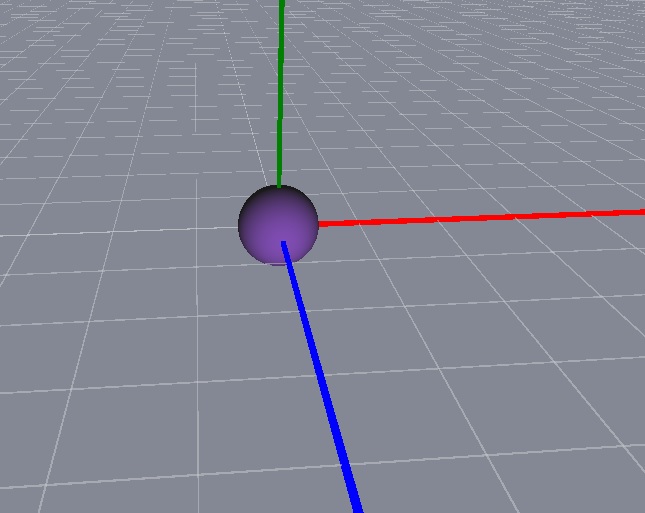
Die X-Achse ist rot, die Y-Achse ist grün und die Z-Achse ist blau.
Die hier gezeigte Beispielszene enthält eine Kugel an der Position (0, 0, 0) sowie ein „AxisHelper“-Objekt. Mit dem „ WasdController “-Helper lässt sich bequem durch die Szene navigieren.
View3D {
    anchors.fill: parent
    camera: camera

    PerspectiveCamera {
        id: camera
        position: Qt.vector3d(0, 0, 600)
    }

    DirectionalLight {
        position: Qt.vector3d(-500, 500, -100)
        color: Qt.rgba(0.4, 0.2, 0.6, 1.0)
        ambientColor: Qt.rgba(0.1, 0.1, 0.1, 1.0)
    }

    Model {
        source: "#Sphere"
        materials: [ PrincipledMaterial { } ]
    }

    AxisHelper {
    }
}

WasdController {
    controlledObject: camera
}
Dokumentation der Eigenschaften
enableAxisLines : bool [default: true]
Aktiviert die Anzeige der Achsenlinien.
enableXYGrid : bool [default: false]
Aktiviert das Raster auf der XY-Ebene.
enableXZGrid : bool
/default true Aktiviert das Raster auf der XZ-Ebene.
enableYZGrid : bool [default: false]
Aktiviert das Raster in der YZ-Ebene.
gridColor : color [default: Qt.rgba(0.8, 0.8, 0.8, 1)]
Legt die Farbe des Rasters fest.
gridOpacity : real [default: 0.5]
Legt die Deckkraft des Rasters fest.
© 2026 The Qt Company Ltd. Documentation contributions included herein are the copyrights of their respective owners. The documentation provided herein is licensed under the terms of the GNU Free Documentation License version 1.3 as published by the Free Software Foundation. Qt and respective logos are trademarks of The Qt Company Ltd. in Finland and/or other countries worldwide. All other trademarks are property of their respective owners.
