
QML-Videorekorder
Aufnahme von Audio und Video mit „ Qt Quick “.
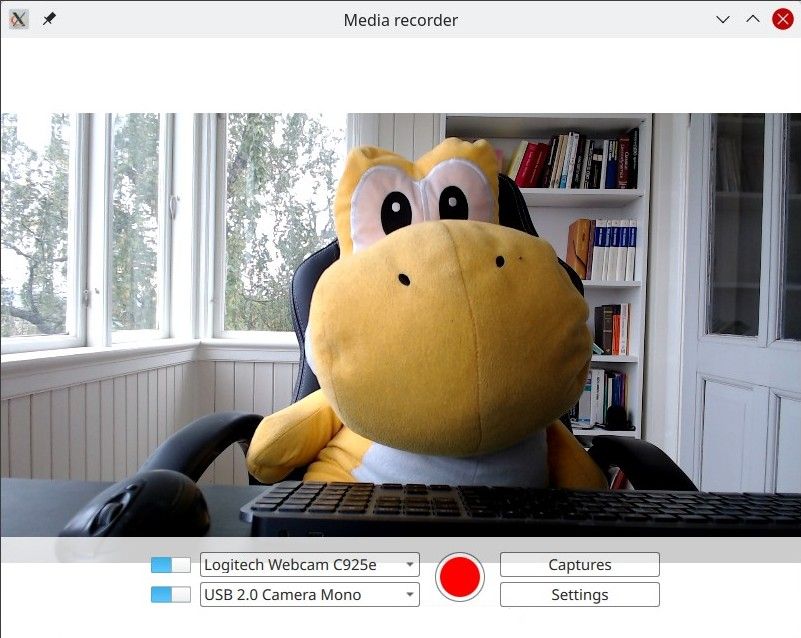
Der QML-Recorder demonstriert eine einfache Anwendung, die Audio und Video separat oder gemeinsam aufnehmen kann – über ein Mikrofon, eine Kamera oder per Bildschirmaufnahme.
Ausführen des Beispiels
Sie können das Beispiel wie folgt ausführen:
- Qt Creator
Öffnen Sie den Modus „ Welcome “ und wählen Sie das Beispiel unter „ Examples “ aus. Weitere Informationen finden Sie unter Qt Creator: Tutorial: Erstellen und Ausführen.
- Qt Extension for Visual Studio Code
Führen Sie den Befehl „ Qt: Open Qt examples “ über „ Command Palette “ aus und wählen Sie das Beispiel aus der Liste aus. Weitere Informationen finden Sie unter Qt Extension for Visual Studio Code: Tutorial: Erstellen und Ausführen.
Übersicht
Im Kern handelt es sich hierbei um eine QML-Anwendung, siehe „Erste Schritte mit Qt Quick -Anwendungen“. Diese Dokumentation konzentriert sich darauf, wie dieses Beispiel die Qt Multimedia QML Types.
Das Beispiel verwendet die QML-Typen „ Camera “ und „ AudioInput “, die mit einem „ CaptureSession “ verbunden sind. Ein „ MediaRecorder “-Objekt wird dann verwendet, um die erfassten Audio- und Videodaten aufzuzeichnen.
Zusätzlich zu „ QtMultimedia “ werden Funktionen von „ Qt Quick “, wie Fenster, Steuerelemente und Layouts, zur Implementierung der grafischen Benutzeroberfläche und der Funktionalität verwendet. Die Wiedergabe wird hier nicht behandelt; dazu siehe das QML-Media-Player-Beispiel.
Das Beispiel veranschaulicht Folgendes:
- Es können Eingabegeräte ausgewählt werden.
- Ein Eingabetyp kann deaktiviert werden.
- Einstellungen für die Aufnahme wie Qualität, Codec-Auswahl, Dateiformat und Zuweisung von Metadaten.
- Aufgezeichnete Dateien werden gespeichert und können wiedergegeben werden.
Aufzeichnung
Die Anwendung unterstützt die Aufnahme.
captureSession
In „ Main.qml “ ist „ captureSession “ wie folgt deklariert:
    CaptureSession {
        id: captureSession
        recorder: recorder
        audioInput: controls.audioInput
        camera: controls.camera
        screenCapture: controls.screenCapture
        windowCapture: controls.windowCapture
        videoOutput: videoOutput
    }
recorder
In „ Main.qml “ übernimmt das „ MediaRecorder “- recorder die Aufzeichnung von Medien sowie das Erstellen eines Vorschaubildes für die Datei und das Hinzufügen dieses Vorschaubildes zu einem „ListModel“, „ mediaList “.
    MediaRecorder {
        id: recorder
        onRecorderStateChanged:
            (state) => {
                if (state === MediaRecorder.StoppedState) {
                    root.contentOrientation = Qt.PrimaryOrientation
                    mediaList.append()
                } else if (state === MediaRecorder.RecordingState && captureSession.camera) {
                    // lock orientation while recording and create a preview image
                    root.contentOrientation = Screen.orientation;
                    videoOutput.grabToImage(function(res) { mediaList.mediaThumbnail = res.url })
                }
            }
        onActualLocationChanged: (url) => { mediaList.mediaUrl = url }
        onErrorOccurred: { recorderErrorText.text = recorder.errorString; recorderError.open(); }
    }
mediaList wird im „ Frame “ deklariert mediaListFrame
    Frame {
        id: mediaListFrame
        height: 150
        width: parent.width
        anchors.bottom: controlsFrame.top
        x: controls.capturesVisible ? 0 : parent.width
        background: Rectangle {
            anchors.fill: parent
            color: palette.base
            opacity: 0.8
        }

        Behavior on x { NumberAnimation { duration: 200 } }

        MediaList {
            id: mediaList
            anchors.fill: parent
            playback: playback
Steuerelemente
Diese sind in „ Controls.qml “ definiert und in „Main.qml“ deklariert.
Die Wurzel ist ein „ Row “, das die Elemente „ Columns “ inputControls, recordButton und optionButtons enthält, die jeweils in eigenen .qml-Dateien definiert sind.
Auswahl einer Videoquelle
„ VideoSourceSlect “ ist in „ VideoSourceSelect.qml “ definiert und besteht aus „ Switch “ sowie „ ComboBox “ und ermöglicht es dem Benutzer, aus den verfügbaren Kameras auszuwählen.
Row {
    id: root
    height: Style.height
    property Camera selectedCamera: cameraAvailable ? camera : null
    property ScreenCapture selectedScreenCapture: screenAvailable ? screenCapture : null
    property WindowCapture selectedWindowCapture: windowAvailable ? windowCapture : null

    property bool sourceAvailable: typeof comboBox.currentValue !== 'undefined' &&
                                   comboBox.currentValue.type !== 'toggler' &&
                                   videoSourceSwitch.checked

    property bool cameraAvailable: sourceAvailable && comboBox.currentValue.type === 'camera'
    property bool screenAvailable: sourceAvailable && comboBox.currentValue.type === 'screen'
    property bool windowAvailable: sourceAvailable && comboBox.currentValue.type === 'window'

    Component.onCompleted: {
        videoSourceModel.populate()

        for (var i = 0; i < videoSourceModel.count; i++) {
            if (videoSourceModel.get(i).value.type !== 'toggler') {
                comboBox.currentIndex = i
                break
            }
        }
    }

    Camera {
        id: camera
        active:
            root.cameraAvailable
            && PermissionHelper.cameraStatus === Qt.PermissionStatus.Granted
    }

    ScreenCapture {
        id: screenCapture
        active: root.screenAvailable
    }

    WindowCapture {
        id: windowCapture
        active: root.windowAvailable
    }

    MediaDevices { id: mediaDevices
        onVideoInputsChanged: {

            videoSourceModel.populate()

            for (var i = 0; i < videoSourceModel.count; i++) {
                if (videoSourceModel.get(i).value.type !== 'toggler') {
                    comboBox.currentIndex = i
                    break
                }
            }
        }
    }

    Switch {
        id: videoSourceSwitch
        anchors.verticalCenter: parent.verticalCenter
        checked: true
    }

    ListModel {
        id: videoSourceModel
        property var enabledSources: {
            'camera': true,
            'screen': true,
            'window': false
        }

        function toggleEnabledSource(type) {
            enabledSources[type] = !enabledSources[type]
            populate()
        }

        function appendItem(text, value) {
            append({ text: text, value: value})
        }

        function appendToggler(name, sourceType) {
            appendItem((enabledSources[sourceType] ? "- Hide " : "+ Show ") + name,
                       { type: 'toggler', 'sourceType': sourceType })
        }

        function populate() {
            clear()

            appendToggler('Cameras', 'camera')
            if (enabledSources['camera'])
                for (var camera of mediaDevices.videoInputs)
                    appendItem(camera.description, { type: 'camera', camera: camera })

            appendToggler('Screens', 'screen')
            if (enabledSources['screen'])
                for (var screen of Application.screens)
                    appendItem(screen.name, { type: 'screen', screen: screen })

            appendToggler('Windows', 'window')
            if (enabledSources['window'])
                for (var window of windowCapture.capturableWindows())
                    appendItem(window.description, { type: 'window', window: window })
        }
}comboBox, das im obigen Ausschnitt deklariert ist, weist die aktuelle Videoquelle zu.
    ComboBox {
        id: comboBox
        width: Style.widthLong
        height: Style.height
        background: StyleRectangle { anchors.fill: parent }
        model: videoSourceModel
        displayText: typeof currentValue === 'undefined' ||
                     currentValue.type === 'toggler' ? "Unavailable" : currentText
        font.pointSize: Style.fontSize
        textRole: "text"
        valueRole: "value"
        onCurrentValueChanged: {
            if (typeof currentValue === 'undefined')
                return
            if (currentValue.type === 'screen')
                screenCapture.screen = currentValue.screen
            else if (currentValue.type === 'camera')
                camera.cameraDevice = currentValue.camera
Auswahl eines Audioeingangs
Wird auf dieselbe Weise wie die Auswahl einer Videoquelle implementiert und in AudioInputSelect.qml wie folgt definiert:
Row {
    id: root
    height: Style.height
    property AudioInput selected: available ? audioInput : null
    property bool available: (typeof comboBox.currentValue !== 'undefined') && audioSwitch.checked

    Component.onCompleted: {
        audioInputModel.populate()
        comboBox.currentIndex = 0
    }

    MediaDevices { id: mediaDevices }

    AudioInput { id: audioInput; muted: !audioSwitch.checked }

    Switch {
        id: audioSwitch;
        height: Style.height;
        checked: true
    }

    ListModel {
        id: audioInputModel
        property var audioInputs: mediaDevices.audioInputs

        function populate() {
            audioInputModel.clear()

            for (var audioDevice of audioInputs)
                audioInputModel.append({ text: audioDevice.description, value:
                                        { type: 'audioDevice', audioDevice: audioDevice } })
        }
    }
    ComboBox {
        id: comboBox
        width: Style.widthLong
        height: Style.height
        background: StyleRectangle { anchors.fill: parent }
        model: audioInputModel
        textRole: "text"
        font.pointSize: Style.fontSize
        displayText: typeof currentValue === 'undefined' ? "unavailable" : currentText
valueRole: "value"© 2026 The Qt Company Ltd. Documentation contributions included herein are the copyrights of their respective owners. The documentation provided herein is licensed under the terms of the GNU Free Documentation License version 1.3 as published by the Free Software Foundation. Qt and respective logos are trademarks of The Qt Company Ltd. in Finland and/or other countries worldwide. All other trademarks are property of their respective owners.
