
Qt Quick 3D - Beispiel für prozedurale Texturen
Veranschaulicht, wie benutzerdefinierte Texturdaten aus C++ oder QML bereitgestellt werden können.
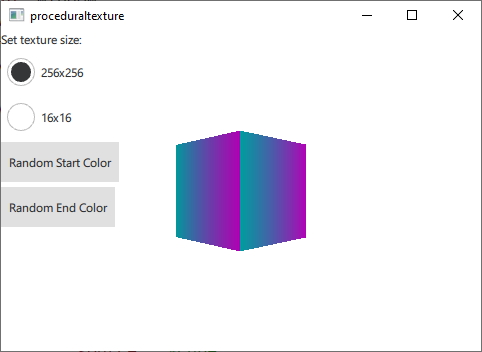
Hier werden verschiedene Möglichkeiten gezeigt, wie Texturdaten, die zur Laufzeit dynamisch generiert werden, bereitgestellt werden können, anstatt sie aus einem statischen Asset zu laden. Zu Demonstrationszwecken generiert dieses Beispiel vertikale Farbverlaufstexturen aus vorgegebenen Start- und Endfarben.
Zunächst definieren wir eine C++-Klasse für unsere Texturdaten. Wir machen sie zu einer Unterklasse von ` QQuick3DTextureData`. Dies ist zwar nicht zwingend erforderlich, da keine virtuellen Funktionen vorhanden sind, aber es ist wesentlich praktischer, alles in einer Klasse zu haben. Wir definieren die Eigenschaften, die wir verwenden werden, und fügen ` QML_NAMED_ELEMENT ` hinzu, um sie in QML verfügbar zu machen:
class GradientTexture : public QQuick3DTextureData
{
    Q_OBJECT
    Q_PROPERTY(int height READ height WRITE setHeight NOTIFY heightChanged)
    Q_PROPERTY(int width READ width WRITE setWidth NOTIFY widthChanged)
    Q_PROPERTY(QColor startColor READ startColor WRITE setStartColor NOTIFY startColorChanged)
    Q_PROPERTY(QColor endColor READ endColor WRITE setEndColor NOTIFY endColorChanged)
    QML_NAMED_ELEMENT(GradientTexture)
    ...
Wir fügen eine Funktion zum Aktualisieren der Textur hinzu. Sie verwendet `setSize` und `setFormat`, um die Textur zu konfigurieren, sowie `setTextureData`, um die Bilddaten festzulegen:
void GradientTexture::updateTexture()
{
    setSize(QSize(m_width, m_height));
    setFormat(QQuick3DTextureData::RGBA8);
    setHasTransparency(false);
    setTextureData(generateTexture());
}
Die Funktion „ generateTexture “ erstellt ein „ QByteArray “ in der richtigen Größe und füllt es mit Bilddaten:
QByteArray GradientTexture::generateTexture()
{
    QByteArray imageData;
    // Create a horizontal gradient between startColor and endColor

    // Create a single scanline and reuse that data for each
    QByteArray gradientScanline;
    gradientScanline.resize(m_width * 4); // RGBA8

    for (int x = 0; x < m_width; ++x) {
        QColor color = linearInterpolate(m_startColor, m_endColor, x / float(m_width));
        int offset = x * 4;
        gradientScanline.data()[offset + 0] = char(color.red());
        gradientScanline.data()[offset + 1] = char(color.green());
        gradientScanline.data()[offset + 2] = char(color.blue());
        gradientScanline.data()[offset + 3] = char(255);
    }

    for (int y = 0; y < m_height; ++y)
        imageData += gradientScanline;

    return imageData;
}
Wir rufen „ updateTexture “ jedes Mal auf, wenn eine Eigenschaft geändert wird:
void GradientTexture::setStartColor(QColor startColor)
{
    if (m_startColor == startColor)
        return;

    m_startColor = startColor;
    emit startColorChanged(m_startColor);
    updateTexture();
}
Schließlich können wir unsere neue Textur in QML verwenden:
Texture {
    id: textureFromCpp

    minFilter: applicationState.filterMode
    magFilter: applicationState.filterMode
    textureData: gradientTexture

    GradientTexture {
        id: gradientTexture
        startColor: applicationState.startColor
        endColor: applicationState.endColor
        width: applicationState.size
        height: width
    }
}
Es ist auch möglich, dieselben Texturdaten in QML zu generieren. In diesem Fall verwenden wir die Komponente „ ProceduralTextureData “:
Texture {
    id: textureFromQML
    minFilter: applicationState.filterMode
    magFilter: applicationState.filterMode
    textureData: gradientTextureDataQML

    ProceduralTextureData {
        id: gradientTextureDataQML

        property color startColor: applicationState.startColor
        property color endColor: applicationState.endColor
        width: applicationState.size
        height: width
        textureData: generateTextureData()

        function linearInterpolate(startColor : color, endColor : color, fraction : real) : color{
            return Qt.rgba(
                        startColor.r + (endColor.r - startColor.r) * fraction,
                        startColor.g + (endColor.g - startColor.g) * fraction,
                        startColor.b + (endColor.b - startColor.b) * fraction,
                        startColor.a + (endColor.a - startColor.a) * fraction
                        );
        }

        function generateTextureData() {
            let dataBuffer = new ArrayBuffer(width * height * 4)
            let data = new Uint8Array(dataBuffer)

            let gradientScanline = new Uint8Array(width * 4);

            for (let x = 0; x < width; ++x) {
                let color = linearInterpolate(startColor, endColor, x / width);
                let offset = x * 4;
                gradientScanline[offset + 0] = color.r * 255;
                gradientScanline[offset + 1] = color.g * 255;
                gradientScanline[offset + 2] = color.b * 255;
                gradientScanline[offset + 3] = color.a * 255;
            }

            for (let y = 0; y < height; ++y) {
                data.set(gradientScanline, y * width * 4);
            }

            return dataBuffer;
        }
    }
}
Genau wie in C++ füllen wir einen ` QByteArray ` mit Bilddaten, die der Größe und dem Format der Textur entsprechen. Wenn Sie dies in QML tun, verwenden Sie den Typ `ArrayBuffer`, um unnötige Typkonvertierungen zu vermeiden.
Bei den beiden vorangegangenen Beispielen werden alle Daten für die Textur auf der CPU-Seite generiert und anschließend zur Verwendung als Texturdaten auf die GPU übertragen. Es ist auch möglich, die Texturdaten direkt auf der GPU zu generieren. In diesem Fall verwenden wir stattdessen eine Unterklasse von ` QQuick3DTextureProviderExtension `.
class GradientTextureProvider : public QQuick3DTextureProviderExtension
{
    Q_OBJECT
    Q_PROPERTY(int height READ height WRITE setHeight NOTIFY heightChanged)
    Q_PROPERTY(int width READ width WRITE setWidth NOTIFY widthChanged)
    Q_PROPERTY(QColor startColor READ startColor WRITE setStartColor NOTIFY startColorChanged)
    Q_PROPERTY(QColor endColor READ endColor WRITE setEndColor NOTIFY endColorChanged)
    QML_ELEMENT
QQuick3DTextureProviderExtension Auf „ QSSGRenderExtension “ basierende Klassen definieren Render-Erweiterungen mithilfe der Qt-RHI-API. Die Unterklasse muss beim Aufruf von ` QQuick3DTextureProviderExtension::updateSpatialNode()` ein auf „ “ basierendes Objekt zurückgeben.
QSSGRenderGraphObject *GradientTextureProvider::updateSpatialNode(QSSGRenderGraphObject *node)
{
    if (!node)
        node = new GradientTextureProviderNode(this);

    // Update the state of the backend node
    auto gradientNode = static_cast<GradientTextureProviderNode *>(node);
    gradientNode->m_isDirty = true;
    gradientNode->m_width = m_width;
    gradientNode->m_height = m_height;
    gradientNode->m_startColor = m_startColor;
    gradientNode->m_endColor = m_endColor;

    return node;
}
Was tatsächlich gerendert wird, wird durch diese Unterklasse von ` QSSGRenderExtension ` definiert:
class GradientTextureProviderNode : public QSSGRenderTextureProviderExtension
{
public:
    explicit GradientTextureProviderNode(GradientTextureProvider *ext);
    ~GradientTextureProviderNode() override;
    bool prepareData(QSSGFrameData &data) override;
    void prepareRender(QSSGFrameData &data) override;
    void render(QSSGFrameData &data) override;
    void resetForFrame() override;

    bool m_isDirty = false;

    // state
    int m_width = 256;
    int m_height = 256;
    QColor m_startColor = QColor(Qt::red);
    QColor m_endColor = QColor(Qt::blue);

private:

    QPointer<GradientTextureProvider> m_ext;
    QSSGExtensionId extensionId {};

    std::unique_ptr<QRhiBuffer> quadGeometryVertexBuffer;
    std::unique_ptr<QRhiBuffer> quadGeometryIndexBuffer;

    //
    std::unique_ptr<QRhiTexture> outputTexture; // the final output texture
    std::unique_ptr<QRhiTextureRenderTarget> outputTextureRenderTarget;
    std::unique_ptr<QRhiRenderPassDescriptor> ouputTextureRenderPassDescriptor;

    std::unique_ptr<QRhiBuffer> gradientTextureUniformBuffer;
    std::unique_ptr<QRhiShaderResourceBindings> gradientTextureShaderResouceBindings;
    std::unique_ptr<QRhiGraphicsPipeline> gradientTexture2dPipeline;
};
Durch die Implementierung der Schnittstellen von ` QSSGRenderExtension` kann die Erweiterung die Texturdaten direkt auf der GPU rendern. Die Implementierung von `prepareDate` stellt sicher, dass die Ausgabetextur mit der richtigen Größe und dem richtigen Format erstellt wird, und registriert die Ausgabetextur als die bereitzustellende Textur.
bool GradientTextureProviderNode::prepareData(QSSGFrameData &data)
{
    if (!m_isDirty)
        return false;

    const auto &ctxIfx = data.contextInterface();
    const auto &rhiCtx = ctxIfx->rhiContext();
    QRhi *rhi = rhiCtx->rhi();

    // If there is no available rhi context, then we can't create the texture
    if (!rhiCtx)
        return false;

    extensionId = m_ext ? QQuick3DExtensionHelpers::getExtensionId(*m_ext) : QSSGExtensionId{};
    if (QQuick3DExtensionHelpers::isNull(extensionId))
        return false;

    // Make sure that the output texture is created and registered as the texture provider
    if (!outputTexture ||
        outputTexture->pixelSize().width() != m_width ||
        outputTexture->pixelSize().height() != m_height) {
        outputTexture.reset(rhi->newTexture(QRhiTexture::Format::RGBA8, QSize(m_width, m_height), 1, QRhiTexture::RenderTarget | QRhiTexture::sRGB));
        outputTexture->create();

        outputTextureRenderTarget.reset(rhi->newTextureRenderTarget({ outputTexture.get() }));
        ouputTextureRenderPassDescriptor.reset(outputTextureRenderTarget->newCompatibleRenderPassDescriptor());
        outputTextureRenderTarget->setRenderPassDescriptor(ouputTextureRenderPassDescriptor.get());
        outputTextureRenderTarget->create();

        // Register the output as the texture provider
        QSSGRenderExtensionHelpers::registerRenderResult(data, extensionId, outputTexture.get());

        gradientTexture2dPipeline.reset();
    }

    // If m_isDirty is true than prepareRender and render will actually get called.
    return m_isDirty;
}
In der Methode „prepareRender“ werden die Pipelines erstellt und die Uniform-Puffer aktualisiert.
void GradientTextureProviderNode::prepareRender(QSSGFrameData &data)
{
    const auto &ctxIfx = data.contextInterface();
    const auto &rhiCtx = ctxIfx->rhiContext();
    if (!rhiCtx)
        return;

    QRhi *rhi = rhiCtx->rhi();
    QRhiCommandBuffer *cb = rhiCtx->commandBuffer();
    QRhiResourceUpdateBatch *resourceUpdates = rhi->nextResourceUpdateBatch();

    // Create the pipeline if necessary
    if (!gradientTexture2dPipeline) {
        // 1 quad (2 trianges), pos + uv.  4 vertices, 5 values each (x, y, z, u, v)
        quadGeometryVertexBuffer.reset(rhi->newBuffer(QRhiBuffer::Immutable, QRhiBuffer::VertexBuffer, 5 * 4 * sizeof(float)));
        quadGeometryVertexBuffer->create();

        // 6 indexes (2 triangles)
        quadGeometryIndexBuffer.reset(rhi->newBuffer(QRhiBuffer::Immutable, QRhiBuffer::IndexBuffer, 6 * sizeof(uint16_t)));
        quadGeometryIndexBuffer->create();

        // Uniform buffer: packed into 2 * vec4 (2 RGBA colors)
        const size_t uBufSize = (sizeof(float) * 4) * 2;
        gradientTextureUniformBuffer.reset(rhi->newBuffer(QRhiBuffer::Dynamic, QRhiBuffer::UniformBuffer, uBufSize));
        gradientTextureUniformBuffer->create();

        // Uniform buffer is only bound/used in Fragment Shader
        gradientTextureShaderResouceBindings.reset(rhi->newShaderResourceBindings());
        gradientTextureShaderResouceBindings->setBindings({
                QRhiShaderResourceBinding::uniformBuffer(0, QRhiShaderResourceBinding::FragmentStage, gradientTextureUniformBuffer.get()),
        });
        gradientTextureShaderResouceBindings->create();

        gradientTexture2dPipeline.reset(rhi->newGraphicsPipeline());
        gradientTexture2dPipeline->setShaderStages({
                { QRhiShaderStage::Vertex, getShader(QLatin1String(":/shaders/gradient.vert.qsb")) },
                { QRhiShaderStage::Fragment, getShader(QLatin1String(":/shaders/gradient.frag.qsb")) }
        });
        // 2 Attributes, Position (vec3) + UV (vec2)
        QRhiVertexInputLayout inputLayout;
        inputLayout.setBindings({
                { 5 * sizeof(float) }
        });
        inputLayout.setAttributes({
                { 0, 0, QRhiVertexInputAttribute::Float3, 0 },
                { 0, 1, QRhiVertexInputAttribute::Float2, 3 * sizeof(float) }
        });
        gradientTexture2dPipeline->setVertexInputLayout(inputLayout);
        gradientTexture2dPipeline->setShaderResourceBindings(gradientTextureShaderResouceBindings.get());
        gradientTexture2dPipeline->setRenderPassDescriptor(ouputTextureRenderPassDescriptor.get());
        gradientTexture2dPipeline->create();

        // Upload the static quad geometry part
        resourceUpdates->uploadStaticBuffer(quadGeometryVertexBuffer.get(), g_vertexData);
        resourceUpdates->uploadStaticBuffer(quadGeometryIndexBuffer.get(), g_indexData);
    }

    // Upload the uniform buffer data
    const float colorData[8] = {
        m_startColor.redF(), m_startColor.greenF(), m_startColor.blueF(), m_startColor.alphaF(),
        m_endColor.redF(), m_endColor.greenF(), m_endColor.blueF(), m_endColor.alphaF()
    };
    resourceUpdates->updateDynamicBuffer(gradientTextureUniformBuffer.get(), 0, sizeof(colorData), colorData);

    cb->resourceUpdate(resourceUpdates);
    m_isDirty = false;
}
Die eigentliche Darstellung für den Durchgang wird in der Render-Funktion definiert.
void GradientTextureProviderNode::render(QSSGFrameData &data)
{
    const auto &ctxIfx = data.contextInterface();
    const auto &rhiCtx = ctxIfx->rhiContext();
    if (!rhiCtx)
        return;

    QRhiCommandBuffer *cb = rhiCtx->commandBuffer();

    // Render the quad with our pipeline to the outputTexture
    cb->beginPass(outputTextureRenderTarget.get(), Qt::black, { 1.0f, 0 }, nullptr, rhiCtx->commonPassFlags());
    cb->setViewport(QRhiViewport(0, 0, m_width, m_height));
    cb->setGraphicsPipeline(gradientTexture2dPipeline.get());
    cb->setShaderResources(gradientTextureShaderResouceBindings.get());
    QRhiCommandBuffer::VertexInput vb(quadGeometryVertexBuffer.get(), 0);
    cb->setVertexInput(0, 1, &vb, quadGeometryIndexBuffer.get(), QRhiCommandBuffer::IndexFormat::IndexUInt16);
    cb->drawIndexed(6);
    cb->endPass();
}
Das Beispiel nutzt den Textur-Provider in QML wie folgt:
Texture {
    id: textureFromGPU
    minFilter: applicationState.filterMode
    magFilter: applicationState.filterMode
    textureProvider: GradientTextureProvider {
        startColor: applicationState.startColor
        endColor: applicationState.endColor
        width: applicationState.size
        height: width
    }
}© 2026 The Qt Company Ltd. Documentation contributions included herein are the copyrights of their respective owners. The documentation provided herein is licensed under the terms of the GNU Free Documentation License version 1.3 as published by the Free Software Foundation. Qt and respective logos are trademarks of The Qt Company Ltd. in Finland and/or other countries worldwide. All other trademarks are property of their respective owners.
