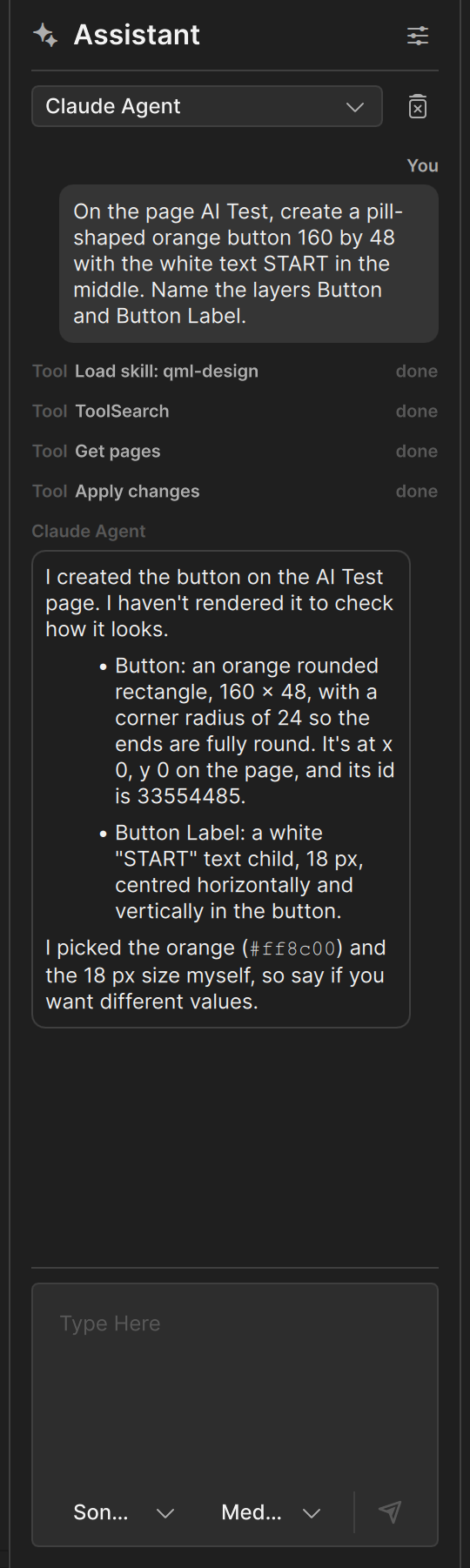
The AI Assistant
The AI Assistant is a chat panel inside Clate. Describe what you want in your own words, and the assistant reads and changes the design you have open.
For now, the built-in assistant works with Claude Agent. We plan to support other vendors in the near future. Any model or tool that supports MCP can already use Clate's MCP server. See Connect an AI tool.
What it does
The assistant works with your open project through the same tools you can reach over MCP. It can:
- look at the pages, layers, and objects of your project and tell you what is there
- create and change objects, for example "change the fill of the card to dark blue"
- work with image assets
- look at the rendered result of an object to check its own work
The assistant makes its changes in your project right away. You see them on the canvas, and every change it
makes in one step is one step in the undo history, so Ctrl + Z takes it back. See
What an AI can do for the details and limits.

What you need
- An open project. The assistant works on the project you have open.
- A Claude account. Clate does not include one. You use your own Claude account, and charges from Anthropic may apply.
- An internet connection. Clate downloads Claude Agent and its components when you set the assistant up, and Claude Agent needs access to Anthropic when you chat.
- The MCP server turned on, which is the default. See The MCP server.
Clate includes everything else it needs to run Claude Agent.
Open the assistant
Click the AI Assistant button (a sparkle icon) in the toolbar, or choose View › Show AI Assistant in the main menu. The panel opens next to the property editor. The first time, it opens the setup. See Set up the assistant.
How it works
You type a request in the panel. Clate passes it to Claude Agent, together with a short instruction that tells the agent to work on your open project. The agent reads your design through Clate's design tools, makes the changes you asked for, and answers in the chat. You can watch each step: the chat shows a line for every tool the assistant uses.