Privacy and your data
When you use the assistant, Clate sends parts of your project to Anthropic, the provider of Claude Agent. This page explains what Clate sends, and what stays on your computer.
What Clate sends
- Your request. Clate sends the text you type to the service, together with a short instruction that tells the assistant to work on your open project through Clate's design tools.
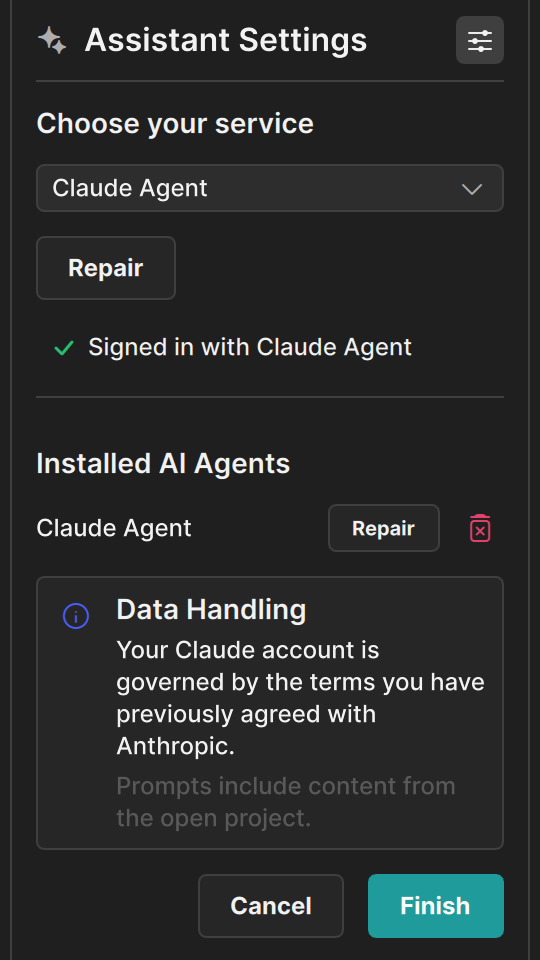
- Parts of your project. To answer, the assistant reads your project through the design tools. This can include the names of pages and layers, the settings of objects, the text in your design, the names of assets, and rendered pictures of objects and images. Clate shows a reminder in the assistant settings: Prompts include content from the open project.
The service passes this to its provider, Anthropic for Claude Agent. The provider's own terms apply, the ones you agreed to with your account.
What stays with you
- Your sign-in. You sign in in the provider's own tool. Clate never receives your credentials.
- Your project file. The project stays on your computer. The assistant reads and changes it through Clate.
- Your conversation history. The service keeps your conversation. Click the trash button and confirm Clear Session? to start a new one.
The MCP server is local
The assistant reaches your project through the MCP server, which runs inside Clate and only accepts connections from your own computer. You can turn it off at any time on the Welcome page, in the Clate menu under Settings › Enable MCP Server, and the assistant then has no access to your project. See The MCP server.
Before you use the assistant
- Use the assistant only with projects you are allowed to share with your provider.
- Read the terms of your provider. Clate shows the line Your Claude account is governed by the terms you have previously agreed with Anthropic for Claude Agent.