The MCP server
The MCP server is a small server inside Clate that lets AI tools read and edit the project you have open. The built-in AI Assistant uses it automatically, and you can connect other AI tools too.
What it is
MCP, the Model Context Protocol, is a standard way for AI tools to use other applications. Clate's MCP server gives an AI the same view of your design that you have, and a fixed set of tools to change it. The server itself offers only these design tools. See What an AI can do.
Turn it on and off
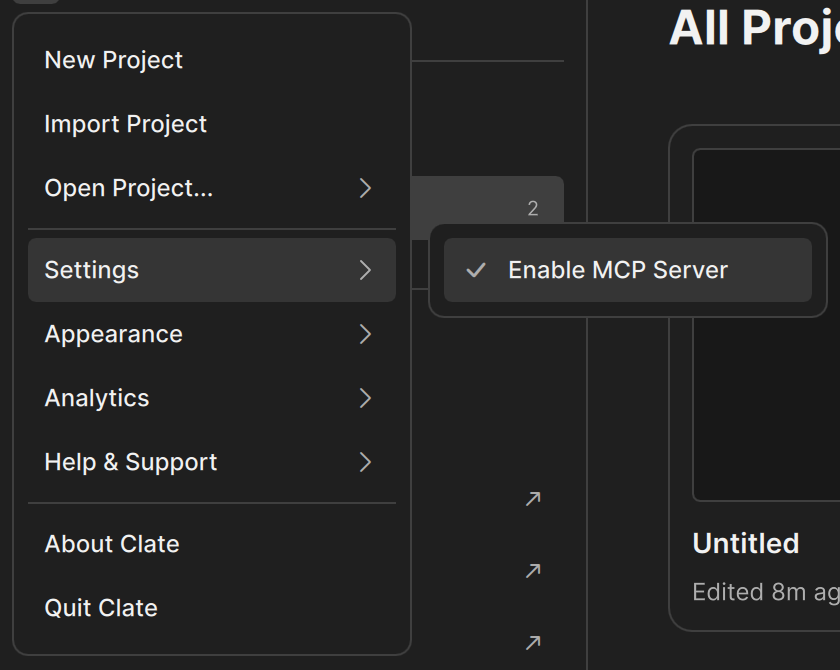
The server is on by default. You switch it on and off on the Welcome page:
- Go to the Welcome page. Click the home tab, or choose Back to Projects in the main menu.
- Click the Clate button in the sidebar to open the menu, and choose Settings.
- Select or clear Enable MCP Server. A check mark means that the server is on.
If you select Enable MCP Server and Clate cannot start the server, a message tells you that another application may be holding the ports. Close that application and enable the server again.
When the server is off, the AI Assistant has no access to your project.
The port
The server tries port 26700 first. If that port is busy, it tries the next ports, up to 26719. Clate does not show the port in its menus. If an AI tool cannot connect on port 26700, try the next ports up to 26719.
Who can connect
The server only accepts connections from your own computer. You do not need to open any ports in a firewall. A program on another computer cannot connect.
The built-in AI Assistant finds the server by itself. For other AI tools, see Connect an AI tool.
Troubleshooting
| Problem | What to do |
|---|---|
| An AI tool cannot connect and the server may be off | Check that Enable MCP Server is selected in the Settings menu on the Welcome page. |
| A message says that the MCP server could not start because no usable port was found | Close the program that uses the ports 26700 to 26719, then enable the server again. |
| An AI tool cannot connect | Use port 26700 in the tool's setting. If that does not work, try the next ports up to 26719. |
| An AI tool says no project is open | Open a project in Clate. The tools need an open project. |