
Qt Quick 3D - Beispiel für räumliche Anker in XR
Veranschaulicht die Verwendung von räumlichen Ankerpunkten in „ Qt Quick 3D “ XR.
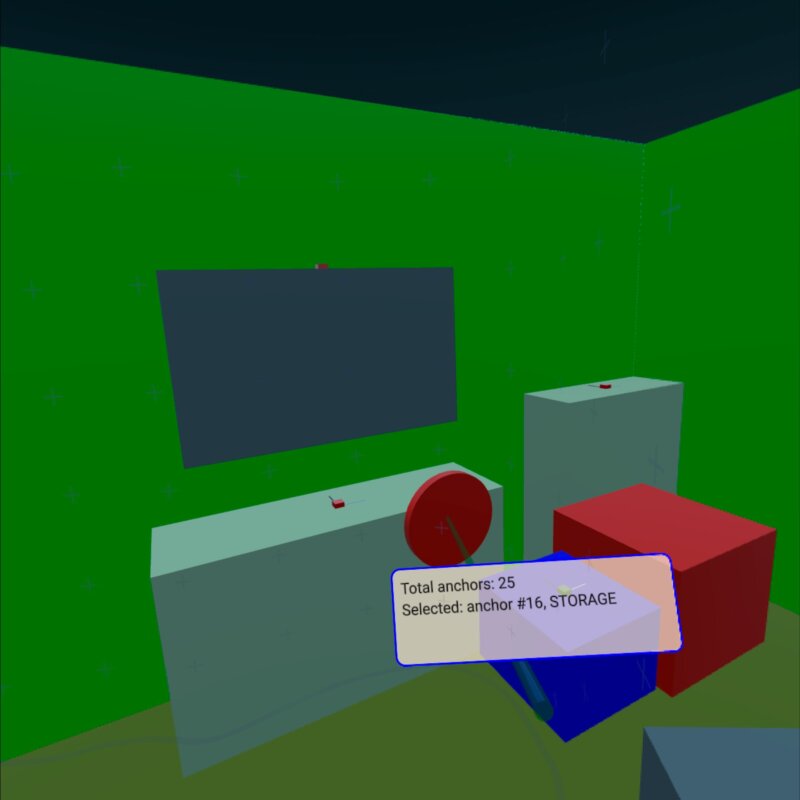
Dieses Beispiel zeigt, wie man mit „ XrSpatialAnchorListModel “ reale physische Objekte in der Umgebung anzeigt und mit ihnen interagiert. Es unterstützt sowohl den Passthrough-Modus als auch den vollständig immersiven Modus. Die Grundstruktur orientiert sich am Beispiel „xr_simple “.
Der wichtigste Teil des Beispiels ist ein „ Repeater3D “ auf einem „ XrSpatialAnchorListModel “. Für jeden Anker erstellen wir einen Kasten, der das Volumen des Ankers mit einer Farbe ausfüllt. Die Wahl der Farbe hängt von der Klassifizierung des Ankers ab. Dieser Kasten ist im Passthrough-Modus unsichtbar. Zusätzlich visualisieren wir die Position und Ausrichtung des Ankers mit kleinen Kästchen:
Repeater3D {
    id: spatialAnchors
    model: XrSpatialAnchorListModel {

    }
    delegate: Node {
        id: anchorNode
        required property XrSpatialAnchor anchor
        required property int index
        position: anchor.position
        rotation: anchor.rotation

        Model {
            pickable: true
            z: anchorNode.anchor.has3DBounds ? anchorNode.anchor.offset3D.z / 2 * 100 : 0 // Position is center of 2D surface also for 3D anchors
            scale: anchorNode.anchor.has3DBounds ? anchorNode.anchor.extent3D : Qt.vector3d(anchorNode.anchor.extent2D.x, anchorNode.anchor.extent2D.y, 0.01)
            materials: PrincipledMaterial {
                // Make anchor objects invisible in passthrough mode
                baseColor: xrView.passthroughEnabled ? Qt.rgba(0, 0, 0, 0) : anchorColor(anchor)
                alphaMode: xrView.passthroughEnabled ? PrincipledMaterial.Blend : PrincipledMaterial.Opaque
                roughness: 0.7
            }
            source: anchorNode.anchor.has3DBounds ? "#Cube" : "#Rectangle"
            property string anchorInfo: "anchor #" + anchorNode.index + ", " + anchorNode.anchor.classificationString
        }

        Model {
            // Visualize anchor orientation
            materials: PrincipledMaterial {
                baseColor: anchorNode.anchor.has3DBounds ? anchorNode.anchor.has2DBounds ? "green" : "red" : "blue"
            }
            scale: Qt.vector3d(0.05, 0.05, 0.05)
            source: "#Cube"

            Model {
                materials: PrincipledMaterial {
                    baseColor: "black"
                }
                scale: Qt.vector3d(0.1, 3, 0.1)
                source: "#Cube"
                y: 150
            }
            Model {
                materials: PrincipledMaterial {
                    baseColor: "white"
                }
                scale: Qt.vector3d(3, 0.1, 0.1)
                source: "#Cube"
                x: 150
            }
        }
        visible: anchor.has2DBounds || anchor.has3DBounds
    }
}
Der Rahmen für den Anker ist ankllickbar und verfügt über eine String-Eigenschaft „ anchorInfo “, die den classificationString des Ankers enthält. Anschließend führen wir die Auswahl basierend auf der Position des Controllers durch. (Einzelheiten finden Sie im Beispiel „xr_input “.) Wenn wir einen der Ankerrahmen berühren, zeigen wir eine Beschriftung mit den Ankerinformationen an:
Node {
    id: labelNode
    position: rightController.position
    rotation: rightController.rotation

    property int numAnchors: spatialAnchors.count
    property string anchorInfo: "(no anchor)"

    Node {
        y: 15
        x: -15
        scale: Qt.vector3d(0.1, 0.1, 0.1)
        Rectangle {
            width: 300
            height: 100
            color: Qt.rgba(1,0.9,0.8,0.7)
            radius: 10
            border.width: 2
            border.color: "blue"
            Text {
                anchors.fill: parent
                anchors.margins: 10
                textFormat: Text.StyledText
                text: "Total anchors: " + labelNode.numAnchors + "<br>" + "Selected: " + labelNode.anchorInfo + "<br>" + "Press A to Capture/Update anchors"
            }
        }
    }
}© 2026 The Qt Company Ltd. Documentation contributions included herein are the copyrights of their respective owners. The documentation provided herein is licensed under the terms of the GNU Free Documentation License version 1.3 as published by the Free Software Foundation. Qt and respective logos are trademarks of The Qt Company Ltd. in Finland and/or other countries worldwide. All other trademarks are property of their respective owners.
