
Qt Quick Beispiele – Drag & Drop
Dies ist eine Sammlung von QML-Beispielen zum Thema Drag & Drop.
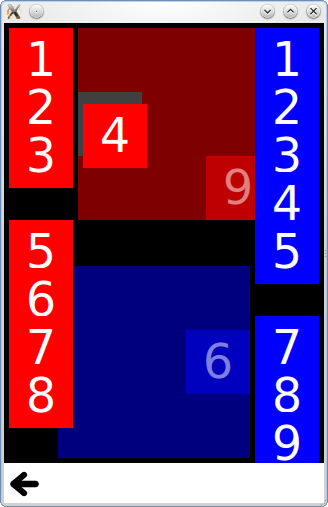
„Drag & Drop“ ist eine Sammlung kleiner QML-Beispiele zur Drag-&-Drop-Funktionalität. Weitere Informationen finden Sie auf der Seite „Drag & Drop “.
Ausführen des Beispiels
Sie können das Beispiel wie folgt ausführen:
- Qt Creator
Öffnen Sie den Modus „ Welcome “ und wählen Sie das Beispiel unter „ Examples “ aus. Weitere Informationen finden Sie unter Qt Creator: Tutorial: Erstellen und Ausführen.
- Qt Extension for Visual Studio Code
Führen Sie den Befehl „ Qt: Open Qt examples “ über „ Command Palette “ aus und wählen Sie das Beispiel aus der Liste aus. Weitere Informationen finden Sie unter Qt Extension for Visual Studio Code: Tutorial: Erstellen und Ausführen.
Kacheln
„Tiles“ erweitert einfache Rechtecke um Drag-and-Drop-Funktionen, sodass Sie diese in ein bestimmtes Raster ziehen können.
Es verfügt über eine „DragTile“-Komponente, die mithilfe eines „ MouseArea “ ein Element beim Ziehen verschiebt:
Item {
    id: root

    required property string colorKey
    required property int modelData

    width: 64
    height: 64

    MouseArea {
        id: mouseArea

        width: 64
        height: 64
        anchors.centerIn: parent

        drag.target: tile

        onReleased: parent = tile.Drag.target !== null ? tile.Drag.target : root

        Rectangle {
            id: tile

            width: 64
            height: 64
            anchors {
                verticalCenter: parent.verticalCenter
                horizontalCenter: parent.horizontalCenter
            }

            color: root.colorKey

            Drag.keys: [ root.colorKey ]
            Drag.active: mouseArea.drag.active
            Drag.hotSpot.x: 32
            Drag.hotSpot.y: 32
            states: State {
                when: mouseArea.drag.active
                AnchorChanges {
                    target: tile
                    anchors {
                        verticalCenter: undefined
                        horizontalCenter: undefined
                    }
                }
            }
        }
    }
}
sowie eine „DropTile“-Komponente, auf der die gezogenen Kacheln abgelegt werden können:
DropArea {
    id: dragTarget

    property string colorKey

    width: 64
    height: 64
    keys: [ colorKey ]

    Rectangle {
        id: dropRectangle

        anchors.fill: parent
        color: dragTarget.containsDrag ? "grey" : dragTarget.colorKey
    }
}
Die Eigenschaft „keys“ des „ DropArea “ lässt das Ablegen eines Elements nur dann zu, wenn dessen „Drag.keys“-Eigenschaft einen passenden Schlüssel enthält.
GridView-Beispiel
Das „GridView “-Beispiel erweitert eine „ GridView “ um Drag-and-Drop-Funktionalität, sodass Sie die Delegaten visuell neu anordnen können, ohne die zugrunde liegende „ ListModel “ zu ändern. Es verwendet eine „ DelegateModel “, um ein Delegat-Element an die Position eines anderen Elements zu verschieben, über das es gezogen wird.
    model: DelegateModel {
        delegate: DropArea {
            id: delegateRoot
            required property color color

            width: 80
            height: 80

            onEntered: function(drag) {
                visualModel.items.move((drag.source as Icon).visualIndex, icon.visualIndex)
            }

            property int visualIndex: DelegateModel.itemsIndex

            Icon {
                id: icon
                dragParent: root
                visualIndex: delegateRoot.visualIndex
                color: delegateRoot.color
            }
}© 2026 The Qt Company Ltd. Documentation contributions included herein are the copyrights of their respective owners. The documentation provided herein is licensed under the terms of the GNU Free Documentation License version 1.3 as published by the Free Software Foundation. Qt and respective logos are trademarks of The Qt Company Ltd. in Finland and/or other countries worldwide. All other trademarks are property of their respective owners.
