
Qt Quick 3D - HelloCube-Beispiel
Veranschaulicht, wie 2D- und 3D-Objekte gemeinsam in „ Qt Quick 3D “ gerendert werden.
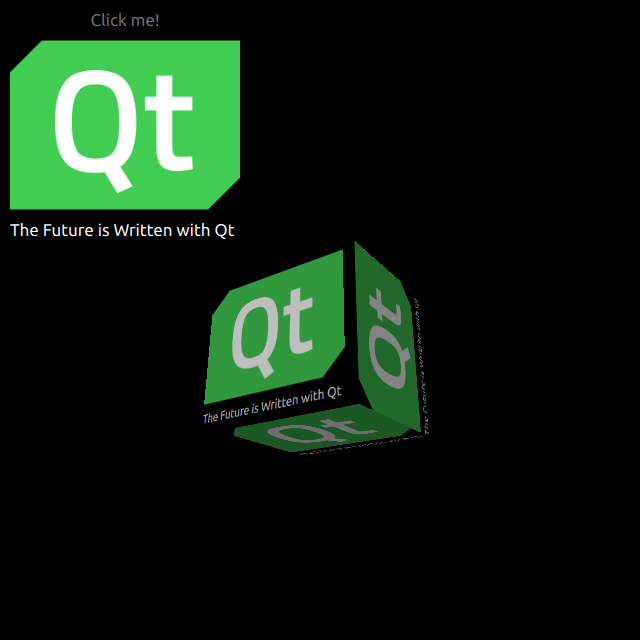
HelloCube zeigt, wie man einen 3D-Würfel zusammen mit 2D-Elementen in „ Qt Quick 3D “ darstellt.
2D-Elemente zeichnen
Wir richten die gesamte Szene in der Datei „main.qml “ ein.
Um die Typen aus dem Modul „ QtQuick3D “ nutzen zu können, müssen wir dieses importieren:
import QtQuick3DWir definieren einfache „ QtQuick “-Elemente mit einem Bild und einem Text auf einem Rechteck.
Image {
    anchors.fill: parent
    source: "qt_logo.png"
}
Text {
    anchors.bottom: parent.bottom
    anchors.left: parent.left
    color: "white"
    font.pixelSize: 17
    text: qsTr("The Future is Written with Qt")
}
Dieses einfache Rechteck verfügt über zwei Animationen zum vertikalen Spiegeln.
transform: Rotation {
    id: rotation
    origin.x: qt_logo.width / 2
    origin.y: qt_logo.height / 2
    axis { x: 1; y: 0; z: 0 }
}

PropertyAnimation {
    id: flip1
    target: rotation
    property: "angle"
    duration: 600
    to: 180
    from: 0
}
PropertyAnimation {
    id: flip2
    target: rotation
    property: "angle"
    duration: 600
    to: 360
    from: 180
}
Einen 3D-Würfel zeichnen
Das Zeichnen eines Würfels ist sehr einfach. Nachdem wir ein „ Camera “ und ein „ Light “ definiert haben, erstellen wir einen Würfel mit einem integrierten „ Model “. In diesem Beispiel rendern wir das vorherige 2D-Rechteck auf dieser Würfeloberfläche als diffuse „ Texture “. In unserem Rechteck setzen wir „ layer.enabled “ auf „ true “.
layer.enabled: trueWenn diese Eigenschaft aktiviert ist, wird das 2D-Element auf eine Offscreen-Oberfläche gerendert, die wir dann als Textur für unseren Würfel verwenden.
id: cube
source: "#Cube"
materials: PrincipledMaterial {
    baseColorMap: Texture {
        sourceItem: qt_logo
    }
}
eulerRotation.y: 90© 2026 The Qt Company Ltd. Documentation contributions included herein are the copyrights of their respective owners. The documentation provided herein is licensed under the terms of the GNU Free Documentation License version 1.3 as published by the Free Software Foundation. Qt and respective logos are trademarks of The Qt Company Ltd. in Finland and/or other countries worldwide. All other trademarks are property of their respective owners.
