Qt Quick 3D Physik – Beispiel für benutzerdefinierte Formen
Veranschaulicht die Verwendung verschiedener Formen.
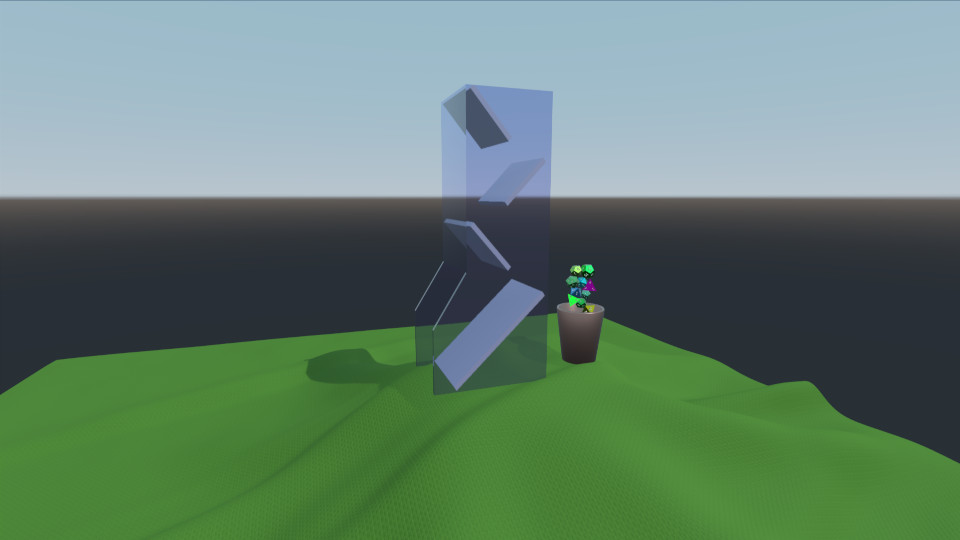
Dieses Beispiel zeigt das Laden und Erzeugen mehrerer Rigid-Body-Meshes sowie deren Animation. Die Szene besteht aus einem Würfelturm, einer Tischdecke, einem Becher und einer Handvoll Würfeln. Der Becher ist so animiert, dass er die erzeugten Würfel auffängt und in den Würfelturm legt. Die Würfel rollen dann den Turm hinunter und landen auf der Tischdecke.
Umgebung
Wie üblich haben wir eine „ PhysicsWorld “ und eine „ View3D “. In der „ View3D “ befindet sich unsere Umgebung, die eine Lichtprobe einrichtet:
environment: SceneEnvironment {
    clearColor: "white"
    backgroundMode: SceneEnvironment.SkyBox
    antialiasingMode: SceneEnvironment.MSAA
    antialiasingQuality: SceneEnvironment.High
    lightProbe: proceduralSky
}
Texturen
Wir definieren vier Texturen, die für die Skybox, die Tischdecke und die Zahlen auf den Würfeln verwendet werden:
Texture {
    id: proceduralSky
    textureData: ProceduralSkyTextureData {
        sunLongitude: -115
    }
}

Texture {
    id: weaveNormal
    source: "maps/weave.png"
    scaleU: 200
    scaleV: 200
    generateMipmaps: true
    mipFilter: Texture.Linear
}
Texture {
    id: numberNormal
    source: "maps/numbers-normal.png"
}

Texture {
    id: numberFill
    source: "maps/numbers.png"
    generateMipmaps: true
    mipFilter: Texture.Linear
}
Szene
Wir haben einen Knoten, der unsere Szene mit der Kamera und einem gerichteten Licht enthält:
id: scene
scale: Qt.vector3d(2, 2, 2)
PerspectiveCamera {
    id: camera
    position: Qt.vector3d(-45, 25, 60)
    eulerRotation: Qt.vector3d(-6, -33, 0)
    clipFar: 1000
    clipNear: 0.1
}

DirectionalLight {
    eulerRotation: Qt.vector3d(-45, 25, 0)
    castsShadow: true
    brightness: 1
    shadowMapQuality: Light.ShadowMapQualityHigh
    pcfFactor: 0.1
    shadowBias: 1
}
Tischdecke
Wir fügen die Tischdecke hinzu, bei der es sich um eine „ StaticRigidBody “ handelt, bestehend aus einem Modell mit einer Webtextur und einem „ HeightFieldShape “ für die Kollision.
StaticRigidBody {
    position: Qt.vector3d(-15, -8, 0)
    id: tablecloth

    Model {
        geometry: HeightFieldGeometry {
            id: tableclothGeometry
            extents: Qt.vector3d(150, 20, 150)
            source: "maps/cloth-heightmap.png"
            smoothShading: false
        }
        materials: PrincipledMaterial {
            baseColor: "#447722"
            roughness: 0.8
            normalMap: weaveNormal
            normalStrength: 0.7
        }
    }

    collisionShapes: HeightFieldShape {
        id: hfShape
        extents: tableclothGeometry.extents
        source: "maps/cloth-heightmap.png"
    }
}
Tasse
Wir definieren die Tasse als „ DynamicRigidBody “ mit einem Modell und einem „ TriangleMeshShape “ als Kollisionsform. Sie verfügt über ein „Behavior“ für die Eigenschaften „ eulerRotation “ und „ position “, da diese Teil einer Animation sind.
DynamicRigidBody {
    id: diceCup
    isKinematic: true
    mass: 0
    property vector3d bottomPos: Qt.vector3d(11, 6, 0)
    property vector3d topPos: Qt.vector3d(11, 45, 0)
    property vector3d unloadPos: Qt.vector3d(0, 45, 0)
    position: bottomPos
    kinematicPivot: Qt.vector3d(0, 6, 0)
    kinematicPosition: bottomPos
    collisionShapes: TriangleMeshShape {
        id: cupShape
        source: "meshes/simpleCup.mesh"
    }
    Model {
        source: "meshes/cup.mesh"
        materials: PrincipledMaterial {
            baseColor: "#cc9988"
            roughness: 0.3
            metalness: 1
        }
    }
}
Turm
Der Turm ist lediglich ein „ StaticRigidBody “ mit einem „Model“ und einem „ TriangleMeshShape “ für die Kollision.
StaticRigidBody {
    id: diceTower
    x: -4
    Model {
        id: testModel
        source: "meshes/tower.mesh"
        materials: [
            PrincipledMaterial {
                baseColor: "#ccccce"
                roughness: 0.3
            },
            PrincipledMaterial {
                id: glassMaterial
                baseColor: "#aaaacc"
                transmissionFactor: 0.95
                thicknessFactor: 1
                roughness: 0.05
            }
        ]
    }
    collisionShapes: TriangleMeshShape {
        id: triShape
        source: "meshes/tower.mesh"
    }
}
Würfel
Zur Erzeugung des Würfels verwenden wir eine Komponente mit einem benutzerdefinierten „Die“-QML-Objekt und einem „ Repeater3D “.
Component {
    id: diceComponent
    Die {}
}

Repeater3D {
    id: dicePool
    model: 25
    delegate: diceComponent
    delegateModelAccess: DelegateModel.ReadWrite
    function restore() {
        for (let i = 0; i < count; i++) {
            (objectAt(i) as Die).restore()
        }
    }
}
Das „Die“-Objekt enthält ein „ DynamicRigidBody “ mit einem „ ConvexMeshShape “ und einem „Model“. Position, Farbe, Skalierung und Mesh-Quelle werden für jeden Würfel zufällig generiert.
DynamicRigidBody {
    id: thisBody
    required property int index

    Texture {
        id: numberNormal
        source: "maps/numbers-normal.png"
    }

    Texture {
        id: numberFill
        source: "maps/numbers.png"
        generateMipmaps: true
        mipFilter: Texture.Linear
    }

    function randomInRange(min, max) {
        return Math.random() * (max - min) + min
    }

    function restore() {
        reset(initialPosition, eulerRotation)
    }

    scale: Qt.vector3d(scaleFactor, scaleFactor, scaleFactor)
    eulerRotation: Qt.vector3d(randomInRange(0, 360),
                               randomInRange(0, 360),
                               randomInRange(0, 360))

    property vector3d initialPosition: Qt.vector3d(11 + 1.5 * Math.cos(index/(Math.PI/4)),
                                                   6 + index * 1.5,
                                                   0)
    position: initialPosition

    property real scaleFactor: randomInRange(0.8, 1.4)
    property color baseCol: Qt.hsla(randomInRange(0, 1),
                                    randomInRange(0.6, 1.0),
                                    randomInRange(0.4, 0.7),
                                    1.0)

    collisionShapes: ConvexMeshShape {
        id: diceShape
        source: Math.random() < 0.25 ? "meshes/icosahedron.mesh"
              : Math.random() < 0.5 ? "meshes/dodecahedron.mesh"
              : Math.random() < 0.75 ? "meshes/octahedron.mesh"
                                     : "meshes/tetrahedron.mesh"
    }

    Model {
        id: thisModel
        source: diceShape.source
        receivesShadows: false
        materials: PrincipledMaterial {
            metalness: 1.0
            roughness: thisBody.randomInRange(0.2, 0.6)
            baseColor: thisBody.baseCol
            emissiveMap: numberFill
            emissiveFactor: Qt.vector3d(1, 1, 1)
            normalMap: numberNormal
            normalStrength: 0.75
        }
    }
}
Animation
Damit sich die Würfel vom Becher zum Würfelturm bewegen, animieren wir den Becher, bewegen ihn nach oben und kippen ihn dann um. Um sicherzustellen, dass die Animation mit der physikalischen Simulation synchron bleibt, verwenden wir ein „ AnimationController “, das wir mit dem Signal „ onFrameDone “ des „ PhysicsWorld “ verbinden. Nach jedem simulierten Frame schreiten wir mit der Animation um den verstrichenen Zeitschritt voran.
Connections {
    target: physicsWorld
    property real totalAnimationTime: 7500
    function onFrameDone(timeStep) {
        let progressStep = timeStep / totalAnimationTime
        animationController.progress += progressStep
        if (animationController.progress >= 1) {
            animationController.completeToEnd()
            animationController.reload()
            animationController.progress = 0
        }
    }
}

AnimationController {
    id: animationController
    animation: SequentialAnimation {
        PauseAnimation { duration: 2500 }
        PropertyAnimation {
            target: diceCup
            property: "kinematicPosition"
            to: diceCup.topPos
            duration: 2500
        }
        ParallelAnimation {
            PropertyAnimation {
                target: diceCup
                property: "kinematicEulerRotation.z"
                to: 130
                duration: 1500
            }
            PropertyAnimation {
                target: diceCup
                property: "kinematicPosition"
                to: diceCup.unloadPos
                duration: 1500
            }
        }
        PauseAnimation { duration: 1000 }
        ParallelAnimation {
            PropertyAnimation {
                target: diceCup
                property: "kinematicEulerRotation.z"
                to: 0
                duration: 1500
            }
            PropertyAnimation {
                target: diceCup
                property: "kinematicPosition"
                to: diceCup.topPos
                duration: 1500
            }
        }
        PropertyAnimation { target: diceCup; property: "kinematicPosition"; to: diceCup.bottomPos; duration: 1500 }
        PauseAnimation { duration: 2000 }
        ScriptAction { script: dicePool.restore() }
    }
}
Steuerung
Abschließend wird ein „ WasdController “ hinzugefügt, um die Kamera über die Tastatur steuern zu können:
WasdController {
    keysEnabled: true
    controlledObject: camera
    speed: 0.2
}
Dateien:
- customshapes/CMakeLists.txt
- customshapes/Die.qml
- customshapes/customshapes.pro
- customshapes/main.cpp
- customshapes/main.qml
- customshapes/qml.qrc
- customshapes/resources.qrc
Bilder:
© 2026 The Qt Company Ltd. Documentation contributions included herein are the copyrights of their respective owners. The documentation provided herein is licensed under the terms of the GNU Free Documentation License version 1.3 as published by the Free Software Foundation. Qt and respective logos are trademarks of The Qt Company Ltd. in Finland and/or other countries worldwide. All other trademarks are property of their respective owners.