
QMLプレビューアの例
QWidget::createWindowContainer() を使用して、Qt Quick をQt Widgets アプリケーションと組み合わせる方法を示しています。
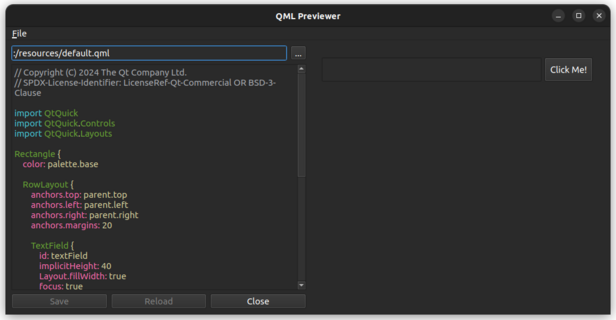
このサンプルでは、Qt Quick のシーンをQt Widgets アプリケーション内に埋め込む方法や、Qt Widgets とQt Quick の間でさまざまなUI要素がどのように統合されるかを示しています。これには以下が含まれます:
- Qt Widgets とQt Quick
- Qt Widgets と 間のドラッグ&ドロップQt Quick
- 埋め込みQMLファイルで定義されたショートカット
- QQuickView のQLayout
例の動作確認
以下の手順でサンプルを実行できます:
- Qt Creator
Welcome モードを開き、Examples から例を選択します。詳細については、Qt Creator の「チュートリアル: ビルドと実行」を参照してください。
- Qt Extension for Visual Studio Code
「Command Palette 」から「Qt: Open Qt examples 」コマンドを実行し、リストからサンプルを選択します。詳細については、Qt Extension for Visual Studio Code の「チュートリアル:ビルドと実行」を参照してください。
UIの概要
この例のメインウィンドウの左側にはファイルブラウザがあり、プレビューするQMLファイルを選択できます。右側には、QQuickWidget でQMLコンテンツが表示されます。ボタンのクリック、テキストの入力、QMLファイルで定義されたショートカットの使用など、QMLコンテンツと対話することができます。
また、このサンプルでは、Qt Widgets とQt Quick コンポーネント間のフォーカスや入力イベントを処理し、スムーズなユーザー体験を実現する方法も示しています。
「QWidget::createWindowContainer()」も参照してください 。
© 2026 The Qt Company Ltd. Documentation contributions included herein are the copyrights of their respective owners. The documentation provided herein is licensed under the terms of the GNU Free Documentation License version 1.3 as published by the Free Software Foundation. Qt and respective logos are trademarks of The Qt Company Ltd. in Finland and/or other countries worldwide. All other trademarks are property of their respective owners.
