
画像合成の例
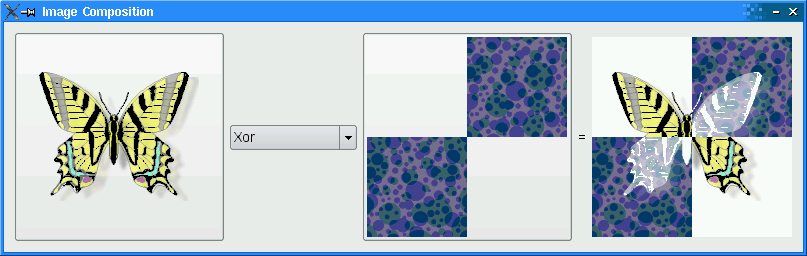
QPainter における合成モードの仕組みを説明しています。
リソースファイルの設定
「画像合成」の例では、imagecomposition.qrc内に埋め込まれた2つのソース画像(butterfly.png とchecker.png)が必要です。このファイルには以下のコードが含まれています:
<!DOCTYPE RCC><RCC version="1.0">
<qresource>
    <file>images/butterfly.png</file>
    <file>images/checker.png</file>
</qresource>
</RCC>リソースファイルの詳細については、「Qtリソースシステム」を参照してください。
ImageComposerクラスの定義
ImageComposer クラスは、QWidget のサブクラスであり、chooseSource() 、chooseDestination() 、recalculateResult() の3つのプライベートスロットを実装しています。
class ImageComposer : public QWidget
{
    Q_OBJECT

public:
    ImageComposer();

private slots:
    void chooseSource();
    void chooseDestination();
void recalculateResult();さらに、ImageComposer は、addOp() 、chooseImage() 、loadImage() 、currentMode() 、imagePos() の5つのプライベート関数と、QToolButton 、QComboBox 、QLabel 、QImage のプライベートインスタンスで構成されています。
private:
    void addOp(QPainter::CompositionMode mode, const QString &name);
    void chooseImage(const QString &title, QImage *image, QToolButton *button);
    void loadImage(const QString &fileName, QImage *image, QToolButton *button);
    QPainter::CompositionMode currentMode() const;
    QPoint imagePos(const QImage &image) const;

    QToolButton *sourceButton;
    QToolButton *destinationButton;
    QComboBox *operatorComboBox;
    QLabel *equalLabel;
    QLabel *resultLabel;

    QImage sourceImage;
    QImage destinationImage;
    QImage resultImage;
};
ImageComposerクラスの実装
QSize オブジェクトであるresultSize を、幅と高さを200に設定した静的定数として宣言します。
static const QSize resultSize(200, 200);コンストラクタ内で、QToolButton オブジェクト(sourceButton )をインスタンス化し、そのiconSize プロパティをresultSize に設定します。operatorComboBox をインスタンス化し、addOp() 関数を使用してデータを設定します。この関数は、QPainter::CompositionMode 、mode 、およびQString 、name を受け取ります。これらはコンポジションモードの名前を表します。
ImageComposer::ImageComposer()
{
    sourceButton = new QToolButton;
    sourceButton->setIconSize(resultSize);

    operatorComboBox = new QComboBox;
    addOp(QPainter::CompositionMode_SourceOver, tr("SourceOver"));
    addOp(QPainter::CompositionMode_DestinationOver, tr("DestinationOver"));
    addOp(QPainter::CompositionMode_Clear, tr("Clear"));
    addOp(QPainter::CompositionMode_Source, tr("Source"));
    addOp(QPainter::CompositionMode_Destination, tr("Destination"));
    addOp(QPainter::CompositionMode_SourceIn, tr("SourceIn"));
    addOp(QPainter::CompositionMode_DestinationIn, tr("DestinationIn"));
    addOp(QPainter::CompositionMode_SourceOut, tr("SourceOut"));
    addOp(QPainter::CompositionMode_DestinationOut, tr("DestinationOut"));
    addOp(QPainter::CompositionMode_SourceAtop, tr("SourceAtop"));
    addOp(QPainter::CompositionMode_DestinationAtop, tr("DestinationAtop"));
    addOp(QPainter::CompositionMode_Xor, tr("Xor"));
    addOp(QPainter::CompositionMode_Plus, tr("Plus"));
    addOp(QPainter::CompositionMode_Multiply, tr("Multiply"));
    addOp(QPainter::CompositionMode_Screen, tr("Screen"));
    addOp(QPainter::CompositionMode_Overlay, tr("Overlay"));
    addOp(QPainter::CompositionMode_Darken, tr("Darken"));
    addOp(QPainter::CompositionMode_Lighten, tr("Lighten"));
    addOp(QPainter::CompositionMode_ColorDodge, tr("ColorDodge"));
    addOp(QPainter::CompositionMode_ColorBurn, tr("ColorBurn"));
    addOp(QPainter::CompositionMode_HardLight, tr("HardLight"));
    addOp(QPainter::CompositionMode_SoftLight, tr("SoftLight"));
    addOp(QPainter::CompositionMode_Difference, tr("Difference"));
    addOp(QPainter::CompositionMode_Exclusion, tr("Exclusion"));
destinationButton がインスタンス化され、そのiconSize プロパティもresultSize に設定されます。QLabelであるequalLabel とresultLabel が作成され、resultLabel のminimumWidth が設定されます。
    destinationButton = new QToolButton;
    destinationButton->setIconSize(resultSize);

    equalLabel = new QLabel(tr("="));

    resultLabel = new QLabel;
    resultLabel->setMinimumWidth(resultSize.width());
以下のシグナルを対応するスロットに接続します:
sourceButtonの `clicked()` 信号は `chooseSource()` に接続され、operatorComboBoxの `activated()` 信号は `recalculateResult()` に接続され、destinationButtonの `clicked()` シグナルは `chooseDestination()` に接続されます。
    connect(sourceButton, &QAbstractButton::clicked,
            this, &ImageComposer::chooseSource);
    connect(operatorComboBox, &QComboBox::activated,
            this, &ImageComposer::recalculateResult);
    connect(destinationButton, &QAbstractButton::clicked,
            this, &ImageComposer::chooseDestination);
QGridLayout (mainLayout )を使用して、すべてのウィジェットを配置します。なお、mainLayout のsizeConstraint プロパティはQLayout::SetFixedSize に設定されているため、ImageComposer のサイズは一切変更できません。
    QGridLayout *mainLayout = new QGridLayout;
    mainLayout->addWidget(sourceButton, 0, 0, 3, 1);
    mainLayout->addWidget(operatorComboBox, 1, 1);
    mainLayout->addWidget(destinationButton, 0, 2, 3, 1);
    mainLayout->addWidget(equalLabel, 1, 3);
    mainLayout->addWidget(resultLabel, 0, 4, 3, 1);
    mainLayout->setSizeConstraint(QLayout::SetFixedSize);
    setLayout(mainLayout);
QImage とresultImage を作成し、loadImage() を2回呼び出して、imagecomposition.qrcファイル内の両方の画像ファイルをロードします。その後、windowTitle プロパティを「Image Composition」に設定します。
    resultImage = QImage(resultSize, QImage::Format_ARGB32_Premultiplied);

    loadImage(":/images/butterfly.png", &sourceImage, sourceButton);
    loadImage(":/images/checker.png", &destinationImage, destinationButton);

    setWindowTitle(tr("Image Composition"));
}
chooseSource() およびchooseDestination() 関数は、特定のパラメータを指定してchooseImage() を呼び出すための便利関数です。
void ImageComposer::chooseSource()
{
    chooseImage(tr("Choose Source Image"), &sourceImage, sourceButton);
}

void ImageComposer::chooseDestination()
{
    chooseImage(tr("Choose Destination Image"), &destinationImage, destinationButton);
}
chooseImage() 関数は、title 、image 、およびbutton に基づいて、ユーザーが選択した画像を読み込みます。
void ImageComposer::chooseImage(const QString &title, QImage *image,
                                QToolButton *button)
{
    QString fileName = QFileDialog::getOpenFileName(this, title);
    if (!fileName.isEmpty())
        loadImage(fileName, image, button);
}
recalculateResult() 関数は、ユーザーが選択した合成モードを用いて2つの画像を合成し、その結果を計算して表示するために使用されます。
void ImageComposer::recalculateResult()
{
    QPainter::CompositionMode mode = currentMode();

    QPainter painter(&resultImage);
    painter.setCompositionMode(QPainter::CompositionMode_Source);
    painter.fillRect(resultImage.rect(), Qt::transparent);
    painter.setCompositionMode(QPainter::CompositionMode_SourceOver);
    painter.drawImage(0, 0, destinationImage);
    painter.setCompositionMode(mode);
    painter.drawImage(0, 0, sourceImage);
    painter.setCompositionMode(QPainter::CompositionMode_DestinationOver);
    painter.fillRect(resultImage.rect(), Qt::white);
    painter.end();

    resultLabel->setPixmap(QPixmap::fromImage(resultImage));
}
addOp() 関数は、QComboBox のaddItem 関数を使用して、operatorComboBox に項目を追加します。この関数は、QPainter::CompositionMode 、mode 、およびQString 、name を受け取ります。矩形はQt::Transparentで塗りつぶされ、sourceImage とdestinationImage の両方が描画された後、resultLabel 上に表示されます。
void ImageComposer::addOp(QPainter::CompositionMode mode, const QString &name)
{
    operatorComboBox->addItem(name, mode);
}
loadImage() 関数は、fillRect()を使用して透明な背景を描画し、drawImage()を使用してimage を中央に配置して描画します。このimage は、その後button のアイコンとして設定されます。
void ImageComposer::loadImage(const QString &fileName, QImage *image,
                              QToolButton *button)
{
    image->load(fileName);

    // Scale the image to given size
    *image = image->scaled(resultSize, Qt::KeepAspectRatio);

    QImage fixedImage(resultSize, QImage::Format_ARGB32_Premultiplied);
    QPainter painter(&fixedImage);
    painter.setCompositionMode(QPainter::CompositionMode_Source);
    painter.fillRect(fixedImage.rect(), Qt::transparent);
    painter.setCompositionMode(QPainter::CompositionMode_SourceOver);
    painter.drawImage(imagePos(*image), *image);
    painter.end();
    button->setIcon(QPixmap::fromImage(fixedImage));

    *image = fixedImage;

    recalculateResult();
}
currentMode() 関数は、operatorComboBox で現在選択されている合成モードを返します。
QPainter::CompositionMode ImageComposer::currentMode() const
{
    return (QPainter::CompositionMode)
           operatorComboBox->itemData(operatorComboBox->currentIndex()).toInt();
}
imagePos() 関数を使用して、QToolButton オブジェクト(sourceButton およびdestinationButton )に読み込まれた画像が中央に配置されるようにします。
QPoint ImageComposer::imagePos(const QImage &image) const
{
    return QPoint((resultSize.width() - image.width()) / 2,
                  (resultSize.height() - image.height()) / 2);
}
main() 関数
main() 関数は、QApplication およびImageComposer をインスタンス化し、そのshow()関数を呼び出します。
int main(int argc, char *argv[])
{
    QApplication app(argc, argv);
    ImageComposer composer;
    composer.show();
    return app.exec();
}© 2026 The Qt Company Ltd. Documentation contributions included herein are the copyrights of their respective owners. The documentation provided herein is licensed under the terms of the GNU Free Documentation License version 1.3 as published by the Free Software Foundation. Qt and respective logos are trademarks of The Qt Company Ltd. in Finland and/or other countries worldwide. All other trademarks are property of their respective owners.
