
Completer の例
「Completer」の例では、モデルから提供されるデータに基づいて、入力ウィジェットに文字列補完機能を提供する方法を示しています。
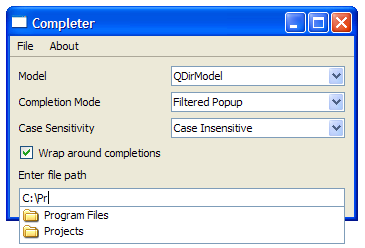
この例では、カスタム項目モデル `FileSystemModel` と `QCompleter ` オブジェクトを使用します。`QCompleter ` は、項目モデルに基づいて補完機能を提供するクラスです。モデルのタイプ、補完モード、大文字と小文字の区別は、コンボボックスを使用して選択できます。
リソースファイル
Completer のサンプルでは、countries.txtおよびwords.txt を格納するためのリソースファイルが必要です。リソースファイルには、次のコードが含まれています。
<!DOCTYPE RCC><RCC version="1.0">
<qresource prefix="/">
   <file>resources/countries.txt</file>
   <file>resources/wordlist.txt</file>
</qresource>
</RCC>
FileSystemModel クラスの定義
FileSystemModel クラスは、ローカルファイルシステム用のデータモデルを提供するQFileSystemModel のサブクラスです。
class FileSystemModel : public QFileSystemModel
{
public:
    FileSystemModel(QObject *parent = nullptr);
    QVariant data(const QModelIndex &index, int role = Qt::DisplayRole) const override;
};このクラスは、コンストラクタとdata() 関数のみを持っています。これは、QFileSystemModel のdata() 関数がフォルダのみを返し、ドライブラベルを返さないのとは異なり、data() がdisplayロールに対して完全なファイルパスを返せるようにするためにのみ作成されているためです。これについては、FileSystemModel の実装でさらに詳しく説明されています。
FileSystemModel クラスの実装
FileSystemModel クラスのコンストラクタは、parent をQFileSystemModel に渡すために使用されます。
FileSystemModel::FileSystemModel(QObject *parent)
    : QFileSystemModel(parent)
{
}前述の通り、data() 関数は、表示処理において完全なファイルパスを返すように再実装されています。例えば、QFileSystemModel を使用すると、ビューには「Program Files」と表示されます。一方、FileSystemModel を使用すると、「C:\Program Files」と表示されます。
QVariant FileSystemModel::data(const QModelIndex &index, int role) const
{
    if (role == Qt::DisplayRole && index.column() == 0) {
        QString path  = QDir::toNativeSeparators(filePath(index));
        if (path.endsWith(QDir::separator()))
            path.chop(1);
        return path;
    }

    return QFileSystemModel::data(index, role);
}
QCompleter が一致を検索するために使用するQt::EditRole は、変更されていません。
MainWindow クラスの定義
MainWindow クラスはQMainWindow のサブクラスであり、about() 、changeCase() 、changeMode() 、changeModel() 、changeMaxVisible() の 5 つのプライベートスロットを実装しています。
class MainWindow : public QMainWindow
{
    Q_OBJECT

public:
    MainWindow(QWidget *parent = nullptr);

private slots:
    void about();
    void changeCase(int);
    void changeMode(int);
    void changeModel();
    void changeMaxVisible(int);
MainWindow クラス内には、createMenu() とmodelFromFile() という2つのプライベート関数があります。また、必要なプライベートウィジェットとして、QComboBox オブジェクト3つ、QCheckBox 、QCompleter 、QLabel 、およびQLineEdit を宣言しています。
private:
    void createMenu();
    QAbstractItemModel *modelFromFile(const QString &fileName);

    QComboBox *caseCombo = nullptr;
    QComboBox *modeCombo = nullptr;
    QComboBox *modelCombo = nullptr;
    QSpinBox *maxVisibleSpinBox = nullptr;
    QCheckBox *wrapCheckBox = nullptr;
    QCompleter *completer = nullptr;
    QLabel *contentsLabel = nullptr;
    QLineEdit *lineEdit = nullptr;
};
MainWindowクラスの実装
MainWindow のコンストラクタは、親ウィジェットを持つMainWindow を構築し、プライベートメンバーを初期化します。その後、createMenu() 関数が呼び出されます。
3つのQComboBox オブジェクト、modelComb 、modeCombo 、およびcaseCombo を設定します。デフォルトでは、modelCombo はQFileSystemModel に、modeCombo は"Filtered Popup"に、caseCombo は"Case Insensitive"に設定されています。
MainWindow::MainWindow(QWidget *parent)
    : QMainWindow(parent)
{
    createMenu();

    QWidget *centralWidget = new QWidget;

    QLabel *modelLabel = new QLabel;
    modelLabel->setText(tr("Model"));

    modelCombo = new QComboBox;
    modelCombo->addItem(tr("QFileSystemModel"));
    modelCombo->addItem(tr("QFileSystemModel that shows full path"));
    modelCombo->addItem(tr("Country list"));
    modelCombo->addItem(tr("Word list"));
    modelCombo->setCurrentIndex(0);

    QLabel *modeLabel = new QLabel;
    modeLabel->setText(tr("Completion Mode"));
    modeCombo = new QComboBox;
    modeCombo->addItem(tr("Inline"));
    modeCombo->addItem(tr("Filtered Popup"));
    modeCombo->addItem(tr("Unfiltered Popup"));
    modeCombo->setCurrentIndex(1);

    QLabel *caseLabel = new QLabel;
    caseLabel->setText(tr("Case Sensitivity"));
    caseCombo = new QComboBox;
    caseCombo->addItem(tr("Case Insensitive"));
    caseCombo->addItem(tr("Case Sensitive"));
    caseCombo->setCurrentIndex(0);
maxVisibleSpinBox が作成され、コンプリーターに表示される項目の数が決定されます。
次に、wrapCheckBox を設定します。このcheckBox は、completer のsetWrapAround()プロパティが有効か無効かを決定します。
    QLabel *maxVisibleLabel = new QLabel;
    maxVisibleLabel->setText(tr("Max Visible Items"));
    maxVisibleSpinBox = new QSpinBox;
    maxVisibleSpinBox->setRange(3,25);
    maxVisibleSpinBox->setValue(10);

    wrapCheckBox = new QCheckBox;
    wrapCheckBox->setText(tr("Wrap around completions"));
    wrapCheckBox->setChecked(true);
contentsLabel をインスタンス化し、そのサイズポリシーをfixed に設定します。その後、コンボボックスのactivated()シグナルをそれぞれのスロットに接続します。
    contentsLabel = new QLabel;
    contentsLabel->setSizePolicy(QSizePolicy::Fixed, QSizePolicy::Fixed);

    connect(modelCombo, &QComboBox::activated,
            this, &MainWindow::changeModel);
    connect(modeCombo, &QComboBox::activated,
            this, &MainWindow::changeMode);
    connect(caseCombo, &QComboBox::activated,
            this, &MainWindow::changeCase);
    connect(maxVisibleSpinBox, &QSpinBox::valueChanged,
            this, &MainWindow::changeMaxVisible);
lineEdit のセットアップが完了したら、QGridLayout を使用してすべてのウィジェットを配置します。次に、changeModel() 関数を呼び出し、completer を初期化します。
    lineEdit = new QLineEdit;

    QGridLayout *layout = new QGridLayout;
    layout->addWidget(modelLabel, 0, 0); layout->addWidget(modelCombo, 0, 1);
    layout->addWidget(modeLabel, 1, 0);  layout->addWidget(modeCombo, 1, 1);
    layout->addWidget(caseLabel, 2, 0);  layout->addWidget(caseCombo, 2, 1);
    layout->addWidget(maxVisibleLabel, 3, 0); layout->addWidget(maxVisibleSpinBox, 3, 1);
    layout->addWidget(wrapCheckBox, 4, 0);
    layout->addWidget(contentsLabel, 5, 0, 1, 2);
    layout->addWidget(lineEdit, 6, 0, 1, 2);
    centralWidget->setLayout(layout);
    setCentralWidget(centralWidget);

    changeModel();

    setWindowTitle(tr("Completer"));
    lineEdit->setFocus();
}
createMenu() 関数は、fileMenu およびhelpMenu を埋めるために必要なQAction オブジェクトをインスタンス化するために使用されます。アクションのtriggered()シグナルは、それぞれのスロットに接続されます。
void MainWindow::createMenu()
{
    QAction *exitAction = new QAction(tr("Exit"), this);
    QAction *aboutAct = new QAction(tr("About"), this);
    QAction *aboutQtAct = new QAction(tr("About Qt"), this);

    connect(exitAction, &QAction::triggered, qApp, &QApplication::quit);
    connect(aboutAct, &QAction::triggered, this, &MainWindow::about);
    connect(aboutQtAct, &QAction::triggered, qApp, &QApplication::aboutQt);

    QMenu *fileMenu = menuBar()->addMenu(tr("File"));
    fileMenu->addAction(exitAction);

    QMenu *helpMenu = menuBar()->addMenu(tr("About"));
    helpMenu->addAction(aboutAct);
    helpMenu->addAction(aboutQtAct);
}
modelFromFile() 関数は、ファイルのfileName を受け取り、その内容に応じて処理を行います。
まず、file がQFile::ReadOnlyモードで開けることを確認します。これが失敗した場合、関数は空のQStringListModel を返します。
QAbstractItemModel *MainWindow::modelFromFile(const QString &fileName)
{
    QFile file(fileName);
    if (!file.open(QFile::ReadOnly))
return new QStringListModel(completer);次に、マウスカーソルをQt::WaitCursor で上書きしてから、QStringList オブジェクト(words )にfile の内容を格納します。これが完了すると、マウスカーソルを元に戻します。
#ifndef QT_NO_CURSOR
    QGuiApplication::setOverrideCursor(QCursor(Qt::WaitCursor));
#endif
    QStringList words;

    while (!file.atEnd()) {
        QByteArray line = file.readLine();
        if (!line.isEmpty())
            words << QString::fromUtf8(line.trimmed());
    }

#ifndef QT_NO_CURSOR
    QGuiApplication::restoreOverrideCursor();
#endif前述の通り、リソースファイルにはcountries.txtとwords.txt の 2 つのファイルが含まれています。file が読み込んだファイルがwords.txt の場合、QStringList にwords を、parent にcompleter を指定したQStringListModel を返します。
    if (!fileName.contains(QLatin1String("countries.txt")))
        return new QStringListModel(words, completer);
file で読み込まれたファイルがcountries.txtである場合、行数words.count() 、列数2、親としてcompleter を持つQStandardItemModel が必要となります。
QStandardItemModel *m = new QStandardItemModel(words.count(), 2, completer);countries.txt内の標準的な行は次の通りです:
Norway NO
したがって、QStandardItemModel オブジェクトであるm にデータを設定するには、国名とその記号を分割する必要があります。これが完了したら、m を返します。
    for (int i = 0; i < words.count(); ++i) {
        QModelIndex countryIdx = m->index(i, 0);
        QModelIndex symbolIdx = m->index(i, 1);
        QString country = words.at(i).mid(0, words[i].length() - 2).trimmed();
        QString symbol = words.at(i).right(2);
        m->setData(countryIdx, country);
        m->setData(symbolIdx, symbol);
    }

    return m;
}
changeMode() 関数は、index の値に応じて、completer のモードを設定します。
void MainWindow::changeMode(int index)
{
    QCompleter::CompletionMode mode;
    if (index == 0)
        mode = QCompleter::InlineCompletion;
    else if (index == 1)
        mode = QCompleter::PopupCompletion;
    else
        mode = QCompleter::UnfilteredPopupCompletion;

    completer->setCompletionMode(mode);
}
changeModel() 関数は、ユーザーが選択したモデルに基づいて、使用されるアイテムモデルを変更します。
switch ステートメントは、modelCombo のインデックスに基づいてアイテムモデルを変更するために使用されます。case が0の場合、ソートされていないQFileSystemModel を使用し、ドライブラベルを含まないファイルパスが提供されます。
void MainWindow::changeModel()
{
    delete completer;
    completer = new QCompleter(this);
    completer->setMaxVisibleItems(maxVisibleSpinBox->value());

    switch (modelCombo->currentIndex()) {
    default:
    case 0:
        { // Unsorted QFileSystemModel
            QFileSystemModel *fsModel = new QFileSystemModel(completer);
            fsModel->setRootPath(QString());
            completer->setModel(fsModel);
            contentsLabel->setText(tr("Enter file path"));
        }
break;なお、モデルはcompleter を親として作成します。これにより、そのモデルを新しいモデルに置き換えることが可能になります。completer により、新しいモデルが割り当てられた瞬間に、古いモデルが確実に削除されます。
case が1の場合、先に定義したDirModel を使用し、ファイルのフルパスが生成されます。
    case 1:
        {   // FileSystemModel that shows full paths
            FileSystemModel *fsModel = new FileSystemModel(completer);
            completer->setModel(fsModel);
            fsModel->setRootPath(QString());
            contentsLabel->setText(tr("Enter file path"));
        }
        break;
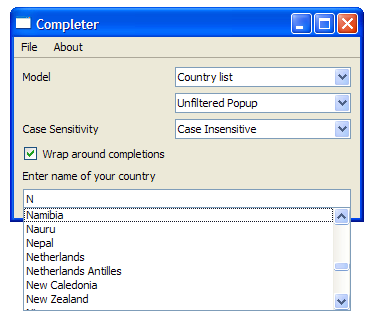
case が2の場合、国名の補完を試みます。これには、QTreeView オブジェクト(treeView )が必要です。国名はcountries.txtから抽出され、補完結果を表示するためのポップアップにはtreeView が設定されます。
    case 2:
        { // Country List
            completer->setModel(modelFromFile(":/resources/countries.txt"));
            QTreeView *treeView = new QTreeView;
            completer->setPopup(treeView);
            treeView->setRootIsDecorated(false);
            treeView->header()->hide();
            treeView->header()->setStretchLastSection(false);
            treeView->header()->setSectionResizeMode(0, QHeaderView::Stretch);
            treeView->header()->setSectionResizeMode(1, QHeaderView::ResizeToContents);
            contentsLabel->setText(tr("Enter name of your country"));
        }
        break;
以下のスクリーンショットは、国リストモデルを使用した Completer を示しています。
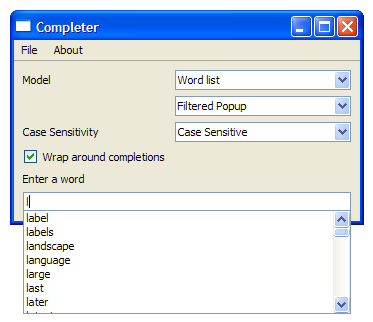
case が3の場合、単語の補完を試みます。これには、words.txtから抽出されたデータを含むQStringListModel を使用します。モデルはcase insensitively でソートされます。
以下のスクリーンショットは、単語リストモデルを使用したコンプリーターを示しています。
モデルタイプが選択されると、changeMode() 関数とchangeCase() 関数を呼び出し、wrapオプションを適宜設定します。wrapCheckBox のclicked()シグナルは、completer のsetWrapAround()スロットに接続されています。
    case 3:
        { // Word list
            completer->setModel(modelFromFile(":/resources/wordlist.txt"));
            completer->setModelSorting(QCompleter::CaseInsensitivelySortedModel);
            contentsLabel->setText(tr("Enter a word"));
        }
        break;
    }

    changeMode(modeCombo->currentIndex());
    changeCase(caseCombo->currentIndex());
    completer->setWrapAround(wrapCheckBox->isChecked());
    lineEdit->setCompleter(completer);
    connect(wrapCheckBox, &QAbstractButton::clicked, completer, &QCompleter::setWrapAround);
}
changeMaxVisible() は、コンプリーター内で表示される項目の最大数を更新します。
void MainWindow::changeMaxVisible(int max)
{
    completer->setMaxVisibleItems(max);
}
about() 関数は、この例に関する簡単な説明を提供します。
void MainWindow::about()
{
    QMessageBox::about(this, tr("About"), tr("This example demonstrates the "
        "different features of the QCompleter class."));
}
main() 関数
main() 関数は、QApplication およびMainWindow をインスタンス化し、show() 関数を呼び出します。
int main(int argc, char *argv[])
{
    QApplication app(argc, argv);
    MainWindow window;
    window.show();
    return app.exec();
}© 2026 The Qt Company Ltd. Documentation contributions included herein are the copyrights of their respective owners. The documentation provided herein is licensed under the terms of the GNU Free Documentation License version 1.3 as published by the Free Software Foundation. Qt and respective logos are trademarks of The Qt Company Ltd. in Finland and/or other countries worldwide. All other trademarks are property of their respective owners.
