
QDialogButtonBox Class
QDialogButtonBox クラスは、現在のウィジェットスタイルに適したレイアウトでボタンを表示するウィジェットです。詳細...
| ヘッダー: | #include <QDialogButtonBox> |
| CMake: | find_package(Qt6 REQUIRED COMPONENTS Widgets) target_link_libraries(mytarget PRIVATE Qt6::Widgets) |
| qmake: | QT += widgets |
| 継承元: | QWidget |
パブリック型
| enum | ButtonLayout { WinLayout, MacLayout, KdeLayout, GnomeLayout, AndroidLayout } |
| enum | ButtonRole { InvalidRole, AcceptRole, RejectRole, DestructiveRole, ActionRole, …, ResetRole } |
| enum | StandardButton { Ok, Open, Save, Cancel, Close, …, NoButton } |
| flags | StandardButtons |
プロパティ
- centerButtons : bool
- orientation : Qt::Orientation
- standardButtons : StandardButtons
パブリック関数
| QDialogButtonBox(QWidget *parent = nullptr) | |
| QDialogButtonBox(QDialogButtonBox::StandardButtons buttons, QWidget *parent = nullptr) | |
| QDialogButtonBox(Qt::Orientation orientation, QWidget *parent = nullptr) | |
| QDialogButtonBox(QDialogButtonBox::StandardButtons buttons, Qt::Orientation orientation, QWidget *parent = nullptr) | |
| virtual | ~QDialogButtonBox() |
| QPushButton * | addButton(QDialogButtonBox::StandardButton button) |
| void | addButton(QAbstractButton *button, QDialogButtonBox::ButtonRole role) |
| QPushButton * | addButton(const QString &text, QDialogButtonBox::ButtonRole role) |
| QPushButton * | button(QDialogButtonBox::StandardButton which) const |
| QDialogButtonBox::ButtonRole | buttonRole(QAbstractButton *button) const |
| QList<QAbstractButton *> | buttons() const |
| bool | centerButtons() const |
| void | clear() |
| Qt::Orientation | orientation() const |
| void | removeButton(QAbstractButton *button) |
| void | setCenterButtons(bool center) |
| void | setOrientation(Qt::Orientation orientation) |
| void | setStandardButtons(QDialogButtonBox::StandardButtons buttons) |
| QDialogButtonBox::StandardButton | standardButton(QAbstractButton *button) const |
| QDialogButtonBox::StandardButtons | standardButtons() const |
シグナル
| void | accepted() |
| void | clicked(QAbstractButton *button) |
| void | helpRequested() |
| void | rejected() |
静的パブリックメンバー
(since 6.12) QKeySequence | standardButtonShortcut(QDialogButtonBox::StandardButton button) |
(since 6.12) QString | standardButtonText(QDialogButtonBox::StandardButton button) |
再実装された保護関数
| virtual void | changeEvent(QEvent *event) override |
| virtual bool | event(QEvent *event) override |
詳細な説明
ダイアログやメッセージボックスでは通常、そのプラットフォームのインターフェースガイドラインに準拠したレイアウトでボタンが表示されます。当然ながら、プラットフォームごとにダイアログのレイアウトは異なります。QDialogButtonBox を使用すると、開発者はボタンを追加するだけで、ユーザーのデスクトップ環境に適したレイアウトが自動的に適用されます。
ダイアログのボタンのほとんどは、特定の役割を担っています。そのような役割には、次のようなものがあります。
- ダイアログの承認または拒否。
- ヘルプを要求する。
- ダイアログ自体に対してアクションを実行する(フィールドのリセットや変更の適用など)。
また、ダイアログを閉じる別の方法があり、それによって破壊的な結果が生じる可能性もあります。
ほとんどのダイアログには、ほぼ標準的と言えるボタン(例:OK ボタンやCancel ボタン)があります。これらのボタンを標準的な方法で作成すると便利な場合があります。
QDialogButtonBox を使用するにはいくつかの方法があります。1 つの方法は、ボタン(またはボタンのテキスト)を自分で作成し、その役割を指定してボタンボックスに追加することです。
QDialogButtonBox *buttonBox = new QDialogButtonBox(Qt::Vertical);
buttonBox->addButton(findButton, QDialogButtonBox::ActionRole);
buttonBox->addButton(moreButton, QDialogButtonBox::ActionRole);
あるいは、QDialogButtonBox には、使用可能ないくつかの標準ボタン(例:OK、Cancel、Save)が用意されています。これらはフラグとして存在するため、コンストラクタ内で OR 演算を組み合わせて指定することができます。
    buttonBox = new QDialogButtonBox(QDialogButtonBox::Ok
                                     | QDialogButtonBox::Cancel);

    connect(buttonBox, &QDialogButtonBox::accepted, this, &QDialog::accept);
    connect(buttonBox, &QDialogButtonBox::rejected, this, &QDialog::reject);
通常のボタンと標準のボタンを組み合わせて使用することも可能です。
現在、ボタンボックスが水平配置の場合、ボタンは次のように配置されます:
 GnomeLayout 水平配置 GnomeLayout 水平配置 | 水平に配置されたボタンボックスGnomeLayout |
 KdeLayout 横向き KdeLayout 横向き | ボタンボックスが横向きに配置されている場合KdeLayout |
 MacLayout 横向き MacLayout 横向き | ボタンボックスが水平に配置されているMacLayout |
 WinLayout 横 WinLayout 横 | ボタンボックスが水平に配置されているWinLayout |
ボタンボックスが縦配置の場合、ボタンは次のように配置されます:
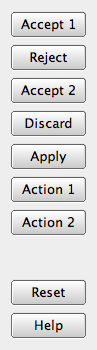
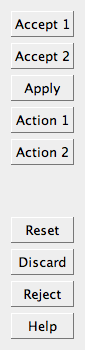
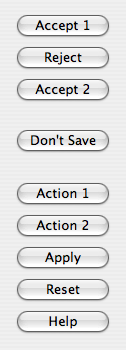
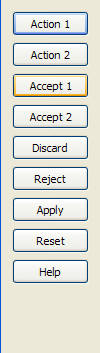
さらに、ActionRole またはHelpRole が設定されたボタンのみを含むボタンボックスは、モデルレスとみなされ、macOSでは異なる外観になります:
 モードレス水平のスクリーンショット
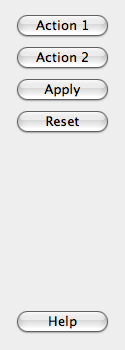 モーデレス垂直のスクリーンショット
ボタンボックス内のボタンがクリックされると、実際に押されたボタンに対してclicked()シグナルが発信されます。便宜上、ボタンにAcceptRole 、RejectRole 、またはHelpRole が設定されている場合、それぞれaccepted()、rejected()、またはhelpRequested()シグナルが発信されます。
特定のボタンをデフォルトに設定したい場合は、そのボタンに対してQPushButton::setDefault()を自分で呼び出す必要があります。ただし、デフォルトボタンが設定されておらず、QPushButton::autoDefault プロパティを使用する際にプラットフォーム間でデフォルトボタンが維持されるようにするには、QDialogButtonBoxが表示された際に、acceptロールを持つ最初のプッシュボタンがデフォルトボタンとして設定されます。
QMessageBox 、QPushButton 、およびQDialogも参照してください 。
メンバ型のドキュメント
enum QDialogButtonBox::ButtonLayout
この列挙型は、ボタンボックスに含まれるボタンを配置する際に使用するレイアウトポリシーを表します。
| 定数 | 値 | 説明 |
|---|---|---|
QDialogButtonBox::WinLayout | 0 | Windows 上のアプリケーションに適したポリシーを使用します。 |
QDialogButtonBox::MacLayout | 1 | macOS 上のアプリケーションに適したポリシーを使用します。 |
QDialogButtonBox::KdeLayout | 2 | KDE 上のアプリケーションに適したポリシーを使用します。 |
QDialogButtonBox::GnomeLayout | 3 | GNOME 上のアプリケーションに適したポリシーを使用します。 |
QDialogButtonBox::AndroidLayout | 4 | Android上のアプリケーションに適したポリシーを使用します。この列挙型値はQt 5.10で追加されました。 |
ボタンのレイアウトは、current style によって指定されます。ただし、X11プラットフォームでは、デスクトップ環境の影響を受ける場合があります。
enum QDialogButtonBox::ButtonRole
この列挙型は、ボタンボックス内のボタンを記述するために使用できる役割を表します。これらの役割の組み合わせは、ボタンの動作のさまざまな側面を記述するためのフラグとして機能します。
| 定数 | 値 | 説明 |
|---|---|---|
QDialogButtonBox::InvalidRole | -1 | ボタンが無効です。 |
QDialogButtonBox::AcceptRole | 0 | このボタンをクリックすると、ダイアログが承認されます(例:OK)。 |
QDialogButtonBox::RejectRole | 1 | このボタンをクリックすると、ダイアログが拒否されます(例:[キャンセル])。 |
QDialogButtonBox::DestructiveRole | 2 | このボタンをクリックすると、破壊的な変更(例:変更の破棄)が行われ、ダイアログが閉じられます。 |
QDialogButtonBox::ActionRole | 3 | このボタンをクリックすると、ダイアログ内の要素に変更が加わります。 |
QDialogButtonBox::HelpRole | 4 | このボタンをクリックすると、ヘルプを要求できます。 |
QDialogButtonBox::YesRole | 5 | このボタンは「はい」のようなボタンです。 |
QDialogButtonBox::NoRole | 6 | このボタンは「いいえ」のようなボタンです。 |
QDialogButtonBox::ApplyRole | 8 | このボタンをクリックすると、現在の変更が適用されます。 |
QDialogButtonBox::ResetRole | 7 | このボタンをクリックすると、ダイアログのフィールドがデフォルト値にリセットされます。 |
StandardButtonも参照してください 。
enum QDialogButtonBox::StandardButton
flags QDialogButtonBox::StandardButtons
これらの列挙型は、標準ボタンのフラグを表しています。各ボタンには、ButtonRole が定義されています。
| 定数 | 値 | 説明 |
|---|---|---|
QDialogButtonBox::Ok | 0x00000400 | AcceptRole で定義された「OK」ボタン。 |
QDialogButtonBox::Open | 0x00002000 | AcceptRole で定義された「開く」ボタン。 |
QDialogButtonBox::Save | 0x00000800 | AcceptRole で定義された「保存」ボタン。 |
QDialogButtonBox::Cancel | 0x00400000 | RejectRole で定義された「Cancel」ボタン。 |
QDialogButtonBox::Close | 0x00200000 | RejectRole で定義された「閉じる」ボタン。 |
QDialogButtonBox::Discard | 0x00800000 | プラットフォームに応じて、「破棄」または「保存しない」ボタン。DestructiveRole で定義されます。 |
QDialogButtonBox::Apply | 0x02000000 | ApplyRole で定義された「適用」ボタン。 |
QDialogButtonBox::Reset | 0x04000000 | ResetRole で定義された「リセット」ボタン。 |
QDialogButtonBox::RestoreDefaults | 0x08000000 | ResetRole で定義された「デフォルトに戻す」ボタン。 |
QDialogButtonBox::Help | 0x01000000 | HelpRole で定義された「ヘルプ」ボタン。 |
QDialogButtonBox::SaveAll | 0x00001000 | AcceptRole で定義された「すべて保存」ボタン。 |
QDialogButtonBox::Yes | 0x00004000 | YesRole で定義された「はい」ボタン。 |
QDialogButtonBox::YesToAll | 0x00008000 | YesRole で定義された「すべてに『はい』」ボタン。 |
QDialogButtonBox::No | 0x00010000 | NoRole で定義された「No」ボタン。 |
QDialogButtonBox::NoToAll | 0x00020000 | NoRole で定義された「すべてに『いいえ』」ボタン。 |
QDialogButtonBox::Abort | 0x00040000 | RejectRole で定義された「中止」ボタン。 |
QDialogButtonBox::Retry | 0x00080000 | AcceptRole で定義された「再試行」ボタン。 |
QDialogButtonBox::Ignore | 0x00100000 | AcceptRole で定義された「無視」ボタン。 |
QDialogButtonBox::NoButton | 0x00000000 | 無効なボタン。 |
StandardButtons 型は、QFlags<StandardButton> の typedef です。これは、StandardButton 値の OR 組み合わせを格納します。
ButtonRole およびstandardButtonsも参照してください 。
プロパティのドキュメント
centerButtons : bool
このプロパティは、ボタンボックス内のボタンが中央に配置されるかどうかを指定します
デフォルトでは、このプロパティはfalse に設定されています。この動作は、ほとんどの種類のダイアログに適しています。注目すべき例外として、ほとんどのプラットフォーム(例:Windows)のメッセージボックスが挙げられます。そこでは、ボタンボックスが水平方向に中央揃えになります。
Accessの関数:
| bool | centerButtons() const |
| void | setCenterButtons(bool center) |
「QMessageBox」も参照してください 。
orientation : Qt::Orientation
このプロパティは、ボタンボックスの向きを指定します
デフォルトでは、配置方向は水平(つまり、ボタンが横一列に並んでいる状態)です。指定可能な配置方向は、Qt::Horizontal およびQt::Vertical です。
アクセス関数:
| Qt::Orientation | orientation() const |
| void | setOrientation(Qt::Orientation orientation) |
standardButtons : StandardButtons
ボタンボックス内の標準ボタンのセット
このプロパティは、ボタンボックスで使用される標準ボタンを制御します。
アクセス関数:
| QDialogButtonBox::StandardButtons | standardButtons() const |
| void | setStandardButtons(QDialogButtonBox::StandardButtons buttons) |
関連項目: addButton()。
メンバ関数のドキュメント
QDialogButtonBox::QDialogButtonBox(QWidget *parent = nullptr)
指定されたparent を使用して、空の水平ボタンボックスを作成します。
orientation およびaddButton()も参照してください 。
[explicit] QDialogButtonBox::QDialogButtonBox(QDialogButtonBox::StandardButtons buttons, QWidget *parent = nullptr)
指定されたparent を使用して、buttons で指定された標準ボタンを含む水平方向のボタンボックスを作成します。
orientation およびaddButton()も参照してください 。
QDialogButtonBox::QDialogButtonBox(Qt::Orientation orientation, QWidget *parent = nullptr)
指定されたorientation およびparent を使用して、空のボタンボックスを作成します。
orientation およびaddButton()も参照してください 。
QDialogButtonBox::QDialogButtonBox(QDialogButtonBox::StandardButtons buttons, Qt::Orientation orientation, QWidget *parent = nullptr)
指定されたorientation およびparent を用いて、buttons で指定された標準ボタンを含むボタンボックスを作成します。
orientation およびaddButton()も参照してください 。
[virtual noexcept] QDialogButtonBox::~QDialogButtonBox()
ボタンボックスを破壊します。
[signal] void QDialogButtonBox::accepted()
この信号は、ボタンボックス内のボタンがクリックされた際に発生します。ただし、そのボタンが `AcceptRole ` または `YesRole` で定義されている場合に限ります。
rejected()、clicked()、およびhelpRequested()も参照してください 。
QPushButton *QDialogButtonBox::addButton(QDialogButtonBox::StandardButton button)
有効な場合、標準のbutton をボタンボックスに追加し、プッシュボタンを返します。button が無効な場合は、ボタンボックスには追加されず、0が返されます。
removeButton() およびclear()も参照してください 。
void QDialogButtonBox::addButton(QAbstractButton *button, QDialogButtonBox::ButtonRole role)
指定されたbutton を、指定されたrole を持つボタンボックスに追加します。ロールが無効な場合、ボタンは追加されません。
ボタンがすでに追加されている場合は、そのボタンが削除され、新しいロールで再度追加されます。
注: ボタンボックスが ボタンの所有権を取得します。
removeButton() およびclear()も参照してください 。
QPushButton *QDialogButtonBox::addButton(const QString &text, QDialogButtonBox::ButtonRole role)
指定されたtext を持つプッシュボタンを作成し、指定されたrole のボタンボックスに追加して、対応するプッシュボタンを返します。role が無効な場合、ボタンは作成されず、0が返されます。
removeButton() およびclear()も参照してください 。
QPushButton *QDialogButtonBox::button(QDialogButtonBox::StandardButton which) const
標準ボタンwhich に対応する `QPushButton ` を返します。このボタンボックスに標準ボタンが存在しない場合は、`nullptr ` を返します。
standardButton()、standardButtons()、およびbuttons()も参照してください 。
QDialogButtonBox::ButtonRole QDialogButtonBox::buttonRole(QAbstractButton *button) const
指定されたbutton のボタンロールを返します。button がnullptr である場合、またはボタンボックスに追加されていない場合、この関数はInvalidRole を返します。
buttons() およびaddButton()も参照してください 。
QList<QAbstractButton *> QDialogButtonBox::buttons() const
ボタンボックスに追加されたすべてのボタンのリストを返します。
buttonRole()、addButton()、およびremoveButton()も参照してください 。
[override virtual protected] void QDialogButtonBox::changeEvent(QEvent *event)
QWidget::changeEvent(QEvent *event) を再実装しています。
void QDialogButtonBox::clear()
ボタンボックスをクリアし、その中のすべてのボタンを削除します。
removeButton() およびaddButton()も参照してください 。
[signal] void QDialogButtonBox::clicked(QAbstractButton *button)
このシグナルは、ボタンボックス内のボタンがクリックされたときに発火します。押された具体的なボタンは、button で指定されます。
accepted()、rejected()、およびhelpRequested()も参照してください 。
[override virtual protected] bool QDialogButtonBox::event(QEvent *event)
QWidget::event(QEvent *event) を再実装します。
[signal] void QDialogButtonBox::helpRequested()
このシグナルは、ボタンボックス内のボタンがクリックされた際に、そのボタンがHelpRole で定義されている場合に限り発火します。
accepted()、rejected()、およびclicked()も参照してください 。
[signal] void QDialogButtonBox::rejected()
この信号は、ボタンボックス内のボタンがクリックされた際に、そのボタンが `RejectRole ` または `NoRole` で定義されている場合に発火します。
accepted()、helpRequested()、およびclicked()も参照してください 。
void QDialogButtonBox::removeButton(QAbstractButton *button)
button を削除せずにボタンボックスから取り除き、その親を null に設定します。
clear()、buttons()、およびaddButton()も参照してください 。
QDialogButtonBox::StandardButton QDialogButtonBox::standardButton(QAbstractButton *button) const
指定されたbutton に対応する標準ボタンの列挙値を返します。指定されたbutton が標準ボタンでない場合は、NoButton を返します。
button()、buttons()、およびstandardButtons()も参照してください 。
[static, since 6.12] QKeySequence QDialogButtonBox::standardButtonShortcut(QDialogButtonBox::StandardButton button)
標準のbutton のキーボードショートカットを返します。ショートカットはプラットフォームに依存します。button に関連付けられたショートカットがない場合、または認識された標準ボタンでない場合は、空のQKeySequence を返します。
この関数は Qt 6.12 で導入されました。
standardButtonText() およびStandardButtonも参照してください 。
[static, since 6.12] QString QDialogButtonBox::standardButtonText(QDialogButtonBox::StandardButton button)
標準のbutton の表示テキスト(ボタンのラベルに表示されるもの)を返します。このテキストは、プラットフォームおよびロケールによって異なります。
button が認識可能な標準ボタンでない場合、空の文字列を返します。
この関数はQt 6.12で導入されました。
standardButtonShortcut() およびStandardButtonも参照してください 。
© 2026 The Qt Company Ltd. Documentation contributions included herein are the copyrights of their respective owners. The documentation provided herein is licensed under the terms of the GNU Free Documentation License version 1.3 as published by the Free Software Foundation. Qt and respective logos are trademarks of The Qt Company Ltd. in Finland and/or other countries worldwide. All other trademarks are property of their respective owners.
