
Android向けQt Notifier
Androidアプリケーションにおいて、QtからJavaコードを呼び出す方法を示します。
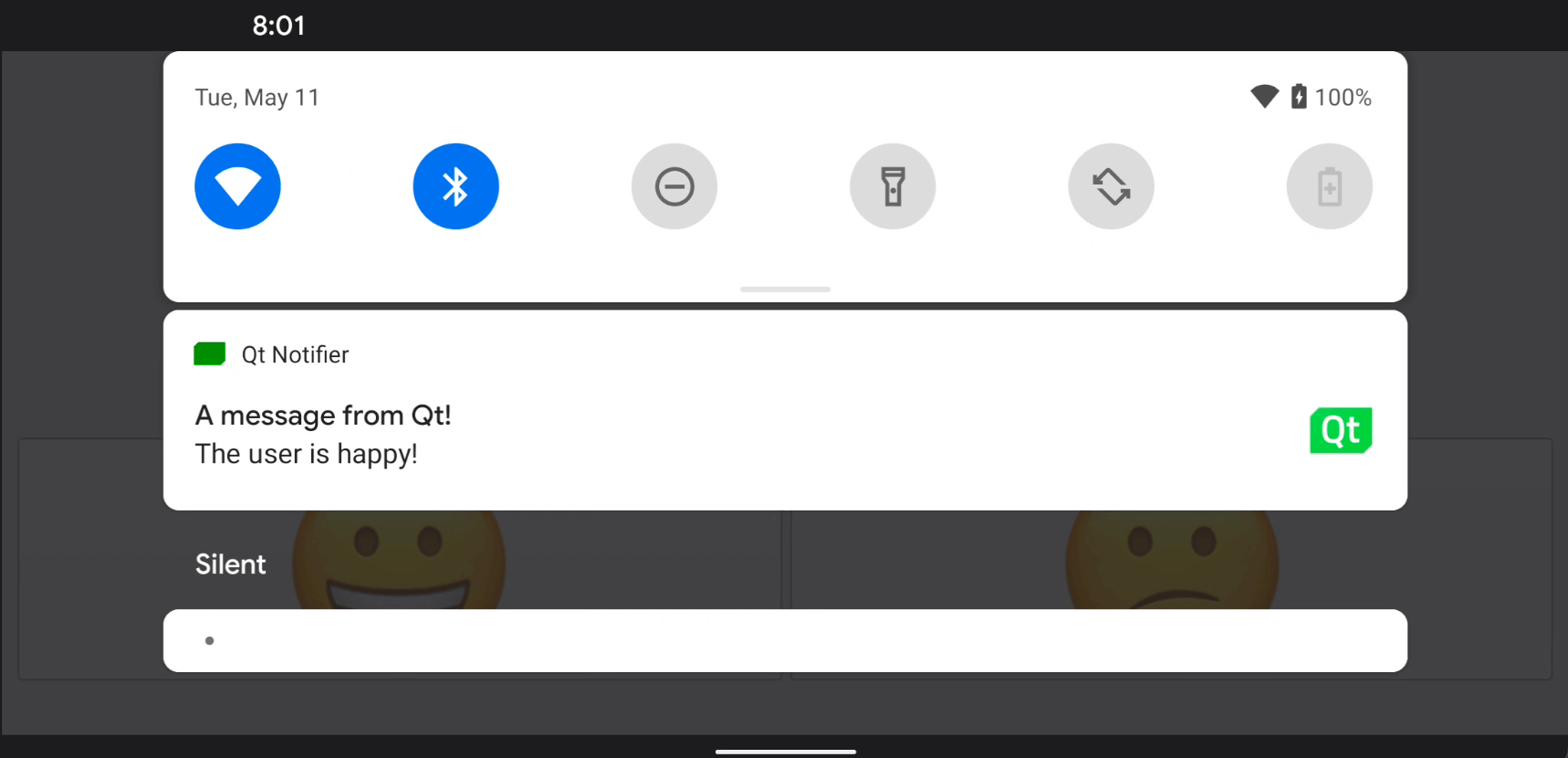
この例では、AndroidアプリケーションにカスタムJavaクラスを追加する方法と、QtのJNI便利APIを使用してそのクラスを呼び出す方法を示しています。
スマイルマークのいずれかをクリックすると、Android 画面のステータスバーに通知が表示されます。
例の実行
このサンプルは、以下の手順で実行できます。
- Qt Creator
Welcome モードを開き、Examples からこの例を選択してください。詳細については、Qt Creator の「チュートリアル:ビルドと実行」を参照してください。
- Qt Extension for Visual Studio Code
Command Palette から `Qt: Open Qt examples ` コマンドを実行し、リストからこのサンプルを選択します。詳細については、Qt Extension for Visual Studio Code: チュートリアル: ビルドと実行を参照してください。
C++ コードからの Java メソッドの呼び出し
NotificationClient.java ファイルで、NotificationClient というカスタム Java クラスを定義します。
package org.qtproject.example.androidnotifier;

import android.app.Notification;
import android.app.NotificationManager;
import android.content.Context;
import android.graphics.Bitmap;
import android.graphics.Color;
import android.graphics.BitmapFactory;
import android.app.NotificationChannel;

public class NotificationClient
{
    public static void notify(Context context, String message) {
        try {
            NotificationManager m_notificationManager = (NotificationManager)
                    context.getSystemService(Context.NOTIFICATION_SERVICE);

            Notification.Builder m_builder;
            if (android.os.Build.VERSION.SDK_INT >= android.os.Build.VERSION_CODES.O) {
                int importance = NotificationManager.IMPORTANCE_DEFAULT;
                NotificationChannel notificationChannel;
                notificationChannel = new NotificationChannel("Qt", "Qt Notifier", importance);
                m_notificationManager.createNotificationChannel(notificationChannel);
                m_builder = new Notification.Builder(context, notificationChannel.getId());
            } else {
                m_builder = new Notification.Builder(context);
            }

            Bitmap icon = BitmapFactory.decodeResource(context.getResources(), R.drawable.icon);
            m_builder.setSmallIcon(R.drawable.icon)
                    .setLargeIcon(icon)
                    .setContentTitle("A message from Qt!")
                    .setContentText(message)
                    .setDefaults(Notification.DEFAULT_SOUND)
                    .setColor(Color.GREEN)
                    .setAutoCancel(true);

            m_notificationManager.notify(0, m_builder.build());
        } catch (Exception e) {
            e.printStackTrace();
        }
    }
}
NotificationClient C++ クラスのヘッダーファイルである `notificationclient.h` では、Android デバイスに通知を表示するためのシンプルな C++ API を宣言します。これは、単一の文字列プロパティ `notification` と、Java コードを呼び出すスロット `updateAndroidNotification()` で構成されています:
class NotificationClient : public QObject
{
Q_OBJECT
public:
explicit NotificationClient(QObject *parent = 0);
void setNotification(const QString ¬ification);
QString notification() const;
signals:
void notificationChanged();
private slots:
void updateAndroidNotification();
private:
QString m_notification;
};`notificationChanged() ` シグナルを `updateAndroidNotification() ` スロットに接続し、`notification ` のテキストが変更された際に通知テキストを更新します:
    m_notification = notification;
    emit notificationChanged();
updateAndroidNotification() 関数は、AndroidプラットフォームAPIから通知を送信する役割を担うJavaメソッドを呼び出します。まず、通知文字列からJava文字列jstring を生成し、次にjstring オブジェクトをパラメータとしてJavaのnotify() メソッドに渡します:
void NotificationClient::updateAndroidNotification()
{
    QJniObject javaNotification = QJniObject::fromString(m_notification);
    QJniObject::callStaticMethod<void>(
                    "org/qtproject/example/androidnotifier/NotificationClient",
                    "notify",
                    "(Landroid/content/Context;Ljava/lang/String;)V",
                    QNativeInterface::QAndroidApplication::context(),
                    javaNotification.object<jstring>());
}
このJavaメソッドへの呼び出しでは、Java Native Interface(JNI)APIを利用してJavaと通信するQJniObject が使用されています。また、前述のコードスニペットでは、アプリのコンテキストオブジェクトを渡しています。これにより、静的なJavaコードからアプリの特定のプロパティやAPIを利用できるようになります。
スマイリーボタンが意図したとおりに動作することを確認するため、いずれかのボタンがクリックされた際に通知テキストを変更する以下のコードを追加します:
    QObject::connect(&happyButton, &QPushButton::clicked, &happyButton, []() {
        NotificationClient().setNotification("The user is happy!");
    });

    QObject::connect(&sadButton, &QPushButton::clicked, &happyButton, []() {
        NotificationClient().setNotification("The user is sad!");
});「Qt for Android」も参照してください 。
© 2026 The Qt Company Ltd. Documentation contributions included herein are the copyrights of their respective owners. The documentation provided herein is licensed under the terms of the GNU Free Documentation License version 1.3 as published by the Free Software Foundation. Qt and respective logos are trademarks of The Qt Company Ltd. in Finland and/or other countries worldwide. All other trademarks are property of their respective owners.
