
MQTTのサブスクリプション
MQTTブローカーと通信するアプリケーションの作成。
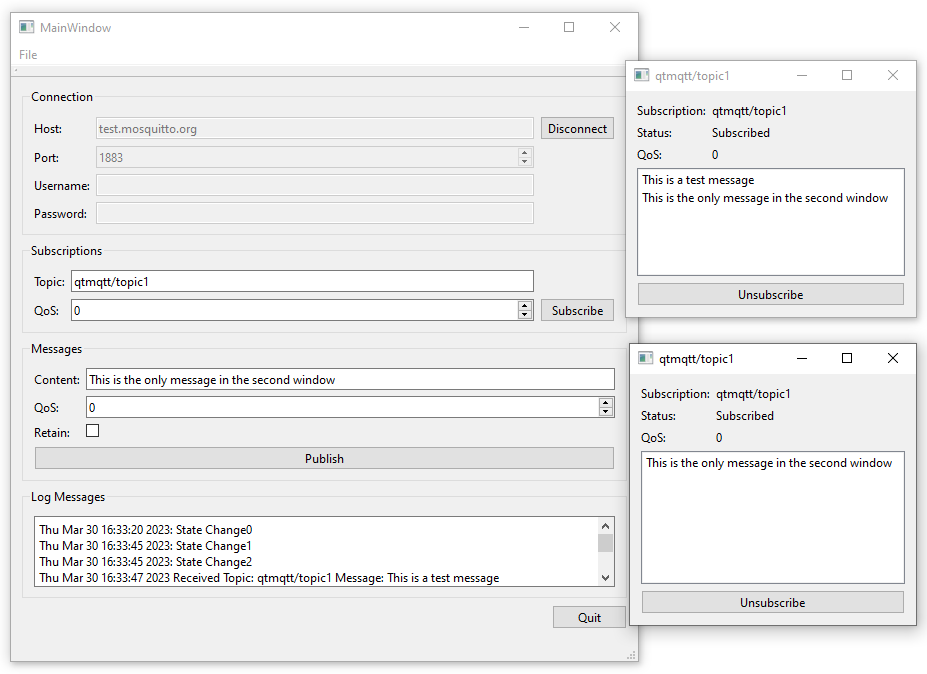
「MQTT サブスクリプション」では、MQTT ブローカーと通信するアプリケーションの作成方法を説明します。サブスクリプションごとに新しいダイアログが開き、そこでサブスクライブしたトピック上のメッセージを確認できます。
クライアントの作成
QMqttClient クラスを使用してMQTTクライアントを作成し、接続に使用するブローカーのホスト名とポートを設定します:
    m_client = new QMqttClient(this);
    m_client->setHostname(ui->lineEditHost->text());
    m_client->setPort(static_cast<quint16>(ui->spinBoxPort->value()));
トピックの購読
ユーザーがクライアントでトピックをサブスクライブすると、新しいサブスクリプションオブジェクトが作成されます:
void MainWindow::on_buttonSubscribe_clicked()
{
    auto subscription = m_client->subscribe(ui->lineEditTopic->text(),
                                            static_cast<quint8>(ui->spinQoS->text().toUInt()));
    if (!subscription) {
        QMessageBox::critical(this, u"Error"_s,
                              u"Could not subscribe. Is there a valid connection?"_s);
        return;
    }
    auto subWindow = new SubscriptionWindow(subscription);
    subWindow->setWindowTitle(subscription->topic().filter());
    subWindow->show();
}
QMqttSubscription クラスを使用して、サブスクリプションのトピック、状態、および QoS レベルを保存します:
SubscriptionWindow::SubscriptionWindow(QMqttSubscription *sub, QWidget *parent) :
    QWidget(parent),
    ui(new Ui::SubscriptionWindow),
    m_sub(sub)
{
    ui->setupUi(this);

    ui->labelSub->setText(m_sub->topic().filter());
    ui->labelQoS->setText(QString::number(m_sub->qos()));
    updateStatus(m_sub->state());
    connect(m_sub, &QMqttSubscription::messageReceived, this, &SubscriptionWindow::updateMessage);
    connect(m_sub, &QMqttSubscription::stateChanged, this, &SubscriptionWindow::updateStatus);
    connect(m_sub, &QMqttSubscription::qosChanged, [this](quint8 qos) {
        ui->labelQoS->setText(QString::number(qos));
    });
    connect(ui->pushButton, &QAbstractButton::clicked, m_sub, &QMqttSubscription::unsubscribe);
}
QoSレベルは、メッセージごととサブスクリプションごとに個別に設定できます。サブスクリプションに設定されたQoSレベルが、最低QoSレベルを決定します。より高いQoSレベルでメッセージが送信された場合、ブローカーはそのメッセージのQoSを高いレベルに引き上げます。 たとえば、クライアントAがQoS 1でトピックを購読しており、クライアントBがQoS 0のメッセージをそのトピックにパブリッシュした場合、ブローカーはそのメッセージのQoSを自動的に1に引き上げます。 クライアントBがQoS 2のメッセージをそのトピックにパブリッシュした場合、ブローカーはそのメッセージをQoS 2で送信します。
メッセージの受信
クライアントがメッセージを受信する際、実際のメッセージペイロードを格納するためにQMqttMessage クラスが使用されます:
void SubscriptionWindow::updateMessage(const QMqttMessage &msg)
{
    ui->listWidget->addItem(msg.payload());
}
ファイル:
© 2026 The Qt Company Ltd. Documentation contributions included herein are the copyrights of their respective owners. The documentation provided herein is licensed under the terms of the GNU Free Documentation License version 1.3 as published by the Free Software Foundation. Qt and respective logos are trademarks of The Qt Company Ltd. in Finland and/or other countries worldwide. All other trademarks are property of their respective owners.
