
Minimal CPP
Minimal CPPは、C++でWaylandコンポジターを記述する方法を示すサンプルです。
Minimal CPPは、C++を使用して完全なQt Wayland Compositor を実装した、最小限のコンポジターのサンプルです。QtWaylandCompositor のC++ APIは低レベルであり、ハードウェア機能のサポートや、Qt Quick が利用できない場合など、特殊な用途を想定しています。QML APIの方が利便性と機能性に優れています。 比較として、「Minimal QML」サンプルでは、30行のQMLで、このサンプルが300行以上かけて実装している機能よりも多くの機能を実装しています。
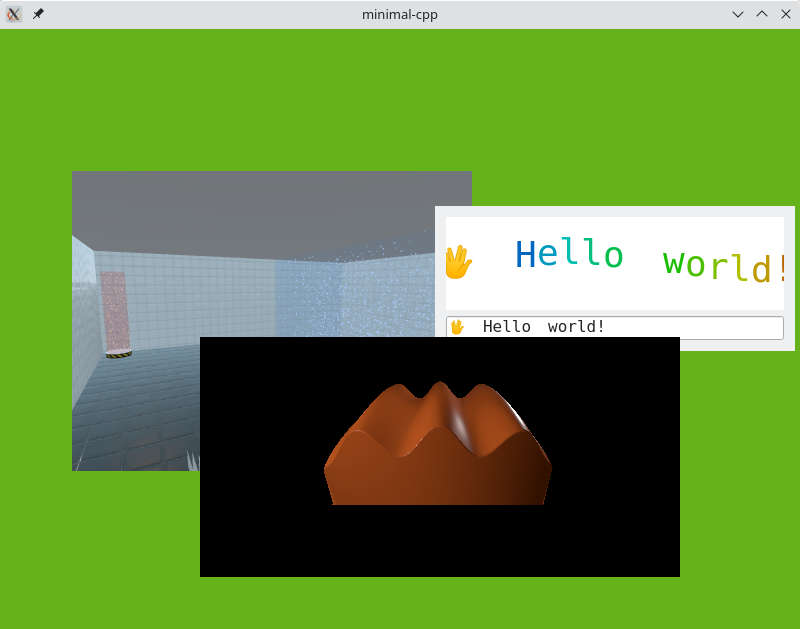
この例は2つの部分に分かれています。Wayland関連のロジックはCompositor クラスに、ユーザーインターフェースはWindow クラスに含まれています。
Window
Window クラスはかなり単純明快です。Waylandサーフェスを表示するために、コンポジターのビューを順に処理し、QOpenGLTextureBlitter を使用して画面上にレンダリングします:
void Window::paintGL()
{
    m_compositor->startRender();

    QOpenGLFunctions *functions = context()->functions();
    functions->glClearColor(.4f, .7f, .1f, 0.5f);
    functions->glClear(GL_COLOR_BUFFER_BIT | GL_DEPTH_BUFFER_BIT);

    GLenum currentTarget = GL_TEXTURE_2D;
    m_textureBlitter.bind(currentTarget);
    functions->glEnable(GL_BLEND);
    functions->glBlendFunc(GL_SRC_ALPHA, GL_ONE_MINUS_SRC_ALPHA);

    const auto views = m_compositor->views();
    for (View *view : views) {
        auto texture = view->getTexture();
        if (!texture)
            continue;
        if (texture->target() != currentTarget) {
            currentTarget = texture->target();
            m_textureBlitter.bind(currentTarget);
        }
        GLuint textureId = texture->textureId();
        QWaylandSurface *surface = view->surface();
        if (surface && surface->hasContent()) {
            QSize s = surface->destinationSize();
            view->initPosition(size(), s);
            QPointF pos = view->globalPosition();
            QRectF surfaceGeometry(pos, s);
            QOpenGLTextureBlitter::Origin surfaceOrigin =
                    view->currentBuffer().origin() == QWaylandSurface::OriginTopLeft
                    ? QOpenGLTextureBlitter::OriginTopLeft
                    : QOpenGLTextureBlitter::OriginBottomLeft;
            QMatrix4x4 targetTransform = QOpenGLTextureBlitter::targetTransform(surfaceGeometry, QRect(QPoint(), size()));
            m_textureBlitter.blit(textureId, targetTransform, surfaceOrigin);
        }
    }
    m_textureBlitter.release();
    m_compositor->endRender();
}
すべてのキーボードおよびマウスイベントはコンポジターに配信されます。例:
void Window::mousePressEvent(QMouseEvent *event)
{
    m_compositor->handleMousePress(event->position().toPoint(), event->button());
}
コンポジター
Compositor クラスは、QMLベースのコンポジターにおいてWaylandCompositor やWaylandQuickItem が処理するロジックの多くを実装する必要があるため、より複雑です。
create 関数は、最も基本的なシェル拡張機能であるIviApplication を使用して、コンポジターをセットアップします。この関数は、OpenGLコンテキストの初期化後に呼び出されます:
void Compositor::create()
{
    QWaylandOutput *output = new QWaylandOutput(this, m_window);
    QWaylandOutputMode mode(m_window->size(), 60000);
    output->addMode(mode, true);
    QWaylandCompositor::create();
    output->setCurrentMode(mode);

    m_iviApplication = new QWaylandIviApplication(this);
    connect(m_iviApplication, &QWaylandIviApplication::iviSurfaceCreated, this, &Compositor::onIviSurfaceCreated);
}
マウスイベントやキーボードフォーカスに関するロジックはすべて、暗黙的なマウスグラブ(最初のマウス押下を受け取ったサーフェスにすべてのマウス移動を送信すること)を含め、手動で実装する必要があります。Waylandプロトコルにおけるマウス押下イベントにはマウス位置が含まれていないため、マウス押下を受信した際には常にマウス移動を送信する必要がある点に注意してください:
void Compositor::handleMousePress(const QPoint &position, Qt::MouseButton button)
{
    if (!m_mouseView) {
        if ((m_mouseView = viewAt(position)))
            raise(m_mouseView);
    }
    auto *seat = defaultSeat();
    seat->sendMouseMoveEvent(m_mouseView, mapToView(m_mouseView, position));
    seat->sendMousePressEvent(button);
}
マウス離しイベントについては、暗黙的なグラブを解除し、現在のマウス位置にあるサーフェスに通知します:
void Compositor::handleMousePress(const QPoint &position, Qt::MouseButton button)
{
    if (!m_mouseView) {
        if ((m_mouseView = viewAt(position)))
            raise(m_mouseView);
    }
    auto *seat = defaultSeat();
    seat->sendMouseMoveEvent(m_mouseView, mapToView(m_mouseView, position));
    seat->sendMousePressEvent(button);
}新しいサーフェスの通知を受け取ると、それを追跡するためにView を作成し、更新を処理できるようシグナルを接続します。
void Compositor::onIviSurfaceCreated(QWaylandIviSurface *iviSurface)
{
    View *view = new View(iviSurface->iviId());
    view->setSurface(iviSurface->surface());
    view->setOutput(outputFor(m_window));

    m_views << view;
    connect(view, &QWaylandView::surfaceDestroyed, this, &Compositor::viewSurfaceDestroyed);
    connect(iviSurface->surface(), &QWaylandSurface::redraw, this, &Compositor::triggerRender);
}
View クラスは、サーフェスの特定のビューを表すQWaylandView のサブクラスです。advance 関数は、ビューの現在のバッファを更新し、新しいコンテンツがある場合はtrueを返します。getTexture 関数は、Window クラスのために、バッファの内容をOpenGLテクスチャとして利用可能にします:
QOpenGLTexture *View::getTexture() {
    if (advance())
        m_texture = currentBuffer().toOpenGLTexture();
    return m_texture;
}© 2026 The Qt Company Ltd. Documentation contributions included herein are the copyrights of their respective owners. The documentation provided herein is licensed under the terms of the GNU Free Documentation License version 1.3 as published by the Free Software Foundation. Qt and respective logos are trademarks of The Qt Company Ltd. in Finland and/or other countries worldwide. All other trademarks are property of their respective owners.
