
ライセンスウィザードの例
「ライセンスウィザード」の例では、Qtで複雑なウィザードを実装する方法を示しています。
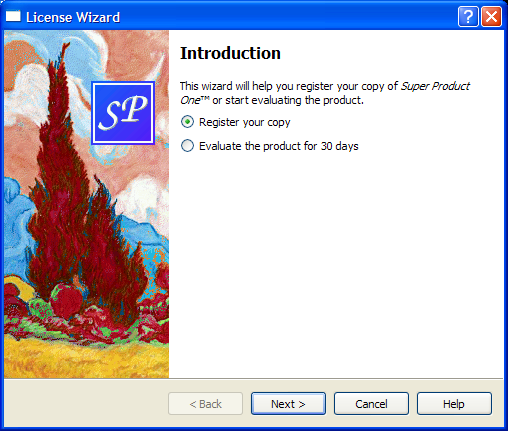
ほとんどのウィザードは直線的な構造をしており、ページ 1 の次にページ 2 が続き、最後のページに至るまで順次進行します。「Trivial Wizard」のサンプルでは、このようなウィザードの作成方法を示しています。
一部のウィザードは、ユーザーが入力した情報に基づいて異なる進行経路を許可するという点で、より複雑です。「License Wizard」のサンプルは、この点を示しています。このサンプルには複数のウィザードページが用意されており、選択されたオプションに応じて、ユーザーは異なるページに進むことができます。
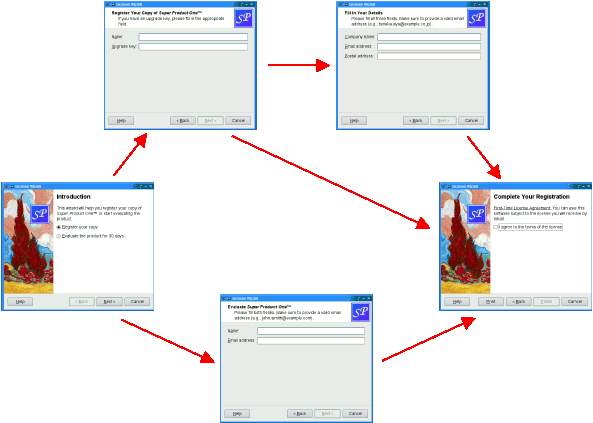
このサンプルは、以下のクラスで構成されています。
LicenseWizardQWizard を継承し、ユーザーがライセンス契約を選択するプロセスを案内する、非線形の5ページからなるウィザードを実装しています。IntroPage、EvaluatePage、RegisterPage、DetailsPage、およびConclusionPageは、ウィザードのページを実装するQWizardPage のサブクラスです。
LicenseWizard クラス
LicenseWizard クラスはQWizard を継承しており、架空のソフトウェア製品のコピーを登録するプロセスをユーザーに案内する、5 ページからなるウィザードを提供します。クラスの定義は次のとおりです:
class LicenseWizard : public QWizard
{
    Q_OBJECT

public:
    enum { Page_Intro, Page_Evaluate, Page_Register, Page_Details,
           Page_Conclusion };

    LicenseWizard(QWidget *parent = nullptr);

private slots:
    void showHelp();
};
このクラスのパブリックAPIは、コンストラクタと列挙型に限定されています。この列挙型は、各ページに関連付けられたIDを定義しています:
| クラス名 | 列挙型の値 | ページID |
|---|---|---|
IntroPage | Page_Intro | 0 |
EvaluatePage | Page_Evaluate | 1 |
RegisterPage | Page_Register | 2 |
DetailsPage | Page_Details | 3 |
ConclusionPage | Page_Conclusion | 4 |
この例では、IDは任意の値です。唯一の制約は、IDが一意であり、かつ-1とは異なる値でなければならないということです。IDを使用することで、ページを参照することができます。
LicenseWizard::LicenseWizard(QWidget *parent)
    : QWizard(parent)
{
    setPage(Page_Intro, new IntroPage);
    setPage(Page_Evaluate, new EvaluatePage);
    setPage(Page_Register, new RegisterPage);
    setPage(Page_Details, new DetailsPage);
    setPage(Page_Conclusion, new ConclusionPage);

setStartId(Page_Intro);コンストラクタでは、5つのページを作成し、QWizard::setPage() を使用してウィザードに挿入し、Page_Intro を最初のページに設定します。
#ifndef Q_OS_MACOS
    setWizardStyle(ModernStyle);
#endifmacOSを除くすべてのプラットフォームで、ModernStyle のスタイルを設定し、
    setOption(HaveHelpButton, true);
    setPixmap(QWizard::LogoPixmap, QPixmap(":/images/logo.png"));

    connect(this, &QWizard::helpRequested, this, &LicenseWizard::showHelp);

    setWindowTitle(tr("License Wizard"));
}
QWizard には、showHelp() スロットに接続された「Help 」ボタンを表示するように設定します。また、ヘッダーを持つすべてのページ(EvaluatePage 、RegisterPage 、DetailsPage )に対して、LogoPixmap を設定します。
void LicenseWizard::showHelp()
{
    static QString lastHelpMessage;

    QString message;

    switch (currentId()) {
    case Page_Intro:
        message = tr("The decision you make here will affect which page you "
                     "get to see next.");
        break;
    ...
    default:
        message = tr("This help is likely not to be of any help.");
    }

    if (lastHelpMessage == message)
        message = tr("Sorry, I already gave what help I could. "
                     "Maybe you should try asking a human?");

    QMessageBox::information(this, tr("License Wizard Help"), message);

    lastHelpMessage = message;
}
showHelp() では、現在のページに適したヘルプテキストを表示します。ユーザーが同じページについて「Help 」を2回クリックした場合、「申し訳ありませんが、提供できるヘルプはすでにすべてお伝えしました。人に聞いてみるのはいかがでしょうか?」と表示します。
IntroPage クラス
各ページは `licensewizard.h ` で定義され、`licensewizard.cpp` および `LicenseWizard` と共に実装されています。
IntroPage の定義と実装は以下の通りです:
class IntroPage : public QWizardPage
{
Q_OBJECT
public:
IntroPage(QWidget *parent = nullptr);
int nextId() const override;
private:
QLabel *topLabel;
QRadioButton *registerRadioButton;
QRadioButton *evaluateRadioButton;
};
IntroPage::IntroPage(QWidget *parent)
: QWizardPage(parent)
{
setTitle(tr("Introduction"));
setPixmap(QWizard::WatermarkPixmap, QPixmap(":/images/watermark.png"));
topLabel = new QLabel(tr("This wizard will help you register your copy of "
"<i>Super Product One</i>™ or start "
"evaluating the product."));
topLabel->setWordWrap(true);
registerRadioButton = new QRadioButton(tr("&Register your copy"));
evaluateRadioButton = new QRadioButton(tr("&Evaluate the product for 30 "
"days"));
registerRadioButton->setChecked(true);
QVBoxLayout *layout = new QVBoxLayout;
layout->addWidget(topLabel);
layout->addWidget(registerRadioButton);
layout->addWidget(evaluateRadioButton);
setLayout(layout);
}ページはQWizardPage から継承されます。title とwatermark pixmap を設定します。subTitle を設定しないことで、このページにはヘッダーが表示されないようにしています。(Windows では、ウィザードにおいて、最初のページと最後のページに透かしピクマップを表示し、その他のページにはヘッダーを表示するのが慣例となっています。)
int IntroPage::nextId() const
{
    if (evaluateRadioButton->isChecked()) {
        return LicenseWizard::Page_Evaluate;
    } else {
        return LicenseWizard::Page_Register;
    }
}
nextId() 関数は、Evaluate the product for 30 days オプションがチェックされている場合はEvaluatePage のIDを返し、そうでない場合はRegisterPage のIDを返します。
EvaluatePage クラス
EvaluatePage の処理は、少し複雑です:
class EvaluatePage : public QWizardPage
{
Q_OBJECT
public:
EvaluatePage(QWidget *parent = nullptr);
int nextId() const override;
private:
QLabel *nameLabel;
QLabel *emailLabel;
QLineEdit *nameLineEdit;
QLineEdit *emailLineEdit;
};
EvaluatePage::EvaluatePage(QWidget *parent)
: QWizardPage(parent)
{
setTitle(tr("Evaluate <i>Super Product One</i>™"));
setSubTitle(tr("Please fill both fields. Make sure to provide a valid "
"email address (e.g., john.smith@example.com)."));
nameLabel = new QLabel(tr("N&ame:"));
nameLineEdit = new QLineEdit;
...
registerField("evaluate.name*", nameLineEdit);
registerField("evaluate.email*", emailLineEdit);
...
}まず、ページの `title ` および `subTitle` を設定します。
次に、子ウィジェットを作成し、それらに関連付けられたwizard fields を作成して、レイアウトに配置します。フィールドは、名前の横にアスタリスク(* )を付けて作成されます。これにより、mandatory fields (必須フィールド)となり、ユーザーがNext ボタン(macOSではContinue )を押す前に、これらのフィールドに入力を行う必要があります。 これらのフィールドの値には、QWizardPage::field() を使用して、他のどのページからでもアクセスできます。
ページをリセットすると、2つのテキストフィールドがクリアされます。
int EvaluatePage::nextId() const
{
    return LicenseWizard::Page_Conclusion;
}次のページは常にConclusionPage になります。
ConclusionPage クラス
RegisterPage およびDetailsPage は、EvaluatePage と非常に似ています。早速、ConclusionPage について見ていきましょう:
class ConclusionPage : public QWizardPage
{
    Q_OBJECT

public:
    ConclusionPage(QWidget *parent = nullptr);

    void initializePage() override;
    int nextId() const override;
    void setVisible(bool visible) override;

private slots:
    void printButtonClicked();

private:
    QLabel *bottomLabel;
    QCheckBox *agreeCheckBox;
};今回は、nextId()に加え、QWizardPage::initializePage()とQWidget::setVisible()も再実装します。また、プライベートスロットprintButtonClicked() も宣言します。
int IntroPage::nextId() const
{
    if (evaluateRadioButton->isChecked()) {
        return LicenseWizard::Page_Evaluate;
    } else {
        return LicenseWizard::Page_Register;
    }
}QWizardPage::nextId() のデフォルトの実装は、次の ID を持つページを返します。現在のページの ID が最大の場合は -1 を返します。Page_Conclusion が 5 であり、それより ID の大きいページが存在しないため、この動作はここでは機能するでしょう。しかし、このような微妙な動作に依存することを避けるために、nextId() を再実装して -1 を返すようにします。
void ConclusionPage::initializePage()
{
    QString licenseText;

    if (wizard()->hasVisitedPage(LicenseWizard::Page_Evaluate)) {
        licenseText = tr("<u>Evaluation License Agreement:</u> "
                         "You can use this software for 30 days and make one "
                         "backup, but you are not allowed to distribute it.");
    } else if (wizard()->hasVisitedPage(LicenseWizard::Page_Details)) {
        const QString emailAddress = field("details.email").toString();
        licenseText = tr("<u>First-Time License Agreement:</u> "
                         "You can use this software subject to the license "
                         "you will receive by email sent to %1.").arg(emailAddress);
    } else {
        licenseText = tr("<u>Upgrade License Agreement:</u> "
                         "This software is licensed under the terms of your "
                         "current license.");
    }
    bottomLabel->setText(licenseText);
}QWizard::hasVisitedPage() を使用して、ユーザーが選択したライセンス契約の種類を判別します。ユーザーがEvaluatePage に入力した場合、ライセンス文は「評価版ライセンス契約」を参照します。ユーザーがDetailsPage に入力した場合、ライセンス文は「初回ライセンス契約」となります。ユーザーがアップグレードキーを入力し、DetailsPage をスキップした場合、ライセンス文は「更新ライセンス契約」となります。
void ConclusionPage::setVisible(bool visible)
{
    QWizardPage::setVisible(visible);

    if (visible) {
        wizard()->setButtonText(QWizard::CustomButton1, tr("&Print"));
        wizard()->setOption(QWizard::HaveCustomButton1, true);
        connect(wizard(), &QWizard::customButtonClicked,
                this, &ConclusionPage::printButtonClicked);
    } else {
        wizard()->setOption(QWizard::HaveCustomButton1, false);
        disconnect(wizard(), &QWizard::customButtonClicked,
                   this, &ConclusionPage::printButtonClicked);
    }
}
ConclusionPage が表示されている場合、ウィザードに「Print 」ボタンを表示したいと考えています。これを実現する1つの方法は、QWidget::setVisible() を再実装することです:
- ページが表示されたら、「CustomButton1 」ボタンのテキストを Printに設定し、「HaveCustomButton1 」オプションを有効にし、QWizard のcustomButtonClicked()シグナルを
printButtonClicked()スロットに接続します。 - ページが非表示の場合は、HaveCustomButton1 オプションを無効にし、
printButtonClicked()スロットの接続を解除します。
「 QWizard 」および「Trivial Wizard Example」も参照してください 。
© 2026 The Qt Company Ltd. Documentation contributions included herein are the copyrights of their respective owners. The documentation provided herein is licensed under the terms of the GNU Free Documentation License version 1.3 as published by the Free Software Foundation. Qt and respective logos are trademarks of The Qt Company Ltd. in Finland and/or other countries worldwide. All other trademarks are property of their respective owners.
