
「Fetch More」の例
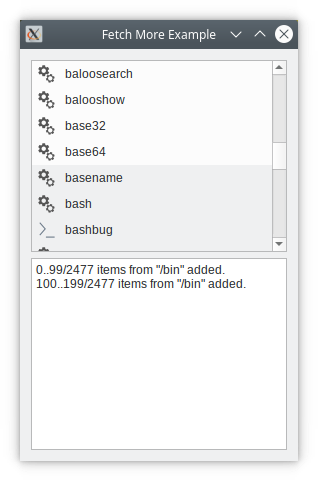
「Fetch More」の例では、オンデマンドでアイテムビューモデルに項目を追加する方法を示します。
データセットが巨大、あるいは無限である場合、モデルへのアイテムの追加はバッチ処理で行う必要があり、できればビューでそのアイテムが必要になったとき(つまり、ビューに表示されるようになったとき)にのみ追加するのが望ましいです。
このサンプルでは、ディレクトリのエントリを含むアイテム・ビュー・モデルである `FileListModel ` を実装します。また、GUI を設定し、ディレクトリをモデルに供給する `Window` もあります。
UIは、ルートディレクトリの内容を表示するリストを備えたダイアログで構成されています。ディレクトリはダブルクリックで移動できます。
下部には、ビューがモデルにさらなるデータを要求した際にメッセージを表示するログウィンドウがあります。
動作を確認するには、大規模なディレクトリ(例えば/bin )に移動し、画面の下部までスクロールしてください。データが取得される様子を示すログメッセージが表示されます。
FileListModel のコードを見てみましょう。
FileListModel クラスの定義
FileListModel はQAbstractListModel を継承しており、ディレクトリの内容を保持しています。このクラスは、ビューから要求があった場合にのみ、自身に項目を追加します。
class FileListModel : public QAbstractListModel
{
    Q_OBJECT

public:
    FileListModel(QObject *parent = nullptr);

    int rowCount(const QModelIndex &parent = QModelIndex()) const override;
    QVariant data(const QModelIndex &index, int role = Qt::DisplayRole) const override;

    QFileInfo fileInfoAt(const QModelIndex &) const;

signals:
    void numberPopulated(const QString &path, int start, int number, int total);

public slots:
    void setDirPath(const QString &path);

protected:
    bool canFetchMore(const QModelIndex &parent) const override;
    void fetchMore(const QModelIndex &parent) override;

private:
    QFileInfoList fileList;
    QString path;
    QFileIconProvider iconProvider;
    int fileCount = 0;
};その秘訣は、QAbstractItemModel からfetchMore() およびcanFetchMore() を再実装している点にあります。これらの関数は、アイテムビューがさらに多くのアイテムを必要とする際に呼び出されます。
setDirPath() 関数は、モデルが処理するディレクトリを設定します。モデルにアイテムのバッチを追加するたびに、numberPopulated() を発行します。
すべてのディレクトリエントリは `fileList` に保持されます。fileCount は、モデルに追加されたアイテムの数です。
FileListModel クラスの実装
まず、setDirPath() を取得します。
void FileListModel::setDirPath(const QString &path)
{
    QDir dir(path);

    beginResetModel();
    this->path = path;
    fileList = dir.entryInfoList(QDir::NoDot | QDir::AllEntries, QDir::Name);
    fileCount = 0;
    endResetModel();
}
QDir を使用して、ディレクトリの内容を取得します。モデルからすべてのアイテム(存在する場合)を削除したいことをQAbstractItemModel に通知する必要があります。
bool FileListModel::canFetchMore(const QModelIndex &parent) const
{
    if (parent.isValid())
        return false;
    return (fileCount < fileList.size());
}
canFetchMore() 関数は、ビューがさらにアイテムを必要とする際に呼び出されます。モデルにまだ追加されていないエントリが残っている場合はtrueを返し、そうでない場合はfalseを返します。
それでは、fetchMore() 関数そのものを見てみましょう:
void FileListModel::fetchMore(const QModelIndex &parent)
{
    if (parent.isValid())
        return;
    const int start = fileCount;
    const int remainder = int(fileList.size()) - start;
    const int itemsToFetch = qMin(batchSize, remainder);

    if (itemsToFetch <= 0)
        return;

    beginInsertRows(QModelIndex(), start, start + itemsToFetch - 1);

    fileCount += itemsToFetch;

    endInsertRows();

    emit numberPopulated(path, start, itemsToFetch, int(fileList.size()));
}まず、取得するアイテムの数を計算します。QAbstractItemModel が行の挿入に追従するためには、beginInsertRows()およびendInsertRows()が必須です。最後に、numberPopulated() を発行し、これがWindow によって処理されます。
この解説を締めくくるために、rowCount() およびdata() についても見ておきます。
int FileListModel::rowCount(const QModelIndex &parent) const
{
    return parent.isValid() ? 0 : fileCount;
}

QVariant FileListModel::data(const QModelIndex &index, int role) const
{
    if (!index.isValid())
        return {};

    const int row = index.row();
    if (row >= fileList.size() || row < 0)
        return {};

    switch (role) {
    case Qt::DisplayRole:
        return fileList.at(row).fileName();
    case Qt::BackgroundRole: {
        const int batch = row / batchSize;
        const QPalette &palette = QGuiApplication::palette();
        return (batch % 2) != 0 ? palette.alternateBase() : palette.base();
    }
    case Qt::DecorationRole:
        return iconProvider.icon(fileList.at(row));
    }
    return {};
}
行数は、現時点で追加したアイテムの数に過ぎず、ディレクトリ内のエントリ数ではない点に注意してください。
data() では、fileList から適切なエントリを返します。また、バッチごとに背景色を変えて区別しています。
© 2026 The Qt Company Ltd. Documentation contributions included herein are the copyrights of their respective owners. The documentation provided herein is licensed under the terms of the GNU Free Documentation License version 1.3 as published by the Free Software Foundation. Qt and respective logos are trademarks of The Qt Company Ltd. in Finland and/or other countries worldwide. All other trademarks are property of their respective owners.
