
モノリスプロジェクトのビルド
このチュートリアルでは、Qtサンプルアプリケーション用のモノリス型INTEGRITYプロジェクトのビルド手順を解説します。サポート対象のQtモジュールを使用しているQtサンプルアプリケーションであれば、どれでも選択可能です。
モノリス型INTEGRITYプロジェクトをビルドする前に、setEnvironment.sh スクリプトを実行してビルド環境を準備してください。このスクリプトの詳細については、「set環境シェルスクリプトの作成」を参照してください。
source ~/setEnvironment.shQt アプリケーションのビルド
CMakeツールCMake を使用して Qt6 向けにアプリケーションをビルドするには、ターミナルで次のコマンドを実行してください:
<Qt installation path>/bin/qt-cmake <Qt example application path>/CMakeLists.txt
cmake --build .
ここで、
qt-cmakeは、適切なインクルードパスを指定してプロジェクトを設定するためにCMakeを呼び出すラッパースクリプトです。qmakeツールqmake を使用して Qt6 に対応したアプリケーションをビルドするには、ターミナルで以下のコマンドを実行してください:
<Qt installation path>/bin/qmake <Qt example application path>/application.pro
make
モノリスプロジェクトのビルド
Qualcomm Snapdragon 8155P ボード用のボードサポートパッケージ(BSP)には、ボードパーティション用のイメージ一式を作成するためのビルドスクリプトが用意されています:
/work/ghs/sa8155/es7/es7_dev_env/hlos_dev_boot/apps/ghs_apps_proc/build_ghs.shmonolith-service.intファイルに Qt アプリケーションを追加して、ビルドに組み込みます:
- MULTI Launcherを起動します。
- 「Components 」>「Open Project Manager 」を選択します。
- /work/ghs/sa8155/es7/es7_dev_env/hlos_dev_boot/apps/ghs_apps_proc/qc_bspディレクトリにあるプロジェクトファイルdefault.gpjを選択します:
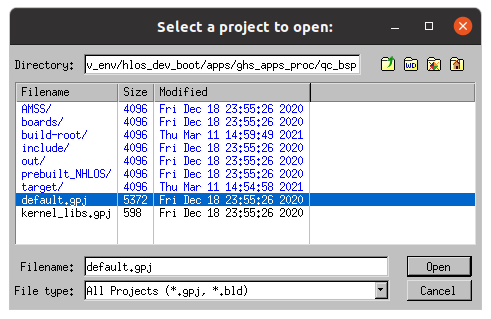
MULTIアプリケーションに、選択したフォルダ内のプロジェクトファイルの一覧が表示されたウィンドウが開きます。
- 「Open 」を選択します。
MULTIの「プロジェクトマネージャー」ビューに、開いたプロジェクトのツリー構造が表示されます。
「default.gpj 」のサブプロジェクトを順に確認します:
- target.auto vmm-adp-no-gvm-sa8155.gpj>vvm-adp-gvm-ref.gpj>monolith-service.gpj の順に選択します。プロジェクトの構造を確認したり、プロジェクトのファイルを編集したりできます。
- monolith-service.intを選択します
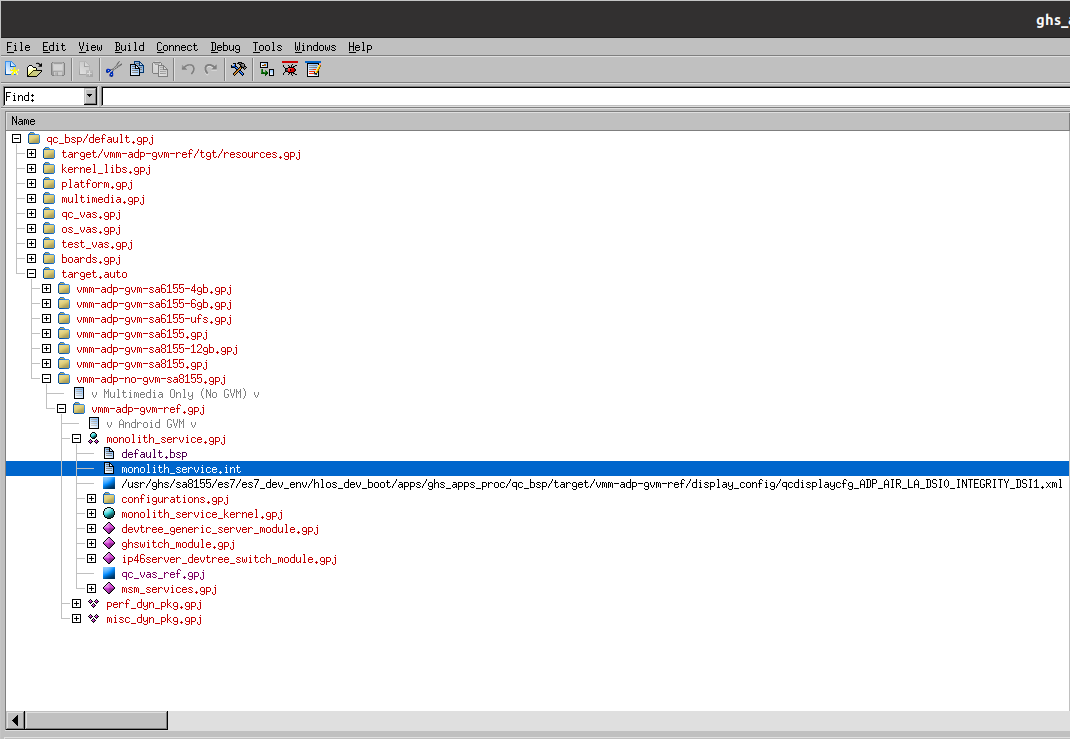
選択したmonolith-service.intファイルがプロジェクトツリー内でハイライト表示されます。
- ファイルを右クリックし、コンテキストメニューから「Edit 」を選択します。
- ファイルの末尾に、以下の行を追加します。
AddressSpace
Name    myappname
Filename    /path/to/your/app/executable
MemoryPoolSize 0x2700000
Language    C++
HeapSize    0x90000

Task Initial
StackSize    0x80000
StartIt    false
EndTask
Extendedmemorypoolsize 0x300000
EndAddressSpace
注: </path/to/your/app/executable>を 、アプリケーションの実行ファイルへのパスに置き換えてください 。
- ビルドスクリプトを実行します。
bash /work/ghs/sa8155/es7/es7_dev_env/hlos_dev_boot/apps/ghs_apps_proc/build_ghs.sh
これで、モノリスプロジェクトをボードにフラッシュする準備が整いました。
© 2026 The Qt Company Ltd. Documentation contributions included herein are the copyrights of their respective owners. The documentation provided herein is licensed under the terms of the GNU Free Documentation License version 1.3 as published by the Free Software Foundation. Qt and respective logos are trademarks of The Qt Company Ltd. in Finland and/or other countries worldwide. All other trademarks are property of their respective owners.
