
QSortFilterProxyModel Class
SortFilterProxyModel クラスは、別のモデルとビューの間でやり取りされるデータのソートおよびフィルタリングをサポートします。詳細...
| ヘッダー: | #include <QSortFilterProxyModel> |
| CMake: | find_package(Qt6 REQUIRED COMPONENTS Core) target_link_libraries(mytarget PRIVATE Qt6::Core) |
| qmake: | QT += core |
| 継承元: | QAbstractProxyModel |
パブリック型
(since 6.12) enum class | DataChangeRelevanceFlag { NotRelevant, RelevantForFiltering, RelevantForSorting, RelevantForFilteringAndSorting } |
| flags | DataChangeRelevanceFlags |
(since 6.10) enum class | Direction { Rows, Columns, Both } |
| flags | Directions |
プロパティ
|
|
パブリック関数
| QSortFilterProxyModel(QObject *parent = nullptr) | |
| virtual | ~QSortFilterProxyModel() |
| bool | autoAcceptChildRows() const |
| QBindable<bool> | bindableAutoAcceptChildRows() |
| QBindable<bool> | bindableDynamicSortFilter() |
| QBindable<Qt::CaseSensitivity> | bindableFilterCaseSensitivity() |
| QBindable<int> | bindableFilterKeyColumn() |
| QBindable<QRegularExpression> | bindableFilterRegularExpression() |
| QBindable<int> | bindableFilterRole() |
| QBindable<bool> | bindableIsSortLocaleAware() |
| QBindable<bool> | bindableRecursiveFilteringEnabled() |
| QBindable<Qt::CaseSensitivity> | bindableSortCaseSensitivity() |
| QBindable<int> | bindableSortRole() |
| bool | dynamicSortFilter() const |
| Qt::CaseSensitivity | filterCaseSensitivity() const |
| int | filterKeyColumn() const |
| QRegularExpression | filterRegularExpression() const |
| int | filterRole() const |
| bool | isRecursiveFilteringEnabled() const |
| bool | isSortLocaleAware() const |
| void | setAutoAcceptChildRows(bool accept) |
| void | setDynamicSortFilter(bool enable) |
| void | setFilterCaseSensitivity(Qt::CaseSensitivity cs) |
| void | setFilterKeyColumn(int column) |
| void | setFilterRole(int role) |
| void | setRecursiveFilteringEnabled(bool recursive) |
| void | setSortCaseSensitivity(Qt::CaseSensitivity cs) |
| void | setSortLocaleAware(bool on) |
| void | setSortRole(int role) |
| Qt::CaseSensitivity | sortCaseSensitivity() const |
| int | sortColumn() const |
| Qt::SortOrder | sortOrder() const |
| int | sortRole() const |
再実装されたパブリック関数
| virtual QModelIndex | buddy(const QModelIndex &index) const override |
| virtual bool | canFetchMore(const QModelIndex &parent) const override |
| virtual int | columnCount(const QModelIndex &parent = QModelIndex()) const override |
| virtual QVariant | data(const QModelIndex &index, int role = Qt::DisplayRole) const override |
| virtual bool | dropMimeData(const QMimeData *data, Qt::DropAction action, int row, int column, const QModelIndex &parent) override |
| virtual void | fetchMore(const QModelIndex &parent) override |
| virtual Qt::ItemFlags | flags(const QModelIndex &index) const override |
| virtual bool | hasChildren(const QModelIndex &parent = QModelIndex()) const override |
| virtual QVariant | headerData(int section, Qt::Orientation orientation, int role = Qt::DisplayRole) const override |
| virtual QModelIndex | index(int row, int column, const QModelIndex &parent = QModelIndex()) const override |
| virtual bool | insertColumns(int column, int count, const QModelIndex &parent = QModelIndex()) override |
| virtual bool | insertRows(int row, int count, const QModelIndex &parent = QModelIndex()) override |
| virtual QModelIndex | mapFromSource(const QModelIndex &sourceIndex) const override |
| virtual QItemSelection | mapSelectionFromSource(const QItemSelection &sourceSelection) const override |
| virtual QItemSelection | mapSelectionToSource(const QItemSelection &proxySelection) const override |
| virtual QModelIndex | mapToSource(const QModelIndex &proxyIndex) const override |
| virtual QModelIndexList | match(const QModelIndex &start, int role, const QVariant &value, int hits = 1, Qt::MatchFlags flags = Qt::MatchFlags(Qt::MatchStartsWith|Qt::MatchWrap)) const override |
| virtual QMimeData * | mimeData(const QModelIndexList &indexes) const override |
| virtual QStringList | mimeTypes() const override |
| virtual QModelIndex | parent(const QModelIndex &child) const override |
| virtual bool | removeColumns(int column, int count, const QModelIndex &parent = QModelIndex()) override |
| virtual bool | removeRows(int row, int count, const QModelIndex &parent = QModelIndex()) override |
| virtual int | rowCount(const QModelIndex &parent = QModelIndex()) const override |
| virtual bool | setData(const QModelIndex &index, const QVariant &value, int role = Qt::EditRole) override |
| virtual bool | setHeaderData(int section, Qt::Orientation orientation, const QVariant &value, int role = Qt::EditRole) override |
| virtual void | setSourceModel(QAbstractItemModel *sourceModel) override |
| virtual QModelIndex | sibling(int row, int column, const QModelIndex &idx) const override |
| virtual void | sort(int column, Qt::SortOrder order = Qt::AscendingOrder) override |
| virtual QSize | span(const QModelIndex &index) const override |
| virtual Qt::DropActions | supportedDropActions() const override |
パブリックスロット
| void | invalidate() |
| void | setFilterFixedString(const QString &pattern) |
| void | setFilterRegularExpression(const QString &pattern) |
| void | setFilterRegularExpression(const QRegularExpression ®ularExpression) |
| void | setFilterWildcard(const QString &pattern) |
シグナル
(since 6.0) void | autoAcceptChildRowsChanged(bool autoAcceptChildRows) |
| void | filterCaseSensitivityChanged(Qt::CaseSensitivity filterCaseSensitivity) |
| void | filterRoleChanged(int filterRole) |
| void | recursiveFilteringEnabledChanged(bool recursiveFilteringEnabled) |
| void | sortCaseSensitivityChanged(Qt::CaseSensitivity sortCaseSensitivity) |
| void | sortLocaleAwareChanged(bool sortLocaleAware) |
| void | sortRoleChanged(int sortRole) |
protected関数
(since 6.9) void | beginFilterChange() |
(since 6.12) QSortFilterProxyModel::DataChangeRelevanceFlags | dataChangeRelevanceFlags(const QModelIndex &sourceTopLeft, const QModelIndex &sourceBottomRight, const QList<int> &roles) const |
(since 6.10) void | endFilterChange(QSortFilterProxyModel::Directions directions = Direction::Both) |
| virtual bool | filterAcceptsColumn(int source_column, const QModelIndex &source_parent) const |
| virtual bool | filterAcceptsRow(int source_row, const QModelIndex &source_parent) const |
(since 6.0, until 6.13) void | invalidateColumnsFilter() |
(until 6.13) void | invalidateFilter() |
(since 6.0, until 6.13) void | invalidateRowsFilter() |
| virtual bool | lessThan(const QModelIndex &source_left, const QModelIndex &source_right) const |
詳細な説明
QSortFilterProxyModel は、項目のソート、項目のフィルタリング、あるいはその両方に使用できます。 このモデルは、ソースモデルのインデックスを、ビューで使用するための異なる位置に対応する新しいインデックスにマッピングすることで、ソースモデルの構造を変換します。このアプローチにより、基盤となるデータに変換を加えることなく、またメモリ内のデータを複製することなく、ビューに関して特定のソースモデルの構造を再構築することができます。
カスタムモデルが提供する項目をソートおよびフィルタリングしたいと仮定しましょう。ソートやフィルタリングを行わない場合、モデルとビューを設定するコードは次のようになります。
        QTreeView *treeView = new QTreeView;
        MyItemModel *model = new MyItemModel(this);

        treeView->setModel(model);
MyItemModel にソートとフィルタリングの機能を追加するには、`QSortFilterProxyModel`を作成し、`MyItemModel `を引数として`setSourceModel()`を呼び出し、その`QSortFilterProxyModel`をビューにインストールする必要があります:
        QTreeView *treeView = new QTreeView;
        MyItemModel *sourceModel = new MyItemModel(this);
        QSortFilterProxyModel *proxyModel = new QSortFilterProxyModel(this);

        proxyModel->setSourceModel(sourceModel);
        treeView->setModel(proxyModel);
この時点では、ソートもフィルタリングも有効になっておらず、ビューには元のデータが表示されます。QSortFilterProxyModelを通じて行われたいかなる変更も、元のモデルに反映されます。
QSortFilterProxyModelは、元のモデルのラッパーとして機能します。ソースのQModelIndexをソート済み/フィルタリング済みのモデルインデックスに変換する場合、またはその逆を行う場合は、mapToSource()、mapFromSource()、mapSelectionToSource()、およびmapSelectionFromSource()を使用してください。
注:デフォルトでは 、元のモデルが変更されるたびに、モデルは動的にデータの並べ替えとフィルタリングを再実行します。この動作は、dynamicSortFilter プロパティを設定することで変更できます。
「基本のソート/フィルタリング・モデル」および「カスタム・ソート/フィルタリング・モデル」の例では、QSortFilterProxyModel を使用して基本的なソートやフィルタリングを行う方法、およびこれをサブクラス化してカスタム動作を実装する方法を示しています。
ソート
QTableView および `QTreeView ` には、ユーザーがビューの水平ヘッダーをクリックしてビューを並べ替えられるかどうかを制御する `sortingEnabled ` プロパティがあります。例:
treeView->setSortingEnabled(true);この機能がオンになっている場合(デフォルトはオフ)、ヘッダーセクションをクリックすると、その列に基づいて項目がソートされます。クリックを繰り返すことで、昇順と降順を切り替えることができます。
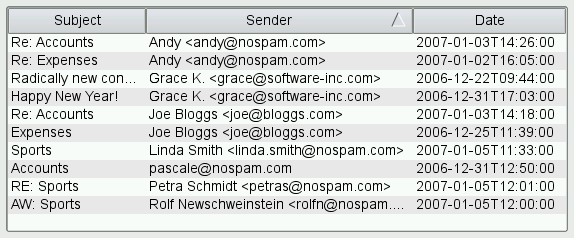
sort内部的には、ビューはモデルの `sort()` 仮想関数を呼び出し、モデル内のデータの順序を並べ替えます。 データをソート可能にするには、モデル内でsort()を実装するか、QSortFilterProxyModelを使用してモデルをラップします。QSortFilterProxyModelは、項目のsortRole()(デフォルトではQt::DisplayRole )を操作し、int 、QString 、QDateTime など、いくつかのデータ型を扱うものです。階層モデルの場合、ソートはすべての子アイテムに対して再帰的に適用されます。文字列の比較はデフォルトで大文字と小文字を区別しますが、sortCaseSensitivity プロパティを設定することで変更可能です。
カスタムソート動作を実現するには、`QSortFilterProxyModel` をサブクラス化し、項目の比較に使用される `lessThan()` を再実装します。例:
bool MySortFilterProxyModel::lessThan(const QModelIndex &left,
                                      const QModelIndex &right) const
{
    QVariant leftData = sourceModel()->data(left);
    QVariant rightData = sourceModel()->data(right);

    if (leftData.userType() == QMetaType::QDateTime)
        return leftData.toDateTime() < rightData.toDateTime();

    static const QRegularExpression emailPattern(u"[\\w\\.]*@[\\w\\.]*"_s);

    QString leftString = leftData.toString();
    if (left.column() == 1) {
        const QRegularExpressionMatch match = emailPattern.match(leftString);
        if (match.hasMatch())
            leftString = match.captured(0);
    }
    QString rightString = rightData.toString();
    if (right.column() == 1) {
        const QRegularExpressionMatch match = emailPattern.match(rightString);
        if (match.hasMatch())
            rightString = match.captured(0);
    }

    return QString::localeAwareCompare(leftString, rightString) < 0;
}(このコードスニペットは、「カスタムソート/フィルタモデル」のサンプルから引用したものです。)
ソートに対する別のアプローチとして、ビューでのソートを無効にし、ユーザーに特定の順序を強制する方法があります。これは、QSortFilterProxyModel(または、sort() を実装している場合は元のモデル)に対して、目的の列と順序を引数としてsort() を明示的に呼び出すことで行います。例えば:
proxyModel->sort(2, Qt::AscendingOrder);QSortFilterProxyModelは、列-1によるソートが可能です。この場合、基になるソースモデルのソート順序が返されます。
注: sortColumn()は、直近で使用されたソート列を返します。デフォルト値は-1であり、これはこのプロキシモデルがソートを行わないことを意味します。また、sort()は、sortColumn()を直近で使用されたソート列に設定することに注意してください。
フィルタリング
ソートに加えて、QSortFilterProxyModel を使用すると、特定のフィルタに一致しない項目を非表示にすることができます。フィルタはQRegularExpression オブジェクトを使用して指定され、指定された列について、各項目のfilterRole()(デフォルトではQt::DisplayRole )に適用されます。QRegularExpression オブジェクトを使用すると、正規表現、ワイルドカードパターン、または固定文字列に一致させることができます。例:
        proxyModel->setFilterRegularExpression(QRegularExpression("\\.png", QRegularExpression::CaseInsensitiveOption));
        proxyModel->setFilterKeyColumn(1);
階層型モデルの場合、フィルタはすべての子要素に対して再帰的に適用されます。親アイテムがフィルタに一致しない場合、その子要素はいずれも表示されません。
一般的な使用例として、QLineEdit 内でユーザーがフィルタの正規表現、ワイルドカードパターン、または固定文字列を指定できるようにすることが挙げられます。これを行うには、QLineEdit::textChanged()またはtextEdited()シグナルを、setFilterRegularExpression()、setFilterWildcard()、またはsetFilterFixedString()のいずれかに接続します。
filterAcceptsRow() およびfilterAcceptsColumn() 関数を再実装することで、独自のフィルタリング動作を実現できます。たとえば(「カスタムソート/フィルタモデル」のサンプルより)、以下の実装ではfilterKeyColumn プロパティを無視し、列 0、1、2 に対してフィルタリングを実行します:
bool MySortFilterProxyModel::filterAcceptsRow(int sourceRow,
                                              const QModelIndex &sourceParent) const
{
    QModelIndex index0 = sourceModel()->index(sourceRow, 0, sourceParent);
    QModelIndex index1 = sourceModel()->index(sourceRow, 1, sourceParent);
    QModelIndex index2 = sourceModel()->index(sourceRow, 2, sourceParent);

    return (sourceModel()->data(index0).toString().contains(filterRegularExpression())
            || sourceModel()->data(index1).toString().contains(filterRegularExpression()))
            && dateInRange(sourceModel()->data(index2).toDate());
}(このコードスニペットは、「カスタムソート/フィルタリングモデル」のサンプルから引用したものです。)
大量のフィルタリング処理を行い、beginFilterChange() /endFilterChange() を繰り返し呼び出す必要がある場合、モデルの実装によっては、beginResetModel() /endResetModel() を使用する方が効率的である可能性があります。ただし、beginResetModel() /endResetModel() はプロキシモデルを元の状態に戻し、選択情報が失われるため、プロキシモデルが再構築されることになります。
サブクラス化
QAbstractProxyModel およびそのサブクラスはQAbstractItemModel から派生しているため、通常のモデルのサブクラス化に関するアドバイスの多くはプロキシモデルにも適用されます。さらに、このクラスの関数のデフォルト実装の多くは、関連するソースモデルの同等の関数を呼び出すように記述されている点に留意してください。 この単純なプロキシ機構は、より複雑な動作を持つソースモデルではオーバーライドする必要がある場合があります。例えば、ソースモデルがhasChildren()のカスタム実装を提供している場合は、プロキシモデルでも同様の実装を提供する必要があります。
注: モデルのサブクラス化に関する一般的なガイドラインについては 、『Model Subclassing Reference』を参照してください。
関連項目: QAbstractProxyModel 、QAbstractItemModel 、Model/View Programming、Basic Sort/Filter Model Example、Custom Sort/Filter Model Example、およびQIdentityProxyModel 。
メンバ型のドキュメント
[since 6.12] enum class QSortFilterProxyModel::DataChangeRelevanceFlag
flags QSortFilterProxyModel::DataChangeRelevanceFlags
この列挙型は、ソースの変更がどの操作に関連するかを指定するために使用されます。
| 定数 | 値 | 説明 |
|---|---|---|
QSortFilterProxyModel::DataChangeRelevanceFlag::NotRelevant | 0x00 | 変更は、フィルタリングと並べ替えのどちらにも関係ありません。 |
QSortFilterProxyModel::DataChangeRelevanceFlag::RelevantForFiltering | 0x01 | 変更はフィルタリングには関係ありません |
QSortFilterProxyModel::DataChangeRelevanceFlag::RelevantForSorting | 0x02 | この変更は並べ替えに影響する |
QSortFilterProxyModel::DataChangeRelevanceFlag::RelevantForFilteringAndSorting | RelevantForFiltering | RelevantForSorting | この変更は、フィルタリングとソートの両方に影響します |
この列挙型は Qt 6.12 で導入されました。
DataChangeRelevanceFlags 型は、QFlags<DataChangeRelevanceFlag> の typedef です。これは、DataChangeRelevanceFlag の値の論理和(OR)を格納します。
dataChangeRelevanceFlags()も参照してください 。
[since 6.10] enum class QSortFilterProxyModel::Direction
flags QSortFilterProxyModel::Directions
この列挙型は、フィルターパラメータが変更された際に、カスタムフィルターが適用される方向を指定するために使用されます。
| 定数 | 値 | 説明 |
|---|---|---|
QSortFilterProxyModel::Direction::Rows | 0x01 | フィルタが適用される対象rows |
QSortFilterProxyModel::Direction::Columns | 0x02 | フィルタが適用される対象columns |
QSortFilterProxyModel::Direction::Both | Rows | Columns | このフィルタは行と列の両方に適用されます |
この列挙型は Qt 6.10 で導入されました。
Directions 型は、QFlags<Direction> の typedef です。これは、Direction 値の OR 組み合わせを格納します。
beginFilterChange() およびendFilterChange()も参照してください 。
プロパティのドキュメント
[bindable, since 6.0] autoAcceptChildRows : bool
注:この プロパティは、QProperty バインディングに対応しています。
true の場合、プロキシモデルは、受け入れられた行の子行であっても、それ自体が通常であれば除外される場合でも、除外しません。
デフォルト値は false です。
この列挙型は Qt 6.0 で導入されました。
アクセス関数:
| bool | autoAcceptChildRows() const |
| void | setAutoAcceptChildRows(bool accept) |
Notifier シグナル:
| void | autoAcceptChildRowsChanged(bool autoAcceptChildRows) |
recursiveFilteringEnabled およびfilterAcceptsRow()も参照してください 。
[bindable] dynamicSortFilter : bool
注:この プロパティは、QProperty バインディングをサポートしています。
このプロパティは、ソースモデルの内容が変更されるたびに、プロキシモデルが動的にソートおよびフィルタリングされるかどうかを示します。
なお、dynamicSortFilter が true の場合は、プロキシ・モデルを介してソース・モデルを更新してはなりません。 たとえば、QComboBox でプロキシモデルを設定した場合、addItem() などのモデルを更新する関数を使用しても、期待どおりに動作しません。別の方法として、dynamicSortFilter を false に設定し、QComboBox に項目を追加した後にsort() を呼び出すことができます。
デフォルト値は true です。
アクセス関数:
| bool | dynamicSortFilter() const |
| void | setDynamicSortFilter(bool enable) |
sortColumn()も参照してください 。
[bindable] filterCaseSensitivity : Qt::CaseSensitivity
注:この プロパティは、QProperty バインディングに対応しています。
このプロパティは、ソースモデルの内容をフィルタリングするために使用されるQRegularExpression パターンの大文字小文字の区別設定を保持します。
デフォルトでは、フィルタは大文字と小文字を区別します。
注: このプロパティを設定すると 、新しい大文字と小文字の区別設定が `filterRegularExpression ` プロパティに反映されるため、そのバインディングが解除されます。同様に、filterRegularExpression を明示的に設定すると、現在の大文字と小文字の区別設定が変更され、それによってそのバインディングが解除されます。
アクセス関数:
| Qt::CaseSensitivity | filterCaseSensitivity() const |
| void | setFilterCaseSensitivity(Qt::CaseSensitivity cs) |
通知シグナル:
| void | filterCaseSensitivityChanged(Qt::CaseSensitivity filterCaseSensitivity) |
関連項目: filterRegularExpression およびsortCaseSensitivity 。
[bindable] filterKeyColumn : int
注:この プロパティは、QProperty バインディングに対応しています。
このプロパティは、ソースモデルの内容をフィルタリングするために使用されるキーが読み込まれる列を保持します。
デフォルト値は 0 です。値が -1 の場合、すべての列からキーが読み込まれます。
アクセス関数:
| int | filterKeyColumn() const |
| void | setFilterKeyColumn(int column) |
[bindable] filterRegularExpression : QRegularExpression
注:この プロパティは、QProperty バインディングに対応しています。
このプロパティには、ソースモデルの内容をフィルタリングするために使用されるQRegularExpression が格納されます。
QRegularExpression のオーバーロードを通じてこのプロパティを設定すると、現在のfilterCaseSensitivity が上書きされます。デフォルトでは、QRegularExpression はすべてのコンテンツに一致する空の文字列です。
QRegularExpression が設定されていないか、空の文字列が設定されている場合、ソースモデル内のすべてのデータが受け入れられます。
正規表現はソースモデルのすべての行に対して照合されるため、複雑または不正な形式のパターンを使用すると、特に大規模なモデルで処理を行う場合、アプリケーション全体の動作が遅くなったり、フリーズしたりする可能性があります。 アプリケーション開発者は、正規表現を使用する前に、そのパフォーマンスとスケーラビリティを測定することをお勧めします。正規表現が信頼できない可能性のある入力から得られたものである場合は、このメソッドに渡す前にサニタイズを行うか、代わりに `setFilterFixedString()` を使用することを検討してください。
注: このプロパティを設定すると、 新しい正規表現の大文字と小文字の区別設定がfilterCaseSensitivity プロパティに反映され、その結果、そのバインディングが解除されます。同様に、filterCaseSensitivity を明示的に設定すると、現在の正規表現の大文字と小文字の区別設定が変更され、それによってバインディングが解除されます。
アクセス関数:
| QRegularExpression | filterRegularExpression() const |
| void | setFilterRegularExpression(const QString &pattern) |
| void | setFilterRegularExpression(const QRegularExpression ®ularExpression) |
関連項目: filterCaseSensitivity 、setFilterWildcard()、およびsetFilterFixedString()。
[bindable] filterRole : int
注:この プロパティは、QProperty バインディングに対応しています。
このプロパティには、アイテムのフィルタリング時にソースモデルのデータをクエリするために使用されるアイテムのロールが格納されます。
デフォルト値はQt::DisplayRole です。
アクセス関数:
| int | filterRole() const |
| void | setFilterRole(int role) |
通知シグナル:
| void | filterRoleChanged(int filterRole) |
関連項目 :filterAcceptsRow()
[bindable] isSortLocaleAware : bool
注:この プロパティは、QProperty のバインディングに対応しています。
このプロパティは、ソート時に文字列を比較するために使用される、ローカル環境を意識した設定を保持します。
デフォルトでは、ソートはローカルを認識しません。
アクセス関数:
| bool | isSortLocaleAware() const |
| void | setSortLocaleAware(bool on) |
通知シグナル:
| void | sortLocaleAwareChanged(bool sortLocaleAware) |
関連項目: sortCaseSensitivity およびlessThan()。
[bindable] recursiveFilteringEnabled : bool
注:この プロパティは、QProperty のバインディングに対応しています。
このプロパティは、フィルタを子要素に対して再帰的に適用するかどうか、および一致する子要素がある場合、その親要素も表示されるかどうかを指定します。
デフォルト値は false です。
アクセス関数:
| bool | isRecursiveFilteringEnabled() const |
| void | setRecursiveFilteringEnabled(bool recursive) |
通知シグナル:
| void | recursiveFilteringEnabledChanged(bool recursiveFilteringEnabled) |
関連項目: ` autoAcceptChildRows ` および `filterAcceptsRow()`。
[bindable] sortCaseSensitivity : Qt::CaseSensitivity
注:この プロパティは、QProperty バインディングをサポートしています。
このプロパティは、ソート時に文字列を比較する際に使用される大文字と小文字の区別に関する設定を保持します
デフォルトでは、ソートは大文字と小文字を区別します。
アクセス関数:
| Qt::CaseSensitivity | sortCaseSensitivity() const |
| void | setSortCaseSensitivity(Qt::CaseSensitivity cs) |
通知シグナル:
| void | sortCaseSensitivityChanged(Qt::CaseSensitivity sortCaseSensitivity) |
関連項目: filterCaseSensitivity およびlessThan()。
[bindable] sortRole : int
注:この プロパティは、QProperty バインディングをサポートしています。
このプロパティには、項目の並べ替え時にソースモデルのデータを照会するために使用される項目の役割が格納されます。
デフォルト値はQt::DisplayRole です。
アクセス関数:
| int | sortRole() const |
| void | setSortRole(int role) |
通知シグナル:
| void | sortRoleChanged(int sortRole) |
関連項目: ` lessThan()`。
メンバ関数のドキュメント
[explicit] QSortFilterProxyModel::QSortFilterProxyModel(QObject *parent = nullptr)
指定されたparent を使用して、ソートフィルターモデルを構築します。
[virtual noexcept] QSortFilterProxyModel::~QSortFilterProxyModel()
このソートフィルターモデルを破棄します。
[signal, since 6.0] void QSortFilterProxyModel::autoAcceptChildRowsChanged(bool autoAcceptChildRows)
このシグナルは、autoAcceptChildRows プロパティの値が変更されたときに発信されます。
注: autoAcceptChildRows プロパティの通知 シグナルです。
この関数は Qt 6.0 で導入されました。
「autoAcceptChildRows」も参照してください 。
[protected, since 6.9] void QSortFilterProxyModel::beginFilterChange()
フィルタの変更を準備します。
カスタムフィルタリング(例:filterAcceptsRow())を実装しており、フィルタパラメータが変更されようとしている場合は、この関数を呼び出す必要があります。
void MySortFilterProxyModel::setFilterMaximumDate(QDate date)
{
    beginFilterChange();
    maxDate = date;
    endFilterChange(QSortFilterProxyModel::Direction::Rows);
}
フィルタの変更が完了したら、行フィルタの場合は `Direction::Rows `、列フィルタの場合は `Direction::Columns `、行と列の両方がフィルタリングされる場合は `Direction::Columns|Direction::Rows ` を引数として `endFilterChange()` を呼び出してください。
この関数は Qt 6.9 で導入されました。
endFilterChange()も参照してください 。
[override virtual] QModelIndex QSortFilterProxyModel::buddy(const QModelIndex &index) const
QAbstractProxyModel::buddy(const QModelIndex &index) const を再実装します。
[override virtual] bool QSortFilterProxyModel::canFetchMore(const QModelIndex &parent) const
QAbstractProxyModel::canFetchMore(const QModelIndex &parent) const を再実装します。
[override virtual] int QSortFilterProxyModel::columnCount(const QModelIndex &parent = QModelIndex()) const
QAbstractItemModel::columnCount(const QModelIndex &parent) const を再実装します。
[override virtual] QVariant QSortFilterProxyModel::data(const QModelIndex &index, int role = Qt::DisplayRole) const
QAbstractProxyModel::data(const QModelIndex &proxyIndex, int role) const を再実装します。
setData()も参照してください 。
[protected invokable, since 6.12] QSortFilterProxyModel::DataChangeRelevanceFlags QSortFilterProxyModel::dataChangeRelevanceFlags(const QModelIndex &sourceTopLeft, const QModelIndex &sourceBottomRight, const QList<int> &roles) const
サブクラスでこのスロットを再実装し、ソースモデルの変更がフィルタリングやソートに関連する場合を指定します。これは、ソートやフィルタリングの結果に影響を与えないソースモデルの変更に対して、不必要な `filterAcceptsRow()` および `lessThan()` の呼び出しを回避するためのパフォーマンス最適化として使用されます。sourceTopLeft 、sourceBottomRight 、roles の各パラメータは、関連性の評価対象となっている変更に対応するソースモデルのdataChanged()シグナルによって発信されるものです。
注:バイナリ互換性の制約により 、Qt 7 まではこのメソッドを仮想メソッドにすることはできません。その間、サブクラスでこれをスロットまたはQ_INVOKABLE メソッドとして再宣言しておけば、QSortFilterProxyModel が動的にそれを検出して呼び出します。
注: デフォルトの実装では 、すべての変更がフィルタリングに関連していると見なされ、ソートに関してはソースのソート列における変更のみが関連すると見なされます。
注:この関数は 、メタオブジェクトシステムを介して、また QML から呼び出すことができます。Q_INVOKABLE を参照してください。
この関数は Qt 6.12 で導入されました。
関連項目: DataChangeRelevanceFlags 、filterAcceptsRow()、およびlessThan()。
[override virtual] bool QSortFilterProxyModel::dropMimeData(const QMimeData *data, Qt::DropAction action, int row, int column, const QModelIndex &parent)
QAbstractProxyModel::dropMimeData (const QMimeData *data, Qt::DropAction action, int row, int column, const QModelIndex &parent)を再実装します。
[protected, since 6.10] void QSortFilterProxyModel::endFilterChange(QSortFilterProxyModel::Directions directions = Direction::Both)
フィルタパラメータが変更された後、現在のフィルタリングを無効にします。
カスタムフィルタリング(例:filterAcceptsRow())を実装しており、フィルタパラメータが変更された場合は、この関数を呼び出す必要があります。directions パラメータは、カスタムフィルタが行、列、またはその両方に影響を与えるかを指定します。
フィルタパラメータが変更される直前に `beginFilterChange()` を呼び出し、フィルタパラメータの変更が完了したら、続いてこの関数を呼び出してください。 行フィルタの場合はdirections をDirection::Rows に設定して呼び出します(つまり、filterAcceptsRow() が実装されている場合)。列フィルタの場合はDirection::Columns に設定して呼び出します(つまり、filterAcceptsColumn() が実装されている場合)。両方のフィルタ関数が実装されている場合は、Direction::Both に設定して呼び出します。
この関数は Qt 6.10 で導入されました。
[override virtual] void QSortFilterProxyModel::fetchMore(const QModelIndex &parent)
QAbstractProxyModel::fetchMore (const QModelIndex &parent)を再実装します。
[virtual protected] bool QSortFilterProxyModel::filterAcceptsColumn(int source_column, const QModelIndex &source_parent) const
指定されたsource_column およびsource_parent で示される列の項目をモデルに含めるべき場合はtrue を返し、そうでない場合はfalse を返します。
注: デフォルトの実装では 、常に `true` を返します。記述された動作を得るには、このメソッドを再実装する必要があります。
関連項目: filterAcceptsRow()、setFilterFixedString()、setFilterRegularExpression()、およびsetFilterWildcard()。
[virtual protected] bool QSortFilterProxyModel::filterAcceptsRow(int source_row, const QModelIndex &source_parent) const
指定されたsource_row およびsource_parent で示される行の項目がモデルに含めるべきものである場合、true を返します。そうでない場合はfalseを返します。
デフォルトの実装では、該当する項目が保持する値が、フィルタ文字列、ワイルドカード文字列、または正規表現と一致する場合に `true ` を返します。
注:デフォルトでは 、行を受け入れるかどうかを判断するために「Qt::DisplayRole 」が使用されます。これは、filterRole プロパティを設定することで変更できます。
関連項目: filterAcceptsColumn()、setFilterFixedString()、setFilterRegularExpression()、およびsetFilterWildcard()。
[signal] void QSortFilterProxyModel::filterCaseSensitivityChanged(Qt::CaseSensitivity filterCaseSensitivity)
このシグナルは、フィルタの大文字小文字の区別設定が「filterCaseSensitivity 」に変更されたときに発信されます。
注: プロパティfilterCaseSensitivity に対する通知 信号です。
[signal] void QSortFilterProxyModel::filterRoleChanged(int filterRole)
このシグナルは、フィルターのロールが「filterRole 」に変更されたときに発信されます。
注: プロパティ「filterRole 」の通知 シグナルです。
[override virtual] Qt::ItemFlags QSortFilterProxyModel::flags(const QModelIndex &index) const
QAbstractProxyModel::flags(const QModelIndex &index) const の再実装です。
[override virtual] bool QSortFilterProxyModel::hasChildren(const QModelIndex &parent = QModelIndex()) const
QAbstractProxyModel::hasChildren(const QModelIndex &parent) const を再実装します。
[override virtual] QVariant QSortFilterProxyModel::headerData(int section, Qt::Orientation orientation, int role = Qt::DisplayRole) const
QAbstractProxyModel::headerData(int section, Qt::Orientation orientation, int role) const を再実装します。
setHeaderData()も参照してください 。
[override virtual] QModelIndex QSortFilterProxyModel::index(int row, int column, const QModelIndex &parent = QModelIndex()) const
QAbstractItemModel::index (int row, int column, const QModelIndex &parent)const を再実装します。
[override virtual] bool QSortFilterProxyModel::insertColumns(int column, int count, const QModelIndex &parent = QModelIndex())
QAbstractItemModel::insertColumns (int column, int count, const QModelIndex &parent)を再実装します。
[override virtual] bool QSortFilterProxyModel::insertRows(int row, int count, const QModelIndex &parent = QModelIndex())
QAbstractItemModel::insertRows (int row, int count, const QModelIndex &parent)を再実装します。
[slot] void QSortFilterProxyModel::invalidate()
現在の並べ替えとフィルタリングを無効にします。
beginFilterChange() およびendFilterChange()も参照してください 。
[protected, since 6.0, until 6.13] void QSortFilterProxyModel::invalidateColumnsFilter()
この関数は、バージョン 6.13 で非推奨となる予定です。
代わりに、beginFilterChange() およびendFilterChange(Direction::Rows) を使用してください。
列に対する現在のフィルタリングを無効にします。
カスタムフィルタリング(filterAcceptsColumn() による)を実装しており、フィルタパラメータが変更された場合は、この関数を呼び出す必要があります。これはinvalidateFilter() とは異なり、filterAcceptsRow() を呼び出さず、filterAcceptsColumn() のみを呼び出します。行が変更されない列を非表示または表示したい場合は、invalidateFilter() の代わりにこれを使用できます。
フィルタパラメータを変更する前に、beginFilterChange() を呼び出してください。
この関数は Qt 6.0 で導入されました。
invalidate()、invalidateRowsFilter()、およびbeginFilterChange()も参照してください 。
[protected, until 6.13] void QSortFilterProxyModel::invalidateFilter()
この関数は、バージョン 6.13 で非推奨となる予定です。
代わりに、beginFilterChange() およびendFilterChange() を使用してください。
現在のフィルタリングを無効にします。
カスタムフィルタリング(例:filterAcceptsRow())を実装しており、フィルタパラメータが変更された場合は、この関数を呼び出す必要があります。
フィルタパラメータが変更される前に、beginFilterChange() を呼び出してください。
void MySortFilterProxyModel::setFilterMaximumDate(QDate date)
{
    beginFilterChange();
    maxDate = date;
    endFilterChange(QSortFilterProxyModel::Direction::Rows);
}invalidate()、invalidateColumnsFilter()、invalidateRowsFilter()、およびbeginFilterChange()も参照してください 。
[protected, since 6.0, until 6.13] void QSortFilterProxyModel::invalidateRowsFilter()
この関数は、バージョン 6.13 で非推奨となる予定です。
代わりに、beginFilterChange() およびendFilterChange(Direction::Columns) を使用してください。
行に対する現在のフィルタリングを無効にします。
この関数は、カスタムフィルタリング(filterAcceptsRow() による)を実装しており、フィルタパラメータが変更された場合に呼び出す必要があります。これは、invalidateFilter() とは異なり、filterAcceptsColumn() を呼び出さず、filterAcceptsRow() のみを呼び出す点が異なります。列が変更されない行を非表示または表示したい場合は、invalidateFilter() の代わりにこれを使用できます。
フィルタパラメータを変更する前に、beginFilterChange() を呼び出してください。
この関数は Qt 6.0 で導入されました。
invalidate()、invalidateFilter()、およびinvalidateColumnsFilter()も参照してください 。
[virtual protected] bool QSortFilterProxyModel::lessThan(const QModelIndex &source_left, const QModelIndex &source_right) const
指定されたインデックスsource_left で参照される項目の値が、指定されたインデックスsource_right で参照される項目の値よりも小さい場合は `true ` を返し、それ以外の場合は `false` を返します。
この関数は、ソート時のoperator< として使用され、QAbstractItemModel::compareData() を使用します。
デフォルトでは、QStringの比較は大文字と小文字が区別されますが、sortCaseSensitivity プロパティを使用してこれを変更することができます。
デフォルトでは、QModelIndexes に関連付けられたQt::DisplayRole が比較に使用されます。これは、sortRole プロパティを設定することで変更できます。
注: 渡されるインデックスは 、ソースモデルに対応しています。
「 sortRole 」、「sortCaseSensitivity 」、および「dynamicSortFilter 」も参照してください 。
[override virtual] QModelIndex QSortFilterProxyModel::mapFromSource(const QModelIndex &sourceIndex) const
QAbstractProxyModel::mapFromSource(const QModelIndex &sourceIndex) const を再実装します。
ソースモデルからのsourceIndex が与えられた場合、QSortFilterProxyModel 内のモデルインデックスを返します。
mapToSource()も参照してください 。
[override virtual] QItemSelection QSortFilterProxyModel::mapSelectionFromSource(const QItemSelection &sourceSelection) const
QAbstractProxyModel::mapSelectionFromSource(const QItemSelection &sourceSelection) const を再実装します。
[override virtual] QItemSelection QSortFilterProxyModel::mapSelectionToSource(const QItemSelection &proxySelection) const
QAbstractProxyModel::mapSelectionToSource(const QItemSelection &proxySelection) const を再実装します。
[override virtual] QModelIndex QSortFilterProxyModel::mapToSource(const QModelIndex &proxyIndex) const
QAbstractProxyModel::mapToSource(const QModelIndex &proxyIndex) const の再実装。
ソートフィルタモデルから、指定されたproxyIndex に対応するソースモデルのインデックスを返します。
mapFromSource()も参照してください 。
[override virtual] QModelIndexList QSortFilterProxyModel::match(const QModelIndex &start, int role, const QVariant &value, int hits = 1, Qt::MatchFlags flags = Qt::MatchFlags(Qt::MatchStartsWith|Qt::MatchWrap)) const
QAbstractItemModel::match (const QModelIndex &start, int role, const QVariant &value, int hits, Qt::MatchFlags flags)const を再実装します。
[override virtual] QMimeData *QSortFilterProxyModel::mimeData(const QModelIndexList &indexes) const
QAbstractProxyModel::mimeData(const QModelIndexList &indexes) const の再実装です。
[override virtual] QStringList QSortFilterProxyModel::mimeTypes() const
QAbstractProxyModel::mimeTypes() const を再実装します。
[override virtual] QModelIndex QSortFilterProxyModel::parent(const QModelIndex &child) const
QAbstractItemModel::parent(const QModelIndex &index) const を再実装します。
[signal] void QSortFilterProxyModel::recursiveFilteringEnabledChanged(bool recursiveFilteringEnabled)
このシグナルは、再帰フィルタの設定が「recursiveFilteringEnabled 」に変更されたときに発信されます。
注: プロパティ `recursiveFilteringEnabled` に対する通知 シグナルです。
[override virtual] bool QSortFilterProxyModel::removeColumns(int column, int count, const QModelIndex &parent = QModelIndex())
QAbstractItemModel::removeColumns (int column, int count, const QModelIndex &parent)を再実装します。
[override virtual] bool QSortFilterProxyModel::removeRows(int row, int count, const QModelIndex &parent = QModelIndex())
QAbstractItemModel::removeRows (int row, int count, const QModelIndex &parent)を再実装します。
[override virtual] int QSortFilterProxyModel::rowCount(const QModelIndex &parent = QModelIndex()) const
QAbstractItemModel::rowCount(const QModelIndex &parent) const を再実装します。
[override virtual] bool QSortFilterProxyModel::setData(const QModelIndex &index, const QVariant &value, int role = Qt::EditRole)
QAbstractProxyModel::setData (const QModelIndex &index, const QVariant &value, int role)を再実装します。
data()も参照してください 。
[slot] void QSortFilterProxyModel::setFilterFixedString(const QString &pattern)
ソースモデルの内容をフィルタリングするために使用される固定文字列を、指定されたpattern に設定します。
このメソッドは正規表現のオプションをリセットしますが、大文字と小文字の区別は維持されます。
注: このメソッドを呼び出すと 正規表現が更新されるため、filterRegularExpression に対するバインディングが解除されます。ただし、filterCaseSensitivity に対するバインディングには影響しません。
関連項目: setFilterCaseSensitivity()、setFilterRegularExpression()、setFilterWildcard()、およびfilterRegularExpression()。
[slot] void QSortFilterProxyModel::setFilterRegularExpression(const QString &pattern)
ソースモデルの内容をフィルタリングするために使用される正規表現を、pattern に設定します。
このメソッドは内部でQRegularExpression を使用するため、新しいコードではこちらを優先して使用してください。
このメソッドは正規表現のオプションをリセットしますが、大文字と小文字の区別は維持されます。
注: このメソッドを呼び出すと 正規表現が更新されるため、filterRegularExpression へのバインディングが解除されます。ただし、filterCaseSensitivity へのバインディングには影響しません。
注: プロパティfilterRegularExpression のセッター 関数です。
注:この スロットは オーバーロードされています。このスロットに接続するには:
// Connect using qOverload:
connect(sender, &SenderClass::signal,
        sortFilterProxyModel, qOverload(&QSortFilterProxyModel::setFilterRegularExpression));

// Or using a lambda as wrapper:
connect(sender, &SenderClass::signal,
sortFilterProxyModel, [receiver = sortFilterProxyModel](const QString &pattern) { receiver->setFilterRegularExpression(pattern); }); 関連項目: setFilterCaseSensitivity()、setFilterWildcard()、setFilterFixedString()、およびfilterRegularExpression()。
[slot] void QSortFilterProxyModel::setFilterWildcard(const QString &pattern)
ソースモデルの内容をフィルタリングするために使用されるワイルドカード式を、指定されたpattern に設定します。
このメソッドは正規表現のオプションをリセットしますが、大文字と小文字の区別は維持されます。
注: このメソッドを呼び出すと 正規表現が更新されるため、filterRegularExpression に対するバインディングが解除されます。ただし、filterCaseSensitivity に対するバインディングには影響しません。
関連項目: setFilterCaseSensitivity()、setFilterRegularExpression()、setFilterFixedString()、およびfilterRegularExpression()。
[override virtual] bool QSortFilterProxyModel::setHeaderData(int section, Qt::Orientation orientation, const QVariant &value, int role = Qt::EditRole)
QAbstractProxyModel::setHeaderData(int section, Qt::Orientation orientation, const QVariant &value, int role) を再実装します。
headerData()も参照してください 。
[override virtual] void QSortFilterProxyModel::setSourceModel(QAbstractItemModel *sourceModel)
QAbstractProxyModel::setSourceModel(QAbstractItemModel *sourceModel) を再実装します。
[override virtual] QModelIndex QSortFilterProxyModel::sibling(int row, int column, const QModelIndex &idx) const
QAbstractProxyModel::sibling (int row, int column, const QModelIndex &idx)const を再実装します。
[override virtual] void QSortFilterProxyModel::sort(int column, Qt::SortOrder order = Qt::AscendingOrder)
QAbstractProxyModel::sort(int column, Qt::SortOrder order) を再実装します。
指定されたorder において、column に基づいてモデルをソートします。ソートcolumn が0未満の場合、指定されたorder において、ソースモデルの行に基づいてモデルがソートされます。
sortColumn()も参照してください 。
[signal] void QSortFilterProxyModel::sortCaseSensitivityChanged(Qt::CaseSensitivity sortCaseSensitivity)
このシグナルは、ソート時の大文字小文字の区別が「sortCaseSensitivity 」に変更されたときに発せられます。
注: プロパティ `sortCaseSensitivity` に関する通知 シグナルです。
int QSortFilterProxyModel::sortColumn() const
現在ソートに使用されている列を返します
これは、直近で使用されたソート列を返します。デフォルト値は -1 で、これはこのプロキシモデルがソートを行わないことを意味します。
sort()も参照してください 。
[signal] void QSortFilterProxyModel::sortLocaleAwareChanged(bool sortLocaleAware)
このシグナルは、ロケール対応の設定が「sortLocaleAware 」に変更されたときに発信されます。
注: プロパティ `isSortLocaleAware` に対する通知 シグナルです。
Qt::SortOrder QSortFilterProxyModel::sortOrder() const
現在ソートに使用されている順序を返します
これは、直近で使用されたソート順序を返します。デフォルト値は `Qt::AscendingOrder` です。
sort()も参照してください 。
[signal] void QSortFilterProxyModel::sortRoleChanged(int sortRole)
このシグナルは、ソートロールが「sortRole 」に変更されたときに発火します。
注: プロパティ `sortRole` に対する通知 シグナルです。
[override virtual] QSize QSortFilterProxyModel::span(const QModelIndex &index) const
QAbstractProxyModel::span(const QModelIndex &index) const を再実装します。
[override virtual] Qt::DropActions QSortFilterProxyModel::supportedDropActions() const
QAbstractProxyModel::supportedDropActions() const を再実装します。
© 2026 The Qt Company Ltd. Documentation contributions included herein are the copyrights of their respective owners. The documentation provided herein is licensed under the terms of the GNU Free Documentation License version 1.3 as published by the Free Software Foundation. Qt and respective logos are trademarks of The Qt Company Ltd. in Finland and/or other countries worldwide. All other trademarks are property of their respective owners.
