
シンプルな棒グラフ
QMLアプリケーションでのBars3D の使用方法。
「シンプルな棒グラフ」では、Bars3D とQMLを使用して、シンプルな3D棒グラフを作成する方法を説明します。
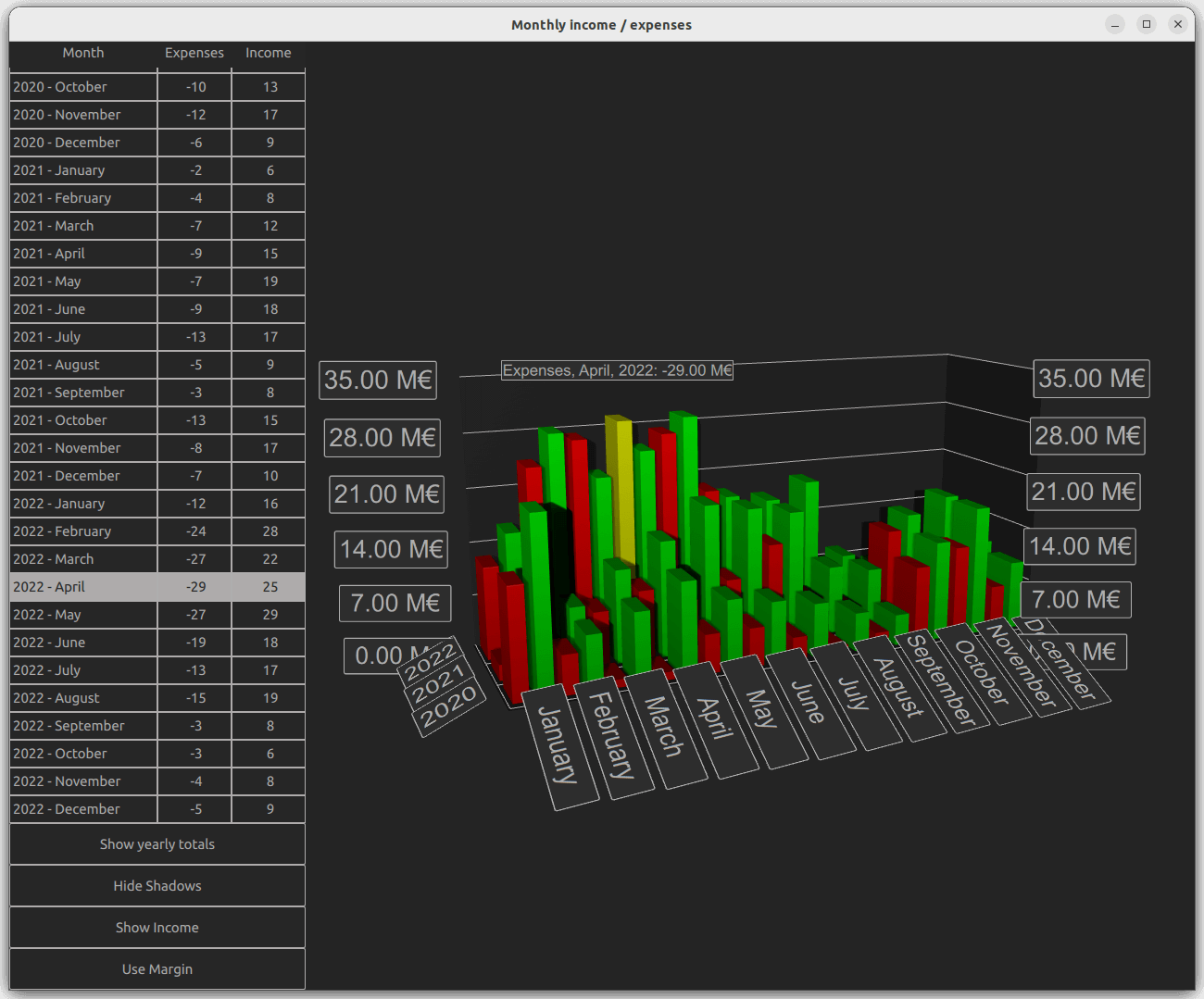
以下のセクションでは、系列を切り替えたり、一度に複数の系列を表示したりする方法について説明します。QML アプリケーションの基本機能に関する詳細については、「シンプルな散布図」を参照してください。
例の動作確認
サンプルは次の手順で実行できます。
- Qt Creator
Welcome モードを開き、Examples からこの例を選択します。詳細については、「Qt Creator: チュートリアル: ビルドと実行」を参照してください。
- Qt Extension for Visual Studio Code
Command Palette から `Qt: Open Qt examples ` コマンドを実行し、リストからサンプルを選択します。詳細については、「Qt Extension for Visual Studio Code: チュートリアル: ビルドと実行」を参照してください。
データ
サンプルデータセットは、架空の企業の数年にわたる月ごとの収入と支出です。このデータは、Data.qml のリストモデルで次のように定義されています。
ListModel {
    id: dataModel
    ListElement{ timestamp: "2016-01"; expenses: "-4";  income: "5" }
    ListElement{ timestamp: "2016-02"; expenses: "-5";  income: "6" }
    ListElement{ timestamp: "2016-03"; expenses: "-7";  income: "4" }
    ...
各データ項目には、タイムスタンプ、収入、支出の 3 つのロールがあります。タイムスタンプの値は、<four digit year>-<two digit month> の形式です。通常、年と月は棒グラフの行と列にマッピングされますが、値として表示できるのは収入か支出のいずれか一方のみです。
それでは、このデータをBars3D グラフに追加しましょう。その中に2つのBar3DSeries を作成し、まず収入用のシリーズから始めます:
Bar3DSeries {
    id: barSeries
    itemLabelFormat: "Income, @colLabel, @rowLabel: @valueLabel"
    baseGradient: barGradient

    ItemModelBarDataProxy {
        id: modelProxy
        itemModel: graphData.model
        rowRole: "timestamp"
        columnRole: "timestamp"
        valueRole: "income"
        rowRolePattern: /^(\d\d\d\d).*$/
        columnRolePattern: /^.*-(\d\d)$/
        rowRoleReplace: "\\1"
        columnRoleReplace: "\\1"
        multiMatchBehavior: ItemModelBarDataProxy.MultiMatchBehavior.Cumulative
    }
...データは、シリーズ内のItemModelBarDataProxy のitemModel プロパティに紐付けられます。valueRole については、目的の値が含まれているため、income フィールドを指定します。年と月は同じフィールド内に含まれているため、これらを取得するのは少し複雑です。 これらの値を抽出するには、rowRole およびcolumnRole の両方に対して、timestamp フィールドを指定します。さらに、各ロールについてフィールド内容の正しい部分を抽出するために、それらのロールに対して検索パターンと置換ルールを指定します。検索パターンは通常のJavaScript正規表現であり、置換ルールでは、正規表現に一致するフィールド内容を何に置き換えるかを指定します。 この場合、フィールドの内容全体を、行と列の両方において最初にキャプチャされた部分文字列である「年」または「月」のみに置き換えます。正規表現を使用した置換機能の詳細については、QString::replace(const QRegExp &rx, constQString &after) 関数のドキュメントを参照してください。
multiMatchBehavior プロパティは、複数のアイテムモデル項目が同じ行/列の組み合わせに一致した場合の処理を指定します。この場合、それらの値を合計します。当アイテムモデルには重複する月がないため、各月の値を表示する際にはこのプロパティは影響しません。ただし、後で年間の合計を表示したい場合には、このプロパティが重要になります。
次に、支出用の別のシリーズを追加します:
Bar3DSeries {
    id: secondarySeries
    visible: false
    itemLabelFormat: "Expenses, @colLabel, @rowLabel: -@valueLabel"
    baseGradient: secondaryGradient

    ItemModelBarDataProxy {
        id: secondaryProxy
        itemModel: graphData.model
        rowRole: "timestamp"
        columnRole: "timestamp"
        valueRole: "expenses"
        rowRolePattern: /^(\d\d\d\d).*$/
        columnRolePattern: /^.*-(\d\d)$/
        valueRolePattern: /-/
        rowRoleReplace: "\\1"
        columnRoleReplace: "\\1"
        multiMatchBehavior: ItemModelBarDataProxy.MultiMatchBehavior.Cumulative
    }
...モデルには支出が負の値として含まれていますが、収入の棒グラフと簡単に比較できるように、正の値の棒グラフとして表示することもできます。「valueRolePattern 」を使用してマイナス記号を削除します。デフォルトの置換文字列は空文字列であるため、置換文字列を指定する必要はありません。
当面は、シリーズのvisible プロパティを使用して、2つ目のシリーズを非表示にします。
カスタム軸ラベル
Axes.qml データには月を表す数値が含まれており、ラベルがごちゃごちゃしてしまうため、列軸のカテゴリラベルを再定義します:
Category3DAxis {
    id: columnAxis
    labels: ["January", "February", "March", "April", "May", "June",
        "July", "August", "September", "October", "November", "December"]
    labelAutoAngle: 30
}
低いカメラアングルでも軸ラベルが読み取りやすくなるよう、軸ラベルの自動回転を設定します。
シリーズの切り替え
main.qml では、グラフやさまざまな UI 要素を設定します。ここで注目すべき興味深いコードブロックが 3 つあります。最初のコードブロックでは、2 つのシリーズの表示/非表示を切り替えるだけで、可視化するデータを「収入」、「支出」、または「両方」の間で変更する方法を示しています:
onClicked: {
    if (text === "Show Expenses") {
        barSeries.visible = false
        secondarySeries.visible = true
        barGraph.valueAxis.labelFormat = "-%.2f M\u20AC"
        secondarySeries.itemLabelFormat = "Expenses, @colLabel, @rowLabel: @valueLabel"
        text = "Show Both"
    } else if (text === "Show Both") {
        barSeries.visible = true
        barGraph.valueAxis.labelFormat = "%.2f M\u20AC"
        secondarySeries.itemLabelFormat = "Expenses, @colLabel, @rowLabel: -@valueLabel"
        text = "Show Income"
    } else { // text === "Show Income"
        secondarySeries.visible = false
        text = "Show Expenses"
    }
}
軸ラベルの書式と項目選択ラベルの書式を微調整し、実際には正の値として処理されていた支出のマイナス記号が正しく表示されるようにしています。
2つ目の注目すべきコードブロックは、プロキシのプロパティを調整して可視化されるデータを変更する部分です:
onClicked: {
    if (text === "Show yearly totals") {
        modelProxy.autoRowCategories = true
        secondaryProxy.autoRowCategories = true
        modelProxy.columnRolePattern = /^.*$/
        secondaryProxy.columnRolePattern = /^.*$/
        graphAxes.value.autoAdjustRange = true
        barGraph.columnAxis = graphAxes.total
        text = "Show all years"
    } else if (text === "Show all years") {
        modelProxy.autoRowCategories = true
        secondaryProxy.autoRowCategories = true
        modelProxy.columnRolePattern = /^.*-(\d\d)$/
        secondaryProxy.columnRolePattern = /^.*-(\d\d)$/
        graphAxes.value.min = 0
        graphAxes.value.max = 35
        barGraph.columnAxis = graphAxes.column
        text = "Show 2020 - 2022"
    } else { // text === "Show 2020 - 2022"
        // Explicitly defining row categories, since we do not want to show data for
        // all years in the model, just for the selected ones.
        modelProxy.autoRowCategories = false
        secondaryProxy.autoRowCategories = false
        modelProxy.rowCategories = ["2020", "2021", "2022"]
        secondaryProxy.rowCategories = ["2020", "2021", "2022"]
        text = "Show yearly totals"
    }
}年間の合計を表示するには、各年の12ヶ月分を1つの棒グラフにまとめます。これは、すべてのモデル項目に一致するcolumnRolePattern を指定することで実現されます。これにより、シリーズは1つの列のみを持つようになります。先にプロキシに対して指定した累積multiMatchBehavior がここで重要となり、各年の12ヶ月分の値が合計されて1つの棒グラフとして表示されます。
特定の年のサブセットのみを表示するには、ItemModelBarDataProxy 項目のautoRowCategories を false に設定し、行カテゴリを明示的に定義します。これにより、指定された行カテゴリ内の項目のみが可視化されます。
3つ目の興味深いブロックでは、行と列の値が分かっている場合に、ItemModelBarDataProxy のメソッドであるrowCategoryIndex() およびcolumnCategoryIndex() を使用して、項目の行インデックスと列インデックスを取得する方法を示しています:
var timestamp = graphData.model.get(mainview.currentRow).timestamp
var pattern = /(\d\d\d\d)-(\d\d)/
var matches = pattern.exec(timestamp)
var rowIndex = modelProxy.rowCategoryIndex(matches[1])
var colIndex

if (barGraph.columnAxis == graphAxes.total)
    colIndex = 0 // Just one column when showing yearly totals
else
    colIndex = modelProxy.columnCategoryIndex(matches[2])

if (selectedSeries.visible)
    mainview.selectedSeries.selectedBar = Qt.point(rowIndex, colIndex)
else if (barSeries.visible)
    barSeries.selectedBar = Qt.point(rowIndex, colIndex)
else
secondarySeries.selectedBar = Qt.point(rowIndex, colIndex)© 2026 The Qt Company Ltd. Documentation contributions included herein are the copyrights of their respective owners. The documentation provided herein is licensed under the terms of the GNU Free Documentation License version 1.3 as published by the Free Software Foundation. Qt and respective logos are trademarks of The Qt Company Ltd. in Finland and/or other countries worldwide. All other trademarks are property of their respective owners.
