
天気情報
「天気情報」の例では、C++プラグイン内でユーザーの現在位置を利用して、Webサービスからローカルコンテンツを取得する方法を示しています。 Qt Quick、 Qt Positioningを使用します。
この例で使用されている Qt Positioning クラス:
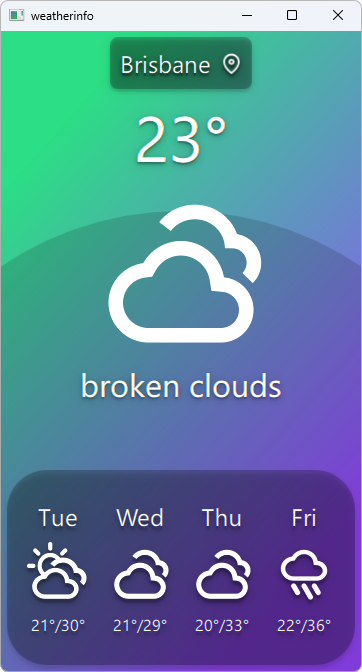
例の動作確認
以下の場所からこの例を実行できます:
- Qt Creator
Welcome モードを開き、Examples からサンプルを選択します。詳細については、Qt Creator の「チュートリアル:ビルドと実行」を参照してください。
- Qt Extension for Visual Studio Code
Command Palette から `Qt: Open Qt examples ` コマンドを実行し、リストからサンプルを選択します。詳細については、Qt Extension for Visual Studio Code の「チュートリアル:ビルドと実行」を参照してください。```
気象データプロバイダ
このサンプルでは、互いに関連性のないいくつかの気象データプロバイダーを使用しています:
使用するプロバイダーは実行時に自動的に選択され、選択されたプロバイダーが利用できない場合は変更可能です。ただし、手動で指定することはできません。
注: すべてのプロバイダーで無料 プランが使用されるため、天気情報の取得リクエスト数には一定の制限があります。制限を超過した場合、プロバイダーは一時的に利用できなくなります。すべてのプロバイダーが利用できない状態になると、アプリケーションは天気情報を一切表示できなくなります。この場合、少なくとも1つのプロバイダーが再び利用可能になるまで待つ必要があります。
アプリケーションデータモデル
この例の重要な部分は、WeatherData およびAppModel クラスに含まれるアプリケーションのデータモデルです。WeatherData は、HTTPサービスから取得した天気情報を表します。これは単純なデータクラスですが、後でQMLから適切に利用できるようにするためにQ_PROPERTY を使用しています。また、QML_ANONYMOUS マクロも使用しており、これによりQML内で認識されるようになります。
class WeatherData : public QObject {
    Q_OBJECT
    Q_PROPERTY(QString dayOfWeek
               READ dayOfWeek WRITE setDayOfWeek
               NOTIFY dataChanged)
    Q_PROPERTY(QString weatherIcon
               READ weatherIcon WRITE setWeatherIcon
               NOTIFY dataChanged)
    Q_PROPERTY(QString weatherDescription
               READ weatherDescription WRITE setWeatherDescription
               NOTIFY dataChanged)
    Q_PROPERTY(QString temperature
               READ temperature WRITE setTemperature
               NOTIFY dataChanged)
    QML_ANONYMOUS

public:
    explicit WeatherData(QObject *parent = 0);
    WeatherData(const WeatherData &other);
    WeatherData(const WeatherInfo &other);

    QString dayOfWeek() const;
    QString weatherIcon() const;
    QString weatherDescription() const;
    QString temperature() const;

    void setDayOfWeek(const QString &value);
    void setWeatherIcon(const QString &value);
    void setWeatherDescription(const QString &value);
    void setTemperature(const QString &value);

signals:
    void dataChanged();
};
AppModel はアプリケーション全体の状態をモデル化します。起動時には、QGeoPositionInfoSource::createDefaultSource() を使用して、プラットフォームのデフォルトの位置情報ソースを取得します。
AppModel::AppModel(QObject*parent) :
        QObject(parent),
        d(newAppModelPrivate)
{
    d->src=QGeoPositionInfoSource::createDefaultSource(this);

    if(d->src) {
        d->useGps= true;
        connect(d->src, &QGeoPositionInfoSource::positionUpdated,
                this, &AppModel::positionUpdated);
        connect(d->src, &QGeoPositionInfoSource::errorOccurred,
                this, &AppModel::positionError);
#if QT_CONFIG(permissions)
        QLocationPermission permission;
        permission.setAccuracy(QLocationPermission::Precise);
        permission.setAvailability(QLocationPermission::WhenInUse);

        switch(qApp->checkPermission(permission)) {
        caseQt::PermissionStatus::Undetermined:
            qApp->requestPermission(permission, [this](constQPermission&permission) {
                if(permission.status()==Qt::PermissionStatus::Granted)
                    d->src->startUpdates();
                else
                    positionError(QGeoPositionInfoSource::AccessError);
            });
            break;
        caseQt::PermissionStatus::Denied:
            qWarning("Location permission is denied");
            positionError(QGeoPositionInfoSource::AccessError);
            break;
        caseQt::PermissionStatus::Granted:
            d->src->startUpdates();
            break;
        }
#else
        d->src->startUpdates();
#endif
    }else{
        d->useGps= false;
        d->city= "Brisbane";
        emitcityChanged();
        requestWeatherByCity();
    }

    QTimer*refreshTimer = newQTimer(this);
    connect(refreshTimer, &QTimer::timeout, this, &AppModel::refreshWeather);
    using namespacestd::chrono;
    refreshTimer->start(60s);
}デフォルトのソースが利用できない場合は、静的な位置を指定してその場所の天気を取得します。一方、位置情報のソースがある場合は、そのpositionUpdated()シグナルをAppModel のスロットに接続し、startUpdates()を呼び出します。これにより、デバイスの位置情報の定期的な更新が開始されます。
位置情報の更新を受信すると、返された座標の経度と緯度を使用して、指定された場所の気象データを取得します。
void AppModel::positionUpdated(QGeoPositionInfo gpsPos)
{
    d->coord = gpsPos.coordinate();

    if (!d->useGps)
        return;

    requestWeatherByCoordinates();
}
この処理を UI に通知するために、新しい都市が使用された際には `cityChanged() ` シグナルを、気象情報の更新が発生した際には `weatherChanged() ` シグナルをそれぞれ発信します。
また、このモデルではQML_ELEMENT マクロも使用しており、これによりQML内で利用可能になります。
class AppModel : public QObject
{
    Q_OBJECT
    Q_PROPERTY(bool ready
               READ ready
               NOTIFY readyChanged)
    Q_PROPERTY(bool hasSource
               READ hasSource
               NOTIFY readyChanged)
    Q_PROPERTY(bool hasValidCity
               READ hasValidCity
               NOTIFY cityChanged)
    Q_PROPERTY(bool hasValidWeather
               READ hasValidWeather
               NOTIFY weatherChanged)
    Q_PROPERTY(bool useGps
               READ useGps WRITE setUseGps
               NOTIFY useGpsChanged)
    Q_PROPERTY(QString city
               READ city WRITE setCity
               NOTIFY cityChanged)
    Q_PROPERTY(WeatherData *weather
               READ weather
               NOTIFY weatherChanged)
    Q_PROPERTY(QQmlListProperty<WeatherData> forecast
               READ forecast
               NOTIFY weatherChanged)
    QML_ELEMENT

public:
    explicit AppModel(QObject *parent = 0);
    ~AppModel();

    bool ready() const;
    bool hasSource() const;
    bool useGps() const;
    bool hasValidCity() const;
    bool hasValidWeather() const;
    void setUseGps(bool value);

    QString city() const;
    void setCity(const QString &value);

    WeatherData *weather() const;
    QQmlListProperty<WeatherData> forecast() const;

public slots:
    Q_INVOKABLE void refreshWeather();

signals:
    void readyChanged();
    void useGpsChanged();
    void cityChanged();
    void weatherChanged();
};
天気予報情報には `QQmlListProperty ` を使用しており、これには今後数日間の天気予報が含まれています(日数はプロバイダによって異なります)。これにより、QML から簡単に予報にアクセスできるようになります。
カスタムモデルをQMLに公開する
モデルをQML UIレイヤーに公開するには、QML_ELEMENT およびQML_ANONYMOUS マクロを使用します。これらのマクロの詳細については、QQmlEngine クラスの説明を参照してください。
QMLでこれらの型を利用できるようにするには、ビルド設定を適宜更新する必要があります。
CMake ビルド
CMake ベースのビルドの場合、CMakeLists.txt に以下を追加する必要があります:
qt_add_qml_module(weatherinfo
    URI Weather
    VERSION 1.0
    SOURCES
        appmodel.cpp appmodel.h
        openmeteobackend.cpp openmeteobackend.h
        openweathermapbackend.cpp openweathermapbackend.h
        providerbackend.cpp providerbackend.h
        weatherapibackend.cpp weatherapibackend.h
    QML_FILES
        BigForecastIcon.qml
        ForecastIcon.qml
        WeatherIcon.qml
        WeatherInfo.qml
    RESOURCES
        icons/weather-few-clouds.svg
        icons/weather-fog.svg
        icons/weather-haze.svg
        icons/weather-icy.svg
        icons/weather-overcast.svg
        icons/weather-showers.svg
        icons/weather-sleet.svg
        icons/weather-snow.svg
        icons/weather-storm.svg
        icons/weather-sunny-very-few-clouds.svg
        icons/weather-sunny.svg
        icons/weather-thundershower.svg
        icons/weather-showers-scattered.svg
        icons/waypoint.svg
)
qmake ビルド
qmakeによるビルドの場合、weatherinfo.pro ファイルを次のように変更する必要があります:
CONFIG += qmltypes
QML_IMPORT_NAME = Weather
QML_IMPORT_MAJOR_VERSION = 1

qml_resources.files = \
    qmldir \
    BigForecastIcon.qml \
    ForecastIcon.qml \
    WeatherIcon.qml \
    WeatherInfo.qml \
    icons/weather-few-clouds.svg \
    icons/weather-fog.svg \
    icons/weather-haze.svg \
    icons/weather-icy.svg \
    icons/weather-overcast.svg \
    icons/weather-showers.svg \
    icons/weather-showers-scattered.svg \
    icons/weather-sleet.svg \
    icons/weather-snow.svg \
    icons/weather-storm.svg \
    icons/weather-sunny-very-few-clouds.svg \
    icons/weather-sunny.svg \
    icons/weather-thundershower.svg \
    icons/waypoint.svg

qml_resources.prefix = /qt/qml/Weather

RESOURCES += qml_resources
QML でのモデルのインスタンス化
最後に、実際の QML 内で、AppModel をインスタンス化します:
Window {
    id: window
    AppModel {
        id: appModel
        onReadyChanged: {
            if (appModel.ready)
                statesItem.state = "ready"
            else
                statesItem.state = "loading"
        }
    }
}
このようにモデルがインスタンス化されると、QMLドキュメント内の他の場所でそのプロパティを使用できるようになります:
    BigForecastIcon {
        id: current
        Layout.fillWidth: true
        Layout.fillHeight: true

        weatherIcon: (appModel.hasValidWeather
                      ? appModel.weather.weatherIcon
                      : "sunny")
}© 2026 The Qt Company Ltd. Documentation contributions included herein are the copyrights of their respective owners. The documentation provided herein is licensed under the terms of the GNU Free Documentation License version 1.3 as published by the Free Software Foundation. Qt and respective logos are trademarks of The Qt Company Ltd. in Finland and/or other countries worldwide. All other trademarks are property of their respective owners.
