
Qt Quick パーティクルの例 - 画像パーティクル
これは、QML パーティクルシステムにおけるアフェクターの使用例を集めたものです。
これは、パーティクルシステムにおけるアフェクターの使用に関連する、簡単なQMLのサンプル集です。各サンプルは、特定のタイプや機能を強調した小さなQMLファイルです。
「All at once」では、ImageParticle のいくつかの機能を同時に紹介しています。
sprites: [
    Sprite {
        name: "bear"
        source: "images/bear_tiles.png"
        frameCount: 13
        frameDuration: 120
    }
]
colorVariation: 0.5
rotationVelocityVariation: 360
colorTable: "images/colortable.png"「Colored」は、色の変化を加えたシンプルなImageParticle を示しています。
ImageParticle {
    anchors.fill: parent
    source: "qrc:///particleresources/star.png"
    alpha: 0
    alphaVariation: 0.2
    colorVariation: 1.0
}
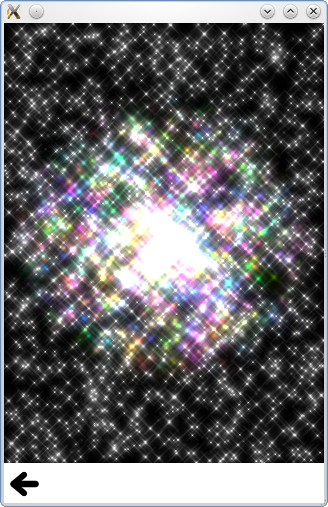
「Color Table」は、パーティクルのライフサイクルを通じて色を変化させ、固定された虹色の効果を生み出します。
source: "qrc:///particleresources/glowdot.png"
colorTable: "images/colortable.png"
sizeTable: "images/colortable.png"
「Deformation」は、ヒトデのパーティクルを回転させたり、押しつぶしたりします。
ImageParticle {
    system: sys
    groups: ["goingLeft", "goingRight"]
    source: "images/starfish_4.png"
    rotation: 90
    rotationVelocity: 90
    autoRotation: true
}
ImageParticle {
    system: sys
    groups: ["goingDown"]
    source: "images/starfish_0.png"
    rotation: 180
    yVector: PointDirection { y: 0.5; yVariation: 0.25; xVariation: 0.25; }
}
「Rotation」は autoRotate プロパティを実演しており、パーティクルが移動方向に沿って回転します。
「Sharing」は、複数のImageParticlesが同じパーティクルをレンダリングしようとした場合に何が起こるかを示しています。以下のImageParticle は、ListView の内部でパーティクルをレンダリングします:
ImageParticle {
    anchors.fill: parent
    system: particles
    source: "images/flower.png"
    alpha: 0.1
    color: "white"
    rotationVariation: 180
    z: -1
}次のImageParticle はリストのハイライト内に配置されており、他のImageParticle の上方にパーティクルを描画します。
ImageParticle {
    anchors.fill: parent
    system: particles
    source: "images/flower.png"
    color: "red"
    clip: true
    alpha: 1.0
}このImageParticle では色と不透明度(アルファ)が設定されているため、パーティクルが異なる色でレンダリングされる点に注意してください。回転については何も指定されていないため、他のImageParticle と回転を共有し、両方の花は同じ方向に回転します。別のImageParticle で回転を元に戻すことも可能です。その場合は、rotationVariationを明示的に0に設定するだけで済みます。
「Sprites」では、各パーティクルごとに静止画像を使用する代わりに、画像パーティクルを使用してアニメーション付きスプライトを描画する方法を示しています。
© 2026 The Qt Company Ltd. Documentation contributions included herein are the copyrights of their respective owners. The documentation provided herein is licensed under the terms of the GNU Free Documentation License version 1.3 as published by the Free Software Foundation. Qt and respective logos are trademarks of The Qt Company Ltd. in Finland and/or other countries worldwide. All other trademarks are property of their respective owners.
