
マルチスクリーン
Multi Screenは、複数のディスプレイに対応したデスクトップスタイルのWaylandコンポジターです。
はじめに
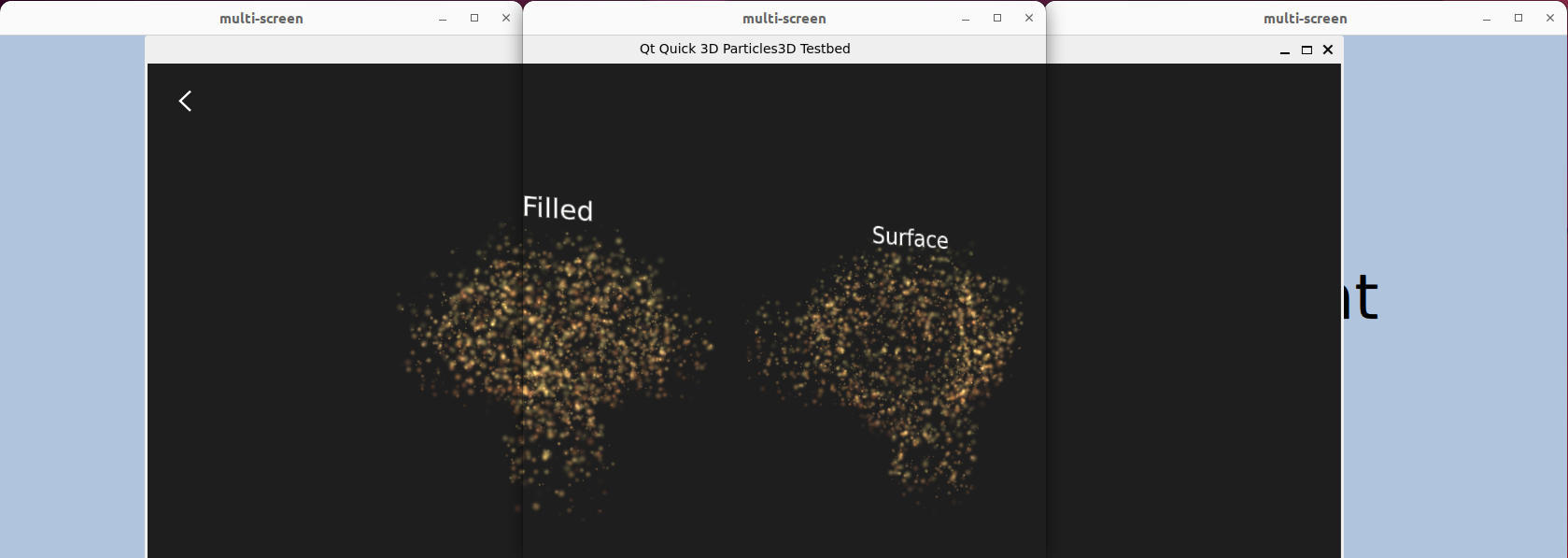
Multi-screenは、複数のディスプレイに対応したデスクトップスタイルのWaylandコンポジターのサンプルです。
Qt を使用した Qt Wayland Compositor については、「Minimal Qml」の例を参照してください。
マルチスクリーンのサポート
システム上で利用可能な画面ごとに、このサンプルは `CompositorScreen` を作成します。これは `WaylandOutput` のサブクラスです。利用可能な物理画面が 1 つしかない場合、このサンプルはダミーデータを使用して 3 つの画面をエミュレートします。
Instantiator {
    id: screens
    model: emulated ? emulatedScreens : Qt.application.screens

    delegate: CompositorScreen {
        surfaceArea.color: "lightsteelblue"
        text: name
        compositor: comp
        screen: emulated ? Qt.application.screens[0] : modelData
        Component.onCompleted: if (!comp.defaultOutput) comp.defaultOutput = this
        position: Qt.point(virtualX, virtualY)
        windowed: emulated
    }
}各WaylandOutput にはWindowが含まれており、これはクライアントのコンテンツを格納するために使用されます。これは、 Qt Wayland Compositor。各Windowは互いに分離されているため、Qt Quick のアイテムをWindow間で共有することはできません。したがって、クライアントが接続してShellSurface が作成されると、各画面上に1つのShellSurfaceItem が作成されます。
for (var i = 0; i < screens.count; ++i)
    createShellSurfaceItem(shellSurface, moveItem, screens.objectAt(i));
これらのアイテムは、同じクライアントコンテンツのビューとして機能します。クライアントのサーフェス自体は一度だけ作成され、サーフェス・アイテム間で共有されます。
最上位のサーフェス・アイテムは、各出力における背景のRectangle の子として作成されます。これらのビューは後で使用するために保存され、クライアントが子ウィンドウを生成した場合、それらは最上位ウィンドウのアイテムの子として配置されます。
var parentSurfaceItem = output.viewsBySurface[shellSurface.parentSurface];
var parent = parentSurfaceItem || output.surfaceArea;クライアントのコンテンツは、一度に1つまたは2つの画面でのみ表示されます。ShellSurfaceItem の位置は同期されており、ウィンドウが1つの画面に入ると、同時に別の画面から移動されます。これにより、画面間をシームレスに移動する単一のアイテムのように見えます。 クライアントのグローバルな位置は、共有されたmoveItem に保存され、各画面のShellSurfaceItem の相対位置はこれに基づいて計算されます。moveItem が現在ある画面の境界外にある場合、その座標はこれを反映し、その画面上では表示されません。
x: surfaceItem.moveItem.x - surfaceItem.output.geometry.x
y: surfaceItem.moveItem.y - surfaceItem.output.geometry.y
最後に、適切なタイミングで `WaylandQuickItem::setPrimary()` が呼び出され、ShellSurface のプライマリビューが設定されます。これは、クライアントが最大化または全画面表示を要求した際に使用されます。プライマリの `ShellSurfaceItem ` は、現在表示されている範囲に基づいて選択されます。
注: 同じコンポジター内で複数の Wayland出力をサポートするには 、QGuiApplication オブジェクトが構築される前にQt::AA_ShareOpenGLContexts 属性を設定する必要があります。この例では、main() 関数の最初の部分でこれを行っています。
QCoreApplication::setAttribute(Qt::AA_ShareOpenGLContexts, true);「マルチ出力」も参照してください 。
© 2026 The Qt Company Ltd. Documentation contributions included herein are the copyrights of their respective owners. The documentation provided herein is licensed under the terms of the GNU Free Documentation License version 1.3 as published by the Free Software Foundation. Qt and respective logos are trademarks of The Qt Company Ltd. in Finland and/or other countries worldwide. All other trademarks are property of their respective owners.
