
Qt Quick 3D物理学 - 質量の例
物体の質量と慣性の設定方法をいくつか紹介します。
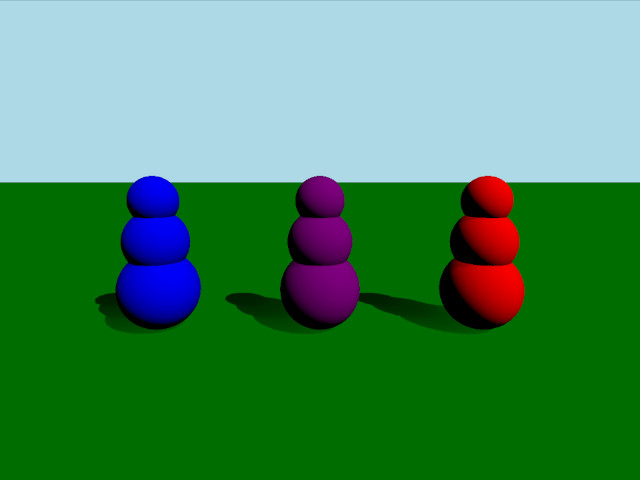
この例では、物体の質量と慣性を設定する3つの異なる方法を示します。シーンは、3つの球体を垂直に積み重ねた3つの物体で構成されています。これらの物体はすべて同じ質量を持っていますが、重心と慣性テンソルが異なるため、衝突時の挙動が異なります。
設定
まず、PhysicsWorld を追加します:
PhysicsWorld {
    running: true
    gravity: Qt.vector3d(0, -9.81, 0)
    typicalLength: 1
    typicalSpeed: 10
    scene: viewport.scene
}
環境、カメラ、ライトを用意する通常のセットアップを行います:
environment: SceneEnvironment {
    clearColor: "lightblue"
    backgroundMode: SceneEnvironment.Color
}

PerspectiveCamera {
    id: camera
    position: Qt.vector3d(0, 2, 5)
    eulerRotation: Qt.vector3d(-10, 0, 0)
    clipFar: 100
    clipNear: 0.01
}

DirectionalLight {
    eulerRotation.x: -45
    eulerRotation.y: 45
    castsShadow: true
    brightness: 1
    shadowFactor: 50
    shadowBias: 0.1
    pcfFactor: 0.01
}
物理オブジェクト
通常の静的な平面を用意します:
StaticRigidBody {
    position: Qt.vector3d(0, 0, 0)
    eulerRotation: Qt.vector3d(-90, 0, 0)
    collisionShapes: PlaneShape {}
    Model {
        source: "#Rectangle"
        materials: PrincipledMaterial {
            baseColor: "green"
        }
        castsShadows: false
        receivesShadows: true
    }
}いわゆる「ロリーポリー」のおもちゃのように振る舞うため、ボディ用に「RolyPoly」という名前のカスタムQMLクラスを定義します。RolyPolyは、3つの球形の衝突形状を持つDynamicRigidBody です:
DynamicRigidBody {
    id: body
    property string color: "blue"

    collisionShapes: [
        SphereShape {
            id: sphere0
            diameter:  1
        },
        SphereShape {
            id: sphere1
            diameter:  0.8
            position: Qt.vector3d(0, 0.6, 0)
        },
        SphereShape {
            id: sphere2
            diameter:  0.6
            position: Qt.vector3d(0, 1.1, 0)
        }
    ]

    Model {
        source: "#Sphere"
        position: sphere0.position
        scale: Qt.vector3d(1,1,1).times(sphere0.diameter*0.01)
        materials: PrincipledMaterial {
            baseColor: body.color
        }
    }

    Model {
        source: "#Sphere"
        position: sphere1.position
        scale: Qt.vector3d(1,1,1).times(sphere1.diameter*0.01)
        materials: PrincipledMaterial {
            baseColor: body.color
        }
    }

    Model {
        source: "#Sphere"
        position: sphere2.position
        scale: Qt.vector3d(1,1,1).times(sphere2.diameter*0.01)
        materials: PrincipledMaterial {
            baseColor: body.color
        }
    }
}
次に、シーンに3つのRolyPolyを追加します:
RolyPoly {
    position: Qt.vector3d(-2, 0.5, 0)
    color: "blue"

    mass: 0.9
    centerOfMassPosition: Qt.vector3d(0, -0.5, 0)
    inertiaTensor: Qt.vector3d(0.217011, 0.0735887, 0.217011)
    massMode: DynamicRigidBody.MassAndInertiaTensor
}

RolyPoly {
    position: Qt.vector3d(0, 0.5, 0)
    color: "purple"

    mass: 0.9
    centerOfMassPosition: Qt.vector3d(0, -0.5, 0)
    inertiaTensor: Qt.vector3d(0.05, 100, 100)
    massMode: DynamicRigidBody.MassAndInertiaTensor
}

RolyPoly {
    position: Qt.vector3d(2, 0.5, 0)
    color: "red"

    mass: 0.9
    massMode: DynamicRigidBody.Mass
}
紫と青のロリーポリには、カスタムの重心と慣性テンソルが設定されています。オブジェクトはデフォルトで均一密度を使用し、質量と慣性を自動的に計算するため、紫と青のオブジェクトでは `massMode` を `DynamicRigidBody.MassAndInertiaTensor` に設定し、代わりに指定した質量と慣性テンソルを使用するようにしています。 重心が低い設定にすることで、物体は倒されても常に立ち上がるようになります。紫の物体の慣性テンサーは、ある方向には容易にぐらつく一方、別の方向にはほとんどぐらつかないようにしています。赤の物体は重心が自動的に計算されるため、倒されてもそのまま横たわったままになります。
ボールの発射
さまざまな物体の挙動をテストするために、ボールを発射するノードを追加します:
Node {
    id: shapeSpawner
    property var spheres: []
    property var sphereComponent: Qt.createComponent("Sphere.qml")

    function createBall(position, forward) {
        let diameter = 0.2
        let speed = 20
        let sphere = sphereComponent.createObject(shapeSpawner, {
                                                      "position": position,
                                                      "sphereDiameter": diameter
                                                  })
        sphere.setLinearVelocity(forward.times(speed))

        var pair = {
            "sphere": sphere,
            "date": Date.now()
        }

        spheres.push(pair)

        if (sphere === null) {
            console.log("Error creating object")
        }
    }

    function clean() {
        spheres = spheres.filter(sphere => {
            let diff = Date.now() - sphere['date'];
            if (diff > 5000) {
                sphere['sphere'].destroy();
                return false;
            }
            return true;
        });
    }

    Timer {
        interval: 200
        running: true
        repeat: true
        onTriggered: shapeSpawner.clean()
    }
}次に、カメラを動かして物体を狙い、ボールを撃つことができるように、WasdController を追加します:
WasdController {
    speed: 0.01
    shiftSpeed: 0.1
    controlledObject: camera
    Keys.onPressed: (event) => {
        handleKeyPress(event);
        if (event.key === Qt.Key_Space) {
            shapeSpawner.createBall(camera.position, camera.forward);
        }
    }
    Keys.onReleased: (event) => { handleKeyRelease(event) }
}
ファイル:
© 2026 The Qt Company Ltd. Documentation contributions included herein are the copyrights of their respective owners. The documentation provided herein is licensed under the terms of the GNU Free Documentation License version 1.3 as published by the Free Software Foundation. Qt and respective logos are trademarks of The Qt Company Ltd. in Finland and/or other countries worldwide. All other trademarks are property of their respective owners.
