
Test File Traceability Mapping
If your tests contain comments or tags with traceability IDs, you can use Test Center to automatically import and map, from your repository to existing traceability items for the selected traceability type.
The traceability items must already be available in the Traceability Views. Traceability items should be pulled for the desired traceability type before starting the import.
To start the repository based mapping, navigate to any of the Traceability Views. On each page, click the Repository Mappings button.
Clicking the Repository Mappings button opens a dialog where you can select the repository branches that contain your test sources. These repositories must be mapped to your Test Center project. You can check Repository Integration to verify that your repositories are configured correctly.
After clicking the Import button in the dialog, Test Center searches the selected repositories and branches for supported test definitions, including test.* files and config.xml files located within test suites.
The following examples illustrate how traceability IDs can be referenced in different types of test files, as well as the dialog:
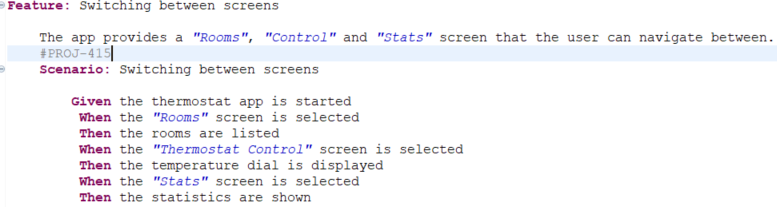
Traceability reference in a feature file

Traceability reference in a test script
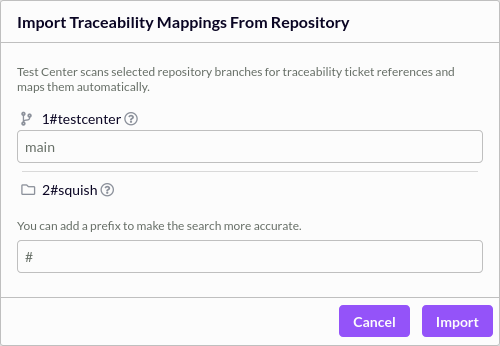
Test File Traceability Mapping dialog
During the import process, Test Center scans the test source code for references to traceability IDs. All references matching the traceability IDs from the selected traceability type, are collected and automatically mapped to either the testcase, the feature or the scenario.
In feature files, a matched traceability ID will be mapped to the feature or scenario if found. If no feature or scenario is found then it will be mapped to the test case.
If a prefix is given, only traceability IDs references that are preceded by the prefix are matched.
This allows you to establish and maintain traceability links directly from your repository without requiring manual mapping.
You can also use the testcentercmd command line to automate the Traceability Mapping.
© 2024 The Qt Company Ltd.
Documentation contributions included herein are the copyrights of
their respective owners.
The documentation provided herein is licensed under the terms of the GNU Free Documentation License version 1.3 as published by the Free Software Foundation.
Qt and respective logos are trademarks of The Qt Company Ltd. in Finland and/or other countries worldwide. All other trademarks are property
of their respective owners.
