
Qt Quick 3D物理 - インペラーの例
トリガーボディと衝突情報の使用方法を解説します。
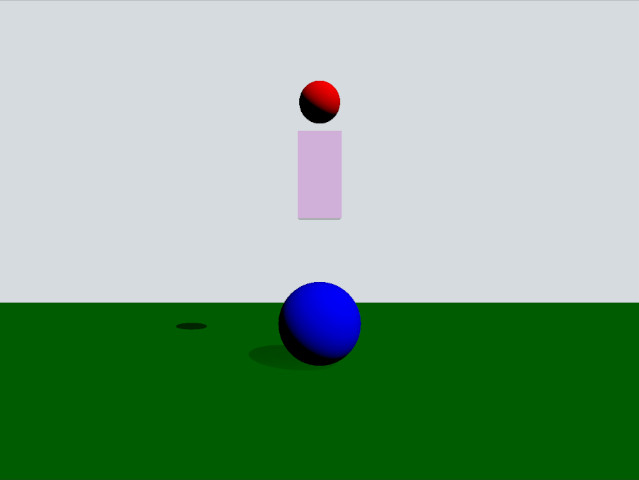
この例では、トリガーボディと衝突情報の使い方を説明します。シーンは、緑色の静的平面、赤色の動的球体、ピンク色のボックストリガー、そして青色の静的球体で構成されています。赤色の球体がトリガーボディと重なると黄色に変わり、青色の球体と衝突すると跳ね返されます。
セットアップ
いつものように、PhysicsWorld を追加する必要があります:
PhysicsWorld {
    gravity: Qt.vector3d(0, -490, 0)
    scene: viewport.scene
}また、シーンオブジェクトを配置するためのView3D も追加します。ここでは、ビジュアル環境に関する設定を行います:
environment: SceneEnvironment {
    clearColor: "#d6dbdf"
    backgroundMode: SceneEnvironment.Color
}

PerspectiveCamera {
    position: Qt.vector3d(0, 200, 1000)
    clipFar: 2000
    clipNear: 1
}

DirectionalLight {
    eulerRotation.x: -45
    eulerRotation.y: 45
    castsShadow: true
    brightness: 1
    shadowFactor: 50
}
物理オブジェクト
通常の静的な平面があります:
StaticRigidBody {
    position: Qt.vector3d(0, -100, 0)
    eulerRotation: Qt.vector3d(-90, 0, 0)
    collisionShapes: PlaneShape {}
    Model {
        source: "#Rectangle"
        scale: Qt.vector3d(500, 500, 1)
        materials: PrincipledMaterial {
            baseColor: "green"
        }
        castsShadows: false
        receivesShadows: true
    }
}
動的な球体は次のように定義されています:
DynamicRigidBody {
    id: sphere
    massMode: DynamicRigidBody.CustomDensity
    density: 0.00001
    position: Qt.vector3d(0, 600, 0)
    property bool inArea: false
    sendContactReports: true
    receiveTriggerReports: true

    onEnteredTriggerBody: {
        inArea = true
    }
    onExitedTriggerBody: {
        inArea = false
    }

    collisionShapes: SphereShape {}
    Model {
        source: "#Sphere"
        materials: PrincipledMaterial {
            baseColor: sphere.inArea ? "yellow" : "red"
        }
    }
}
inArea プロパティは、球体がボックストリガーボディと重なっているかどうかを追跡するために使用するカスタムプロパティです。これはbaseColor プロパティで使用され、球体がボックスと重なっているときは黄色に、そうでないときは赤色に表示されます。 球体にコンタクトレポートに参加させたいので、プロパティ `sendContactReports ` を `true` に設定する必要があります。また、球体がTriggerBody に進入・離脱した際にコールバックを受け取りたいので、プロパティ `receiveContactReports ` も `true` に設定します。球体上でシグナルメソッド `enteredTriggerBody ` および `exitedTriggerBody ` を実装し、トリガーボディへの進入・離脱時にプロパティ `inArea ` を `true ` または `false ` に設定します。
それでは、トリガーボディについて見てみましょう:
TriggerBody {
    position: Qt.vector3d(0, 350, 0)
    scale: Qt.vector3d(1, 2, 1)

    collisionShapes: BoxShape {
        id: boxShape
    }
    Model {
        source: "#Cube"
        materials: PrincipledMaterial {
            baseColor: Qt.rgba(1, 0, 1, 0.2)
            alphaMode: PrincipledMaterial.Blend
        }
    }
}QMLタイプはTriggerBody であり、衝突が無効になっている点を除けば、静的ボディと同様に動作します。その代わり、球体に対してenteredTriggerBody およびexitedTriggerBody メソッドの呼び出しをトリガーします。
最後に、インペラーを見てみましょう:
StaticRigidBody {
    position: Qt.vector3d(0, 0, 0)
    scale: Qt.vector3d(2, 2, 2)
    receiveContactReports: true

    collisionShapes: SphereShape {}

    Model {
        source: "#Sphere"
        materials: PrincipledMaterial {
            baseColor: "blue"
        }
    }

    onBodyContact: (body, positions, impulses, normals) => {
        for (let normal of normals) {
            let velocity = normal.times(-700)
            if (body instanceof DynamicRigidBody) {
                (body as DynamicRigidBody).setLinearVelocity(velocity)
            }
        }
    }
}これは静的ボディであり、衝突コールバックを有効にするためにreceiveContactReports をtrue に設定しています。コールバックbodyContact は、衝突が報告されるたびに呼び出されます。このメソッド内では、setLinearVelocity を呼び出し、衝突法線ベクトルの反対方向への直線速度を設定することで、インペラーをシミュレートしています。
ファイル:
© 2026 The Qt Company Ltd. Documentation contributions included herein are the copyrights of their respective owners. The documentation provided herein is licensed under the terms of the GNU Free Documentation License version 1.3 as published by the Free Software Foundation. Qt and respective logos are trademarks of The Qt Company Ltd. in Finland and/or other countries worldwide. All other trademarks are property of their respective owners.
