
Qt Quick 3D物理学 - 素材の例
物理マテリアルを使用した例を示します。
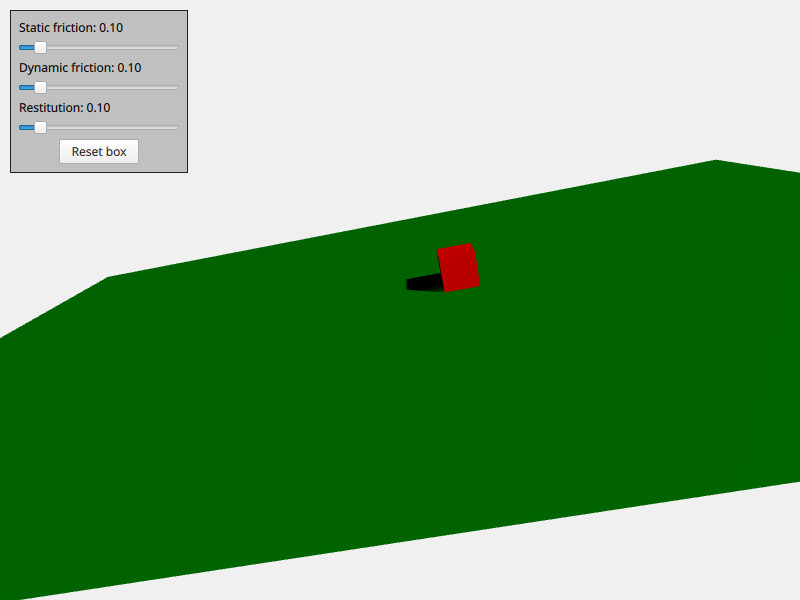
「マテリアル」の例では、物理ボディのマテリアル特性を制御する方法を示します。このシーンには、View3D 、PhysicsWorld 、PerspectiveCamera 、DirectionalLight といった、通常の定型要素が含まれています。さらに、このシーンには、わずかに傾いた平面と箱という2つの物理ボディが含まれています。 各物理ボディには、`physicsMaterial `プロパティがあり、その中に`PhysicsMaterial `ノードが含まれています。`PhysicsMaterial `には、`staticFriction`、`dynamicFriction `、`restitution `という3つのマテリアルプロパティが含まれており、これらは他のボディと衝突したり滑ったりした際の挙動を定義するために使用されます。シンプルなユーザーインターフェースが用意されており、ボックスのマテリアルをインタラクティブに調整して、マテリアルプロパティに応じてどのように相互作用するかを確認することができます。
以下は、このマテリアル用の QML コードです:
PhysicsMaterial {
    id: physicsMaterial
    staticFriction: staticFrictionSlider.value
    dynamicFriction: dynamicFrictionSlider.value
    restitution: restitutionSlider.value
}
このマテリアルは、ユーザーインターフェースのスライダーの値を単純に参照しているだけです。この同じマテリアルが、ボックスと床の両方に使用されます:
DynamicRigidBody {
    id: box
    physicsMaterial: physicsMaterial
    massMode: DynamicRigidBody.CustomDensity
    density: 10
    property vector3d startPosition: Qt.vector3d(700, 300, 0)
    position: startPosition
    Model {
        source: "#Cube"
        materials: PrincipledMaterial {
            baseColor: "red"
        }
    }
    collisionShapes: BoxShape {}
}
StaticRigidBody {
    eulerRotation: Qt.vector3d(-79, -90, 0)
    scale: Qt.vector3d(20, 30, 100)
    physicsMaterial: physicsMaterial
    collisionShapes: PlaneShape {}
    Model {
        source: "#Rectangle"
        materials: PrincipledMaterial {
            baseColor: "green"
        }
        castsShadows: false
        receivesShadows: true
    }
}
ファイル:
© 2026 The Qt Company Ltd. Documentation contributions included herein are the copyrights of their respective owners. The documentation provided herein is licensed under the terms of the GNU Free Documentation License version 1.3 as published by the Free Software Foundation. Qt and respective logos are trademarks of The Qt Company Ltd. in Finland and/or other countries worldwide. All other trademarks are property of their respective owners.
