
Plane Spotter (QML)
「Plane Spotter 」のサンプルは、位置情報および測位関連のデータ型が QML に緊密に統合されていることを示しています。
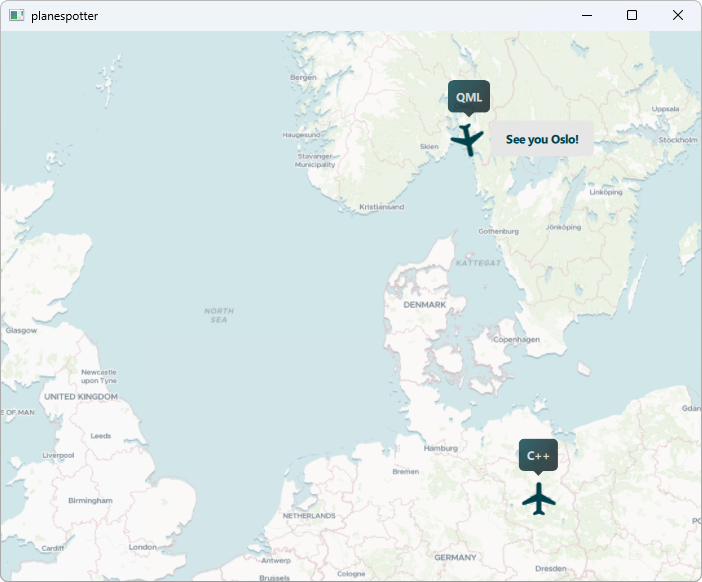
Plane Spotter のサンプルは、位置情報および測位に関連するC++データ型をQMLに統合する方法、およびその逆の方法を示しています。これは、CPU負荷の高い位置計算をネイティブ環境で実行しつつ、その結果をQMLを使用して表示したい場合に役立ちます。
このサンプルでは、ヨーロッパの地図と、ヨーロッパを横断する2つのルートを飛行する航空機が表示されています。1機目の航空機はオスロとベルリン間を、2機目の航空機はロンドンとベルリン間を往復します。各航空機の位置追跡はC++で実装されています。オスロ-ベルリン間の航空機はQMLで操縦され、ロンドン-ベルリン間の航空機はC++のパイロットによって制御されます。
例の動作
この例は、以下の手順で実行できます。
- Qt Creator
Welcome モードを開き、Examples からこの例を選択してください。詳細については、Qt Creator: Tutorial: Build and run を参照してください。
- Qt Extension for Visual Studio Code
Command Palette から「Qt: Open Qt examples 」コマンドを実行し、リストからサンプルを選択します。詳細については、Qt Extension for Visual Studio Code: チュートリアル: ビルドと実行を参照してください。
概要
この例では、位置コントローラの実装の一部として、Q_GADGET 機能を利用しています。これにより、QObject に基づかないC++の値型をQMLに直接統合することが可能になります。
PlaneController クラスの主な目的は、指定された時点における平面の現在の座標を追跡することです。このクラスは、positionプロパティを介して位置情報を公開します。
class PlaneController: public QObject
{
    Q_OBJECT
    Q_PROPERTY(QGeoCoordinate position READ position WRITE setPosition NOTIFY positionChanged)
    // ...
};この例のmain() 関数は、PlaneController クラスのインスタンスをQMLコンテキストにバインドする役割を担っています:
int main(int argc, char *argv[])
{
    QGuiApplication app(argc, argv);

    PlaneController oslo2berlin;
    PlaneController berlin2london;

    QQmlApplicationEngine engine;
    engine.rootContext()->setContextProperty("oslo2Berlin", &oslo2berlin);
    engine.rootContext()->setContextProperty("berlin2London", &berlin2london);
    engine.load(QUrl(QStringLiteral("qrc:/planespotter.qml")));

    return app.exec();
}
QObject の派生クラスと同様に、QGeoCoordinate も追加のQMLラッパーなしで統合できます。
飛行機の操縦
前述の通り、PlaneController クラスの主な目的は、2機の航空機(オスロ-ベルリンおよびロンドン-ベルリン)の現在位置を追跡し、それらをプロパティとしてQMLレイヤーに公開することです。その副次的な目的は、航空機を所定の飛行経路に沿って設定し、進行させることです。 ある意味では、パイロットとしての役割を果たすことができます。これは、ある地理座標から別の地理座標への遷移をアニメーション化できるCoordinateAnimation と非常によく似ています。この例では、PlaneController の位置プロパティが、PlaneController自身の操縦機能を使用したC++コードと、CoordinateAnimation をパイロットとして使用するQMLコードによって、どのように変更されるかを示しています。 オスロ-ベルリン間の飛行機のアニメーションはQMLコードで、ロンドン-ベルリン間の飛行機のアニメーションはC++コードで生成されています。
どのパイロットを使用する場合でも、パイロットのアクションによる結果は C++ および QML で確認できるため、この例では、C++/QML の境界を越えて位置データが支障なく直接交換されることが示されています。
各Plane の視覚的表現には、MapQuickItem 型が使用されています。この型により、任意のQtQuick アイテムをマップに埋め込むことが可能です:
// Plane.qml
MapQuickItem {
    id: plane
    property string pilotName;
    property int bearing: 0;

    anchorPoint.x: image.width/2
    anchorPoint.y: image.height/2

    sourceItem: Item {
        //...
    }
}
C++ パイロット
C++機はC++によって操縦されます。コントローラクラスのfrom およびto プロパティは、出発地と目的地を設定し、パイロットはこれを使用して機体の方位を計算します:
Q_PROPERTY(QGeoCoordinate from READ from WRITE setFrom NOTIFY fromChanged)
Q_PROPERTY(QGeoCoordinate to READ to WRITE setTo NOTIFY toChanged)パイロットは、QBasicTimer およびQTimerEvents を使用して、位置情報を常に更新します。タイマーの各反復処理においてPlaneController::updatePosition() が呼び出され、新しい位置が計算されます。
void updatePosition()
{
    // simple progress animation
    qreal progress;
    QTime current = QTime::currentTime();
    if (current >= finishTime) {
        progress = 1.0;
        timer.stop();
    } else {
        progress = ((qreal)startTime.msecsTo(current) / ANIMATION_DURATION);
    }

    setPosition(coordinateInterpolation(
                      fromCoordinate, toCoordinate, easingCurve.valueForProgress(progress)));

    if (!timer.isActive())
        emit arrived();
}新しい位置が計算されると、setPosition() が呼び出され、そのプロパティの変更通知によって新しい位置が QML レイヤーに反映されます。
C++ プレーンは、プレーンをクリックすることで開始されます:
Plane {
    id: cppPlane
    pilotName: "C++"
    coordinate: berlin2London.position

    TapHandler {
        onTapped: {
            if (cppPlaneAnimation.running || berlin2London.isFlying()) {
                console.log("Plane still in the air.");
                return;
            }

            berlin2London.swapDestinations();
            cppPlaneAnimation.rotationDirection = berlin2London.position.azimuthTo(berlin2London.to)
            cppPlaneAnimation.start();
            cppPlane.departed();
        }
    }
}azimuthTo() は、ある座標から別の座標への方位角(度単位)を計算します。上記のコードでは、QML アニメーションを利用して、回転と位置の変更を単一のアニメーションフローに統合している点に注意してください:
SequentialAnimation {
    id: cppPlaneAnimation
    property real rotationDirection : 0;
    NumberAnimation {
        target: cppPlane; property: "bearing"; duration: 1000
        easing.type: Easing.InOutQuad
        to: cppPlaneAnimation.rotationDirection
    }
    ScriptAction { script: berlin2London.startFlight() }
}まず、NumberAnimation が飛行機を正しい方向へ回転させ、それが完了すると、startFlight() 関数が飛行機の位置変更を開始します。
public slots:
    void startFlight()
    {
        if (timer.isActive())
            return;

        startTime = QTime::currentTime();
        finishTime = startTime.addMSecs(ANIMATION_DURATION);

        timer.start(15, this);
        emit departed();
    }
QMLパイロット
CoordinateAnimation 型は、オスロからベルリンへの飛行、およびその逆の飛行を制御するために使用されます。これは、上記のScriptAction に代わるものです。
CoordinateAnimation {
    id: coordinateAnimation; duration: 5000
    target: oslo2Berlin; property: "position"
    easing.type: Easing.InOutQuad
}
QML 飛行機の `TapHandler ` は、航路設定のロジックを実装し、必要に応じてアニメーションを開始します。
TapHandler {
    onTapped: {
        if (qmlPlaneAnimation.running) {
            console.log("Plane still in the air.");
            return;
        }

        if (oslo2Berlin.position === berlin) {
            coordinateAnimation.from = berlin;
            coordinateAnimation.to = oslo;
        } else if (oslo2Berlin.position === oslo) {
            coordinateAnimation.from = oslo;
            coordinateAnimation.to = berlin;
        }

        qmlPlaneAnimation.rotationDirection = oslo2Berlin.position.azimuthTo(coordinateAnimation.to)
        qmlPlaneAnimation.start()
    }
}© 2026 The Qt Company Ltd. Documentation contributions included herein are the copyrights of their respective owners. The documentation provided herein is licensed under the terms of the GNU Free Documentation License version 1.3 as published by the Free Software Foundation. Qt and respective logos are trademarks of The Qt Company Ltd. in Finland and/or other countries worldwide. All other trademarks are property of their respective owners.
