
Qt Quick 3D - Quick Ball の例
Quick3D を使用して簡単なゲームを作成する方法を紹介します。
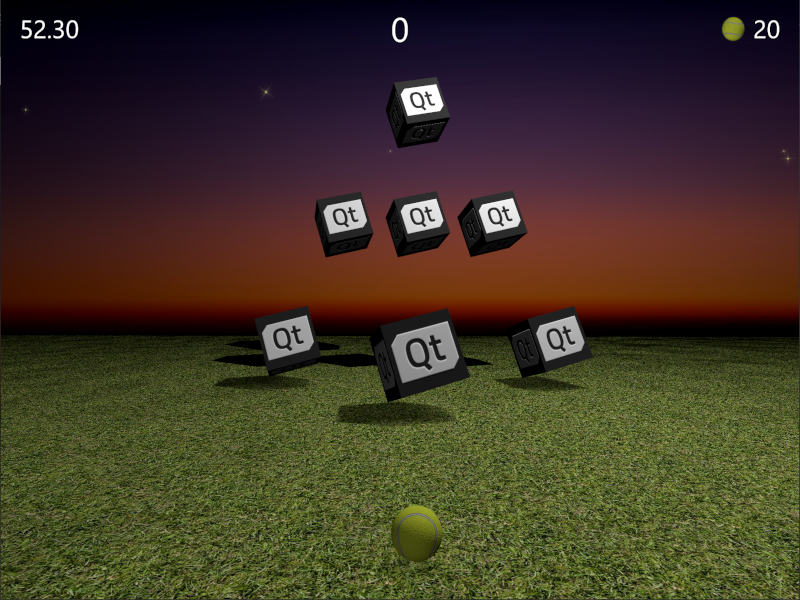
このサンプルでは、Qt Quick とQt Quick 3Dを組み合わせて、シンプルな3Dゲームを作成する方法を紹介します。ゲームの目的は、ボールを投げてターゲットボックスを当てることです。すべてのターゲットを倒すのにかかった時間と、使用したボールの数が少ないほど多くのポイントが獲得できます。狙いを定めて、素早く行動しましょう!
この例は、完全にプレイ可能なゲームであることを考慮しても非常にコンパクトであることを強調するため、ソースコードは単一のQMLファイルにまとめられています。まずは主要なプロパティを見てみましょう。これらは非常に直感的で、調整してゲームにどのような影響があるかを確認するのは簡単です。
// Scaling helpper
readonly property real px: 0.2 + Math.min(width, height) / 800
// This is false until the first game has started
property bool playingStarted: false
// This is true whenever game is on
property bool gameOn: false
// Sizes of our 3D models
readonly property real ballSize: 40
readonly property real targetSize: 120
// Playing time in seconds
readonly property real gameTime: 60
property real currentTime: 0
// Amount of balls per game
readonly property int gameBalls: 20
property int currentBalls: 0
// Scores
property int score: 0
property int timeBonus: 0
property int ballsBonus: 0ゲームロジックはJavaScriptで実装されています。View3D には、ゲームを開始する関数が含まれており、この関数は必要な変数をすべて(再)初期化し、レベルのターゲットを作成します。また、ゲーム終了時に最終スコアを計算する関数も含まれています。
function createLevel1() {
    // Simple level of target items
    var level1 = [{ "x": 0, "y": 100, "z": -100, "points": 10 },
                  { "x": -300, "y": 100, "z": -400, "points": 10 },
                  { "x": 300, "y": 100, "z": -400, "points": 10 },
                  { "x": -200, "y": 400, "z": -600, "points": 20 },
                  { "x": 0, "y": 400, "z": -600, "points": 20 },
                  { "x": 200, "y": 400, "z": -600, "points": 20 },
                  { "x": 0, "y": 700, "z": -600, "points": 30 }];
    targetsNode.addTargets(level1);
}

function startGame() {
    ballModel.resetBall();
    targetsNode.resetTargets();
    createLevel1();
    mainWindow.score = mainWindow.timeBonus = mainWindow.ballsBonus = 0;
    mainWindow.currentBalls = mainWindow.gameBalls;
    mainWindow.gameOn = true;
    mainWindow.playingStarted = true;
}

function endGame() {
    if (targetsNode.currentTargets == 0) {
        // If we managed to get all targets down -> bonus points!
        mainWindow.timeBonus = mainWindow.currentTime;
        mainWindow.ballsBonus = mainWindow.currentBalls * 10;
    }
    mainWindow.gameOn = false;
    ballModel.resetBall();
}ビューには、シーンを照らすためのPointLight ノードも含まれています。これはオブジェクトの上に配置され、影を落とすように設定されています。ゲーム終了時に、明るさの設定を使ってプレイエリアを暗くしている点に注目してください。ambientColor プロパティは光のコントラストを和らげるために使用されています。これがないと、オブジェクトの下部が非常に暗くなってしまうからです。
PointLight {
    x: 400
    y: 1200
    castsShadow: true
    shadowMapQuality: Light.ShadowMapQualityHigh
    shadowFactor: 50
    quadraticFade: 2
    ambientColor: "#202020"
    brightness: mainWindow.gameOn ? 200 : 40
    Behavior on brightness {
        NumberAnimation {
            duration: 1000
            easing.type: Easing.InOutQuad
        }
    }
}ボールを投げる際には、Qt Quick のMouseArea アイテムが使用されます。これは、ゲームが進行中で、かつボールがまだ動いていない場合にのみ有効になります。
MouseArea {
    anchors.fill: parent
    enabled: mainWindow.gameOn && !ballModel.ballMoving
    onPressed: {
        ballModel.moveBall(mouseX, mouseY);
    }
    onPositionChanged: {
        ballModel.moveBall(mouseX, mouseY);
    }
    onReleased: {
        ballModel.throwBall();
    }
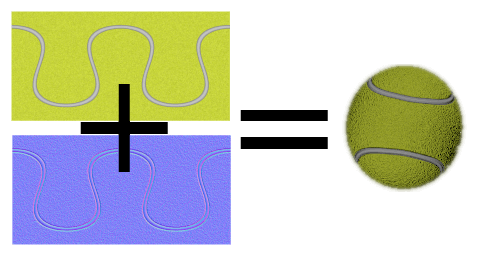
}次に、実際の3Dモデルについて見ていきましょう。ボールモデルは最も大規模なもので、ボールの挙動ロジック、アニメーション、ヒット検出が含まれています。まずはボールのプロパティを確認しましょう。ボールは組み込みの球体モデルを使用しており、ballSize に基づいてスケールが調整されています。テニスボールのような外観を作るために、`PrincipledMaterial `に`baseColorMap `と`normalMap `を適用しています。
Model {
    id: ballModel
    property real directionX: 0
    property real directionY: 0
    // How many ms the ball flies
    readonly property real speed: 2000
    readonly property real ballScale: mainWindow.ballSize / 100
    property var moves: []
    readonly property int maxMoves: 5
    readonly property bool ballMoving: ballAnimation.running

    source: "#Sphere"
    scale: Qt.vector3d(ballScale, ballScale, ballScale)

    materials: PrincipledMaterial {
        baseColorMap: Texture {
            source: "images/ball.jpg"
        }
        normalMap: Texture {
            source: "images/ball_n.jpg"
        }
        normalStrength: 1.0
}マウスを動かしたり、タッチスクリーンをスワイプしたりすると、ボールを離す直前のmaxMoves の位置情報がmoves 配列に保存されます。ユーザーがボールを離すと、throwBall() が呼び出され、これらの最新の位置情報からボールの方向を計算し、アニメーションを開始します。
function resetBall() {
    moves = [];
    x = 0;
    y = mainWindow.ballSize/2;
    z = 400;
}

function moveBall(posX, posY) {
    if (!mainWindow.gameOn) return;
    var pos = view3D.mapTo3DScene(Qt.vector3d(posX, posY, ballModel.z + mainWindow.ballSize));
    pos.y = Math.max(mainWindow.ballSize / 2, pos.y);
    var point = {"x": pos.x, "y": pos.y };
    moves.push(point);
    if (moves.length > maxMoves) moves.shift();
    // Apply position into ball model
    ballModel.x = pos.x;
    ballModel.y = pos.y;
}

function throwBall() {
    if (!mainWindow.gameOn) return;
    mainWindow.currentBalls--;
    var moveX = 0;
    var moveY = 0;
    if (moves.length >= 2) {
        var first = moves.shift();
        var last = moves.pop();
        moveX = last.x - first.x;
        moveY = last.y - first.y;
        if (moveY < 0) moveY = 0;
    }
    directionX = moveX * 20;
    directionY = moveY * 4;
    ballAnimation.start();
}ボールの位置は、各軸ごとに個別にアニメーション化されます。これらのアニメーションでは、事前に割り当てられたdirectionX とdirectionY を使用してボールの移動先を定義し、speed を使用してボールの飛行時間を決定します。垂直位置には2つの連続したアニメーションがあるため、ボールのバウンドにイージング効果を適用できます。位置のアニメーションが終了したら、ボールが残っているか、それともゲームを終了すべきかを確認します。 最後に、ユーザーがカーブボールを投げられるように、ボールの回転もアニメーション化します。
ParallelAnimation {
    id: ballAnimation
    running: false
    // Move forward
    NumberAnimation {
        target: ballModel
        property: "z"
        duration: ballModel.speed
        to: -ballModel.directionY * 5
        easing.type: Easing.OutQuad
    }
    // Move up & down with a bounce
    SequentialAnimation {
        NumberAnimation {
            target: ballModel
            property: "y"
            duration: ballModel.speed * (1 / 3)
            to: ballModel.y + ballModel.directionY
            easing.type: Easing.OutQuad
        }
        NumberAnimation {
            target: ballModel
            property: "y"
            duration: ballModel.speed * (2 / 3)
            to: mainWindow.ballSize / 4
            easing.type: Easing.OutBounce
        }
    }
    // Move sideways
    NumberAnimation {
        target: ballModel
        property: "x"
        duration: ballModel.speed
        to: ballModel.x + ballModel.directionX
    }

    onFinished: {
        if (mainWindow.currentBalls <= 0)
            view3D.endGame();
        ballModel.resetBall();
    }
}

NumberAnimation on eulerRotation.z {
    running: ballModel.ballMoving
    loops: Animation.Infinite
    from: ballModel.directionX < 0 ? 0 : 720
    to: 360
    duration: 10000 / (2 + Math.abs(ballModel.directionX * 0.05))
}ゲームプレイにおいて重要なのは、ボールがターゲットにヒットしたタイミングを検出することです。ボールのZ座標が変化するたびに、targets 配列をループ処理し、fuzzyEquals() を使用してボールがいずれかのターゲットに接触しているかどうかを検出します。ヒットを検出するたびに、ターゲットのhit() 関数を呼び出し、すべてのターゲットがダウンしたかどうかを確認します。
onZChanged: {
    // Loop through target items and detect collisions
    var hitMargin = mainWindow.ballSize / 2 + mainWindow.targetSize / 2;
    for (var i = 0; i < targetsNode.targets.length; ++i) {
        var target = targetsNode.targets[i];
        var targetPos = target.scenePosition;
        var hit = ballModel.scenePosition.fuzzyEquals(targetPos, hitMargin);
        if (hit) {
            target.hit();
            if (targetsNode.currentTargets <= 0)
                view3D.endGame();
        }
    }
}その後、ターゲットへの処理に移行します。ターゲットは、ヘルパー関数を格納し、例えばすべてのターゲットをグループとしてアニメーション化できる「グループ化ノード」内に動的に生成されます。QMLの配列では変更によってバインディングがトリガーされないため、currentTargets プロパティが必要となります。そのため、ターゲットの数は手動で更新します。
Node {
    id: targetsNode

    property var targets: []
    property int currentTargets: 0

    function addTargets(items) {
        items.forEach(function (item) {
            let instance = targetComponent.createObject(
                    targetsNode, { "x": item.x, "startPosY": item.y, "z": item.z, "points": item.points});
            targets.push(instance);
        });
        currentTargets = targets.length;
    }

    function removeTarget(item) {
        var index = targets.indexOf(item);
        targets.splice(index, 1);
        currentTargets = targets.length;
    }

    function resetTargets() {
        while (targets.length > 0)
            targets.pop().destroy();
        currentTargets = targets.length;
    }
}ターゲットは、キューブモデルとポイントを表示するためのテキスト要素を持つノードです。ボールモデルと同様に、baseColorMap およびnormalMap のテクスチャを使用して、Qt ロゴ入りのキューブを作成します。ヒットが検出されると、キューブを順次アニメーションで消去し、そのターゲットから獲得したポイントを表示します。アニメーションが終了したら、ターゲットノードを動的に削除します。
Component {
    id: targetComponent
    Node {
        id: targetNode

        property int points: 0
        property real hide: 0
        property real startPosY: 0
        property real posY: 0
        property real pointsOpacity: 0

        function hit() {
            targetsNode.removeTarget(this);
            mainWindow.score += points;
            hitAnimation.start();
            var burstPos = targetNode.mapPositionToScene(Qt.vector3d(0, 0, 0));
            hitParticleEmitter.burst(100, 200, burstPos);
        }

        y: startPosY + posY
        SequentialAnimation {
            running: mainWindow.gameOn && !hitAnimation.running
            loops: Animation.Infinite
            NumberAnimation {
                target: targetNode
                property: "posY"
                from: 0
                to: 150
                duration: 3000
                easing.type: Easing.InOutQuad
            }
            NumberAnimation {
                target: targetNode
                property: "posY"
                to: 0
                duration: 1500
                easing.type: Easing.InOutQuad
            }
        }

        SequentialAnimation {
            id: hitAnimation
            NumberAnimation {
                target: targetNode
                property: "hide"
                to: 1
                duration: 800
                easing.type: Easing.InOutQuad
            }
            NumberAnimation {
                target: targetNode
                property: "pointsOpacity"
                to: 1
                duration: 1000
                easing.type: Easing.InOutQuad
            }
            NumberAnimation {
                target: targetNode
                property: "pointsOpacity"
                to: 0
                duration: 200
                easing.type: Easing.InOutQuad
            }
            ScriptAction {
                script: targetNode.destroy();
            }
        }

        Model {
            id: targetModel

            readonly property real targetScale: (1 + targetNode.hide) * (mainWindow.targetSize / 100)

            source: "#Cube"
            scale: Qt.vector3d(targetScale, targetScale, targetScale)
            opacity: 0.99 - targetNode.hide * 2
            materials: PrincipledMaterial {
                baseColorMap: Texture {
                    source: "images/qt_logo.jpg"
                }
                normalMap: Texture {
                    source: "images/qt_logo_n.jpg"
                }
                normalStrength: 1.0
            }
            Vector3dAnimation on eulerRotation {
                loops: Animation.Infinite
                duration: 5000
                from: Qt.vector3d(0, 0, 0)
                to: Qt.vector3d(360, 360, 360)
            }
        }
        Text {
            anchors.centerIn: parent
            scale: 1 + targetNode.pointsOpacity
            opacity: targetNode.pointsOpacity
            text: targetNode.points
            font.pixelSize: 60 * mainWindow.px
            color: "#808000"
            style: Text.Outline
            styleColor: "#f0f000"
        }
    }
}
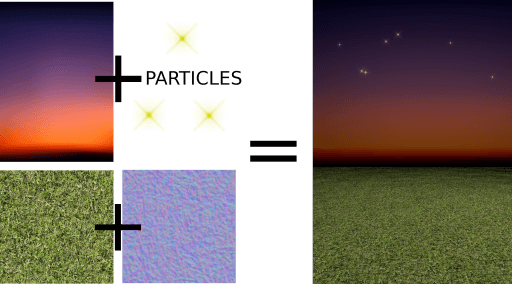
また、プレイエリア用のモデルもいくつか必要です。地面のモデルは長方形で、より広い範囲を覆うように拡大された草のテクスチャが適用されています。
Model {
    source: "#Rectangle"
    scale: Qt.vector3d(50, 50, 1)
    eulerRotation.x: -90
    materials: PrincipledMaterial {
        baseColorMap: Texture {
            source: "images/grass.jpg"
            tilingModeHorizontal: Texture.Repeat
            tilingModeVertical: Texture.Repeat
            scaleU: 25.0
            scaleV: 25.0
        }
        normalMap: Texture {
            source: "images/grass_n.jpg"
        }
        normalStrength: 0.6
    }
}空のモデルはさらに奥に位置しており、空に影が落ちないようにするため、receivesShadows をfalseに設定します。また、空には Qt Quick Particles モジュールを使用して星を追加します。他の2DのQt Quick 要素と同様に、パーティクルも3Dノード内に直接追加することができます。
Model {
    id: sky
    property real scaleX: 100
    property real scaleY: 20
    source: "#Rectangle"
    scale: Qt.vector3d(sky.scaleX, sky.scaleY, 1)
    position: Qt.vector3d(0, 960, -2000)
    // We don't want shadows casted into sky
    receivesShadows: false
    materials: PrincipledMaterial {
        baseColorMap: Texture {
            source: "images/sky.jpg"
        }
    }
    // Star particles
    Node {
        z: 500
        y: 30
        // Stars are far away, scale up to half the resolution
        scale: Qt.vector3d(2 / sky.scaleX, 2 / sky.scaleY, 1)
        ParticleSystem {
            anchors.horizontalCenter: parent.horizontalCenter
            anchors.top: parent.top
            width: 3000
            height: 400
            ImageParticle {
                source: "qrc:///particleresources/star.png"
                rotationVariation: 360
                color: "#ffffa0"
                colorVariation: 0.1
            }
            Emitter {
                anchors.fill: parent
                emitRate: 4
                lifeSpan: 6000
                lifeSpanVariation: 4000
                size: 30
                sizeVariation: 20
            }
        }
    }
}
上記の地面モデルと空モデルを組み合わせると、次のような3Dワールドが完成します:
最後に、ターゲット用にきらめき効果を追加します。今回はQtQuick3D.Particles3D モジュールを使用します。ParticleSystem3D にはSpriteParticle3D が含まれており、それらに200 を割り当てています。これは、2つの100 粒子バーストを同時に発生させるのに十分な量です。ParticleEmitter3D では、スケール、回転、速度、ライフスパンといった粒子のエミットプロパティを定義します。また、Gravity3D アフェクターを追加して、適切な強さで粒子を下方へ引き下げるようにしています。
ParticleSystem3D {
    id: psystem
    SpriteParticle3D {
        id: sprite
        sprite: Texture {
            source: "images/particle.png"
        }
        color: Qt.rgba(1.0, 1.0, 0.0, 1.0)
        colorVariation: Qt.vector4d(0.4, 0.6, 0.0, 0.0)
        unifiedColorVariation: true
        maxAmount: 200
    }
    ParticleEmitter3D {
        id: hitParticleEmitter
        particle: sprite
        particleScale: 4.0
        particleScaleVariation: 2.0
        particleRotationVariation: Qt.vector3d(0, 0, 180)
        particleRotationVelocityVariation: Qt.vector3d(0, 0, 250)
        velocity: VectorDirection3D {
            direction: Qt.vector3d(0, 300, 0)
            directionVariation: Qt.vector3d(200, 150, 100)
        }
        lifeSpan: 800
        lifeSpanVariation: 200
        depthBias: 100
    }
    Gravity3D {
        magnitude: 600
    }
}
これで、ゲームの3D部分に関する説明は終わりです。ゲームにとって重要ではあるものの、この「Quick 3D」ドキュメントの範囲外となる、時間、スコア、スタートボタンなどを表示するための2D要素(Qt Quick )がまだいくつか残っています。
さあ、あとはあなた次第です(ダジャレです)。ぜひ自由にゲームを拡張し、新しい奇想天外なステージを作成してみてください!
© 2026 The Qt Company Ltd. Documentation contributions included herein are the copyrights of their respective owners. The documentation provided herein is licensed under the terms of the GNU Free Documentation License version 1.3 as published by the Free Software Foundation. Qt and respective logos are trademarks of The Qt Company Ltd. in Finland and/or other countries worldwide. All other trademarks are property of their respective owners.
